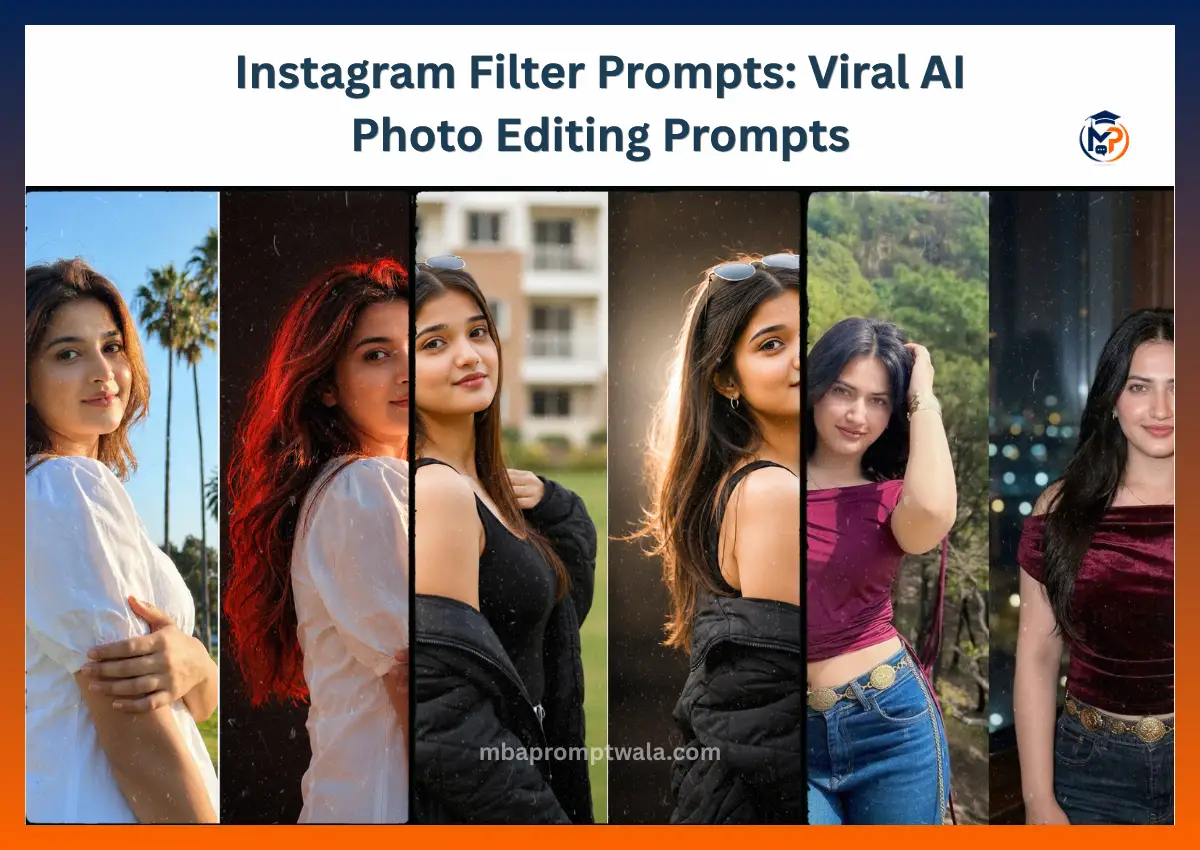
Creating Instagram-worthy photos no longer requires expensive cameras, professional editing, or advanced photography skills. With the right Instagram filter prompt, AI tools like ChatGPT and Gemini can transform an ordinary image into a stylish portrait that looks like it was captured by a fashion photographer. From viral flash photography to cinematic street portraits and trendy aesthetic edits, these prompts help recreate the most popular Instagram looks in just a few seconds.
I tested dozens of Instagram-style AI prompts across different photos, lighting conditions, and AI models. Some generated realistic influencer-quality results, while others produced overly edited or artificial-looking images.
In this collection, you’ll find ready-to-copy Instagram flash filter prompts, Gemini-optimized prompts, viral aesthetic styles, dirty flash effects, lo-fi dusk edits, and practical tips to improve your AI-generated photos.
Whether you’re creating selfies, couple pictures, travel photos, or fashion portraits, these prompts will help you achieve professional-looking Instagram edits with minimal effort.
What Is an Instagram Filter Prompt?
An Instagram filter prompt is a text instruction that tells AI software like ChatGPT or Gemini how to edit or generate a photo with a specific Instagram-style look.
Unlike built-in Instagram filters, these prompts can recreate popular aesthetics such as flash photography, soft glam, vintage film, or cinematic portraits while preserving facial details.
Classic Instagram Flash Portrait Prompt
After a few refinements, this prompt consistently created a clean Instagram flash effect with natural facial details, balanced shadows, and the trendy editorial look seen on influencer profiles.
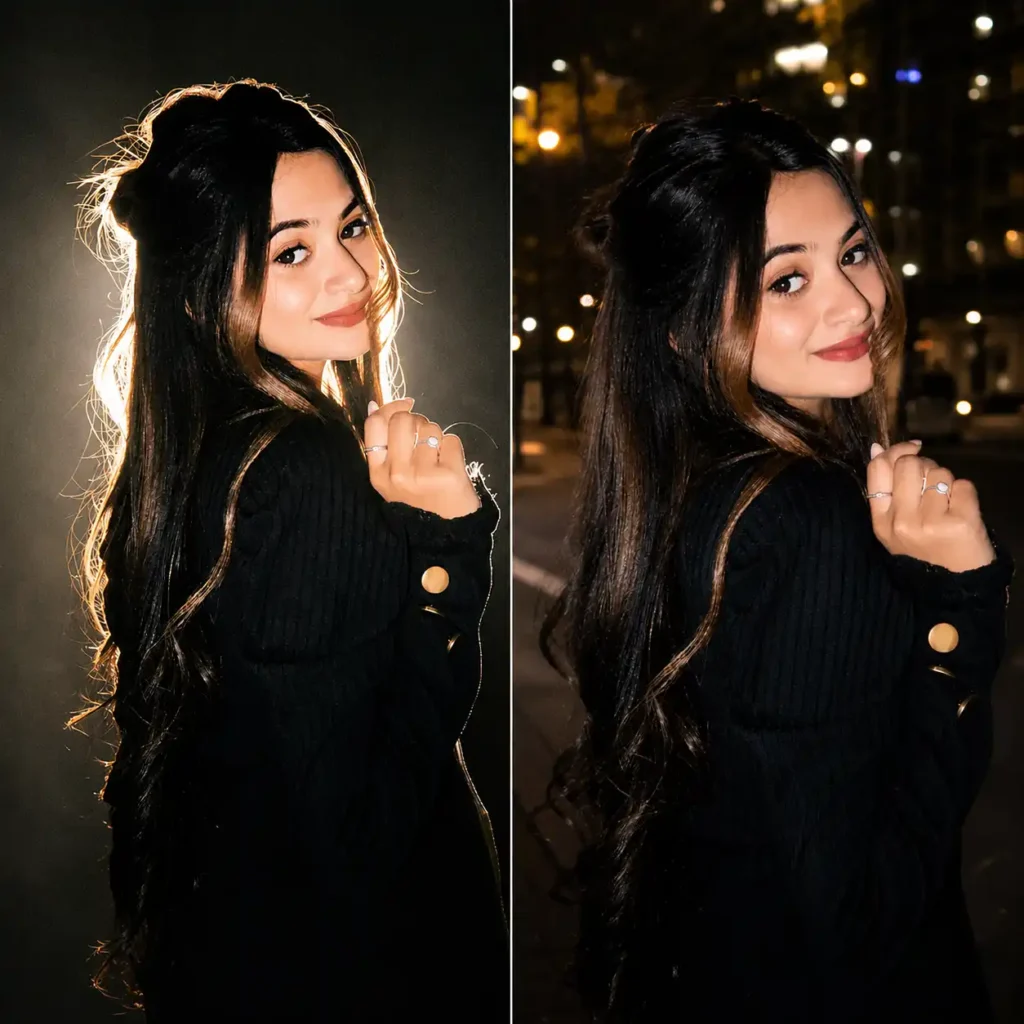
Prompt
Create a highly realistic Instagram-style flash portrait using the uploaded photo as the only facial reference. Preserve my exact face, hairstyle, skin tone, facial features, body proportions, and identity without altering my appearance. Capture the image as if it were taken with a professional camera using a direct on-camera flash at night. Create bright highlights, soft natural skin texture, subtle facial shine, crisp shadows behind the subject, and realistic depth. Use a modern urban background with slightly blurred lights to enhance the atmosphere. Keep the composition centered with a natural pose, authentic colors, high detail, and a premium editorial Instagram aesthetic. The final image should look like an unedited DSLR flash photograph that is suitable for a viral Instagram post.
Negative Prompt:
Cartoon, CGI, painting, anime, blurry face, low resolution, extra people, distorted hands, oversaturated colors, plastic skin, duplicate face, watermark, text, unrealistic lighting.
Tips to Customize This Prompt
- Replace the urban background with a café, beach, rooftop, luxury hotel, or street to match your photo.
- Change the camera angle to low angle, eye level, or close-up portrait for a different composition.
- Mention your outfit such as oversized hoodie, formal suit, casual denim, or party wear to suit the aesthetic.
- Add a mood like confident, candid, smiling, or serious while keeping the lighting and flash effect unchanged.
Instagram Mirror Selfie Flash Filter Prompt
After testing several mirror selfie prompts, I found that most AI models either changed facial features or created unrealistic reflections. This version gave me the most consistent results.
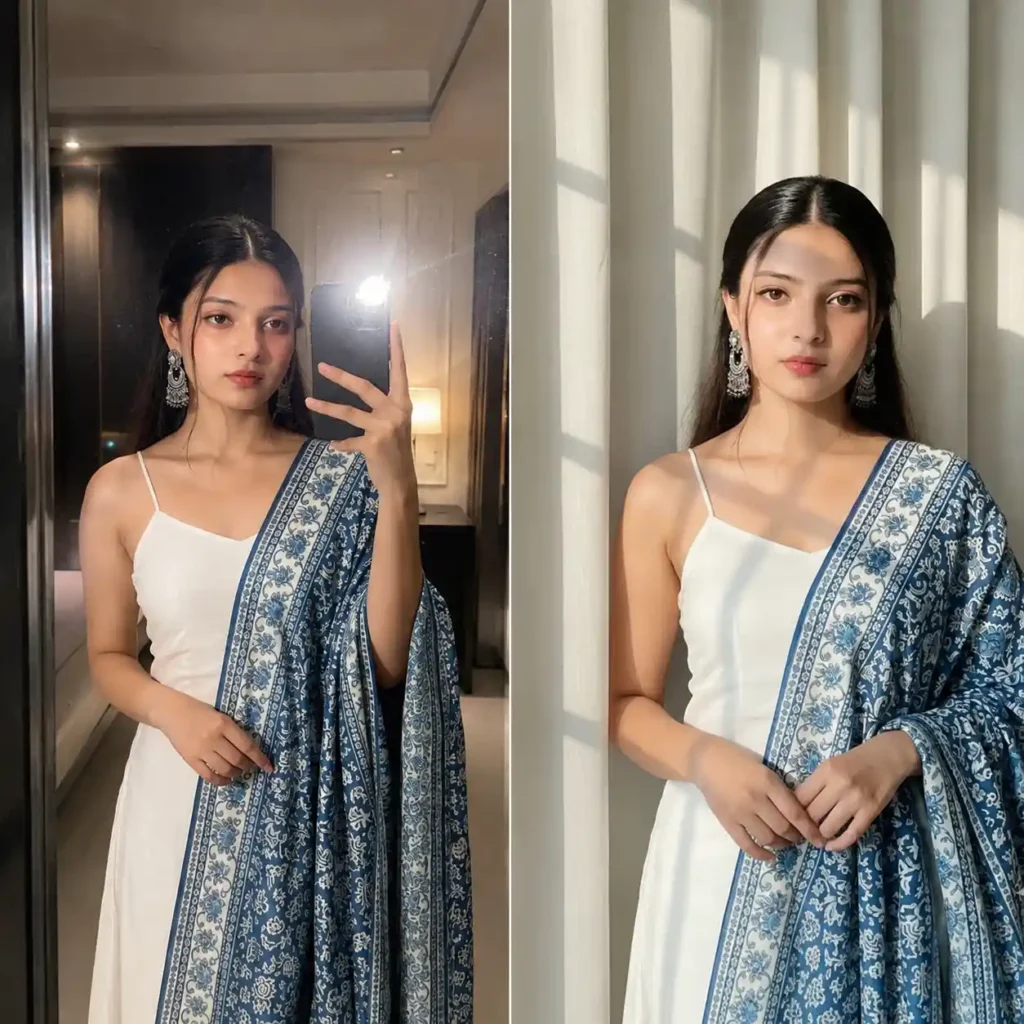
Prompt
Create an ultra-realistic Instagram mirror selfie using the uploaded image as the only facial reference. Preserve my exact face, hairstyle, beard, skin tone, facial expression, body proportions, and identity without making any changes. Show me standing naturally in front of a large full-length mirror while confidently holding a modern smartphone with one hand. The mirror reflection must accurately match my pose, facial features, clothing, and body position without distortion. Capture the scene as if it were photographed using a professional smartphone camera with a powerful direct on-camera flash, producing bright highlights, crisp shadows, realistic reflections, and natural skin texture. Style the environment as a modern luxury bedroom, premium hotel suite, minimalist apartment, or designer dressing room with elegant décor, soft ambient lighting, and subtle background blur. Ensure the mirror is clean with realistic glass reflections, polished flooring, and balanced indoor lighting. Maintain realistic proportions, authentic colors, high dynamic range, DSLR-quality sharpness, and fine details throughout the image. The final result should look like a genuine Instagram influencer mirror selfie captured in one shot without heavy editing or AI artifacts.
Negative Prompt:
Low quality, blurry image, distorted mirror, duplicate reflection, incorrect body proportions, extra fingers, deformed hands, unrealistic face, plastic skin, oversaturated colors, cartoon, CGI, painting, watermark, logo, text, cropped body, poor lighting, noisy image.
Tips to Customize This Prompt
- Replace the background with a gym, luxury bathroom, elevator, café, clothing store, or walk-in wardrobe.
- Change the outfit to oversized streetwear, formal suit, gym wear, traditional outfit, or casual denim.
- Add a specific pose like looking at the phone, one hand in pocket, sitting, or leaning against the mirror.
- For a premium aesthetic, mention marble flooring, warm LED lights, designer furniture, or floor-to-ceiling mirrors.
Instagram Flash Filter Prompt Copy and Paste
While testing flash prompts, I realized that simple prompts often produced flat lighting. After multiple refinements, this version consistently generated realistic Instagram-style flash photos with sharp details, balanced lighting, and a premium social media look that required almost no additional editing.
What This Prompt Creates
This prompt recreates the clean, direct-camera flash aesthetic commonly seen on Instagram. It preserves your identity while adding realistic lighting, crisp shadows, natural skin texture, and a polished influencer-style finish.
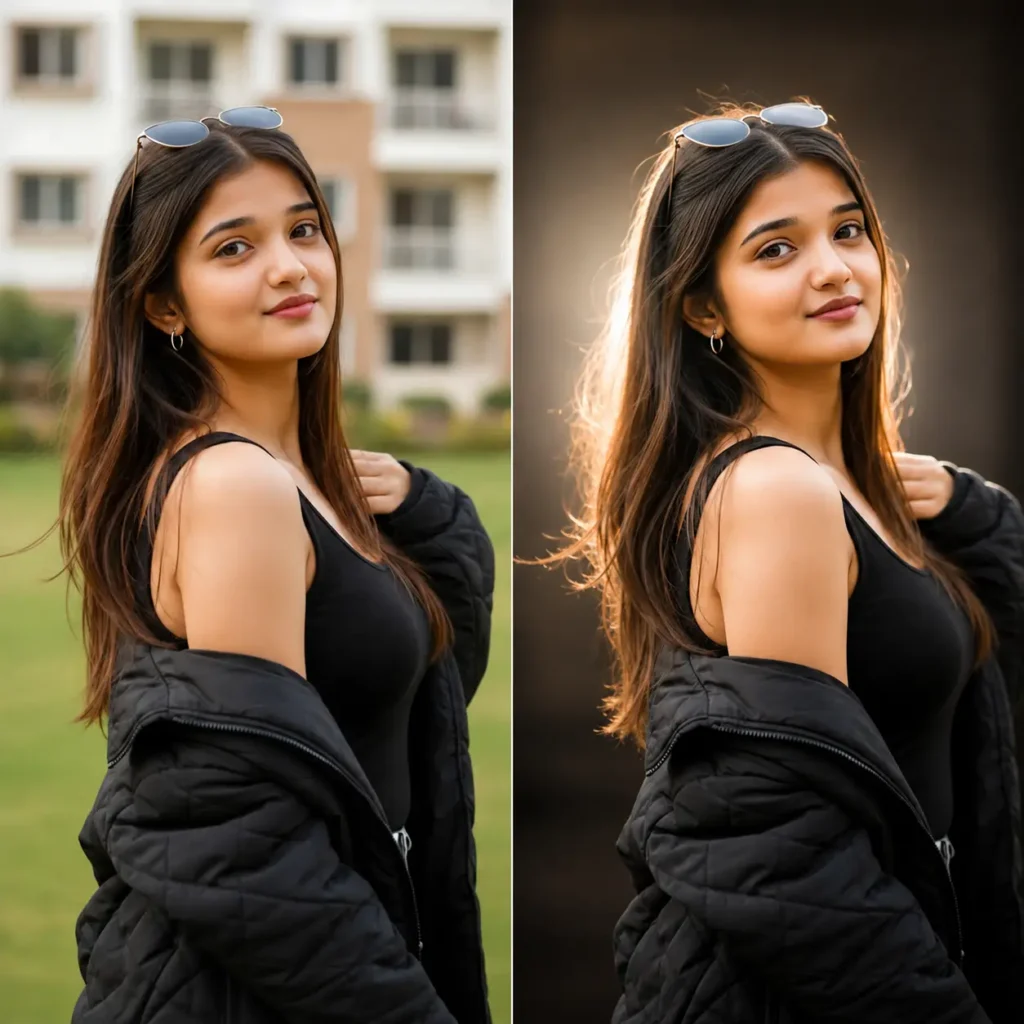
Prompt
Create an ultra-realistic Instagram flash portrait using the uploaded image as the only facial and identity reference. Preserve my exact face, hairstyle, beard, eyebrows, eye shape, skin tone, facial expression, body proportions, and overall identity without altering or beautifying my natural appearance. Photograph me as if using a flagship smartphone with a powerful direct LED flash during the evening, creating bright but balanced highlights, crisp natural shadows, realistic skin texture, and subtle reflections on the face without making the skin appear oily or plastic. Position me naturally in an urban environment such as a quiet city street, modern café entrance, rooftop, luxury hotel lobby, or stylish apartment hallway with softly blurred background lights. Keep the composition centered with realistic body posture and relaxed confidence. Maintain authentic clothing textures, accurate colors, detailed hair strands, sharp eyes, and natural facial depth. Apply realistic HDR processing, true-to-life contrast, minimal image noise, and DSLR-level clarity while avoiding excessive sharpening. The final image should look like a genuine Instagram photo captured in a single shot by an experienced lifestyle photographer, not an AI-generated artwork or heavily edited image.
Negative Prompt
Cartoon, CGI, painting, anime, unrealistic beauty filter, plastic skin, low quality, blurry image, distorted face, extra fingers, duplicate person, incorrect reflection, oversaturated colors, excessive skin smoothing, watermark, logo, text, cropped body, unnatural lighting, fake background.
Tips to Customize This Prompt
- Replace the background with a beach, shopping mall, airport, luxury restaurant, college campus, or neon-lit street.
- Specify your outfit such as oversized streetwear, black suit, denim jacket, hoodie, or traditional clothing.
- Change the camera framing to close-up, waist-up, full-body, or over-the-shoulder portrait.
- Add a mood like a candid smile, serious expression, confident pose, or looking away from the camera.
- For a more premium result, mention 35mm lens photography, shallow depth of field, and natural bokeh while keeping the direct flash effect.
Instagram Flash Filter Prompt for Gemini
After comparing the same flash prompt in ChatGPT and Gemini, I noticed Gemini responds much better to prompts that clearly describe lighting, reflections, camera behavior, and realism. This version consistently produced sharper facial details, more natural flash lighting, and images that looked like they were taken with a premium smartphone instead of being AI-generated.
What This Prompt Creates
This prompt is specifically optimized for Gemini AI to generate an ultra-realistic Instagram flash photo with accurate facial identity, premium lighting, clean skin texture, realistic reflections, and a modern influencer aesthetic.
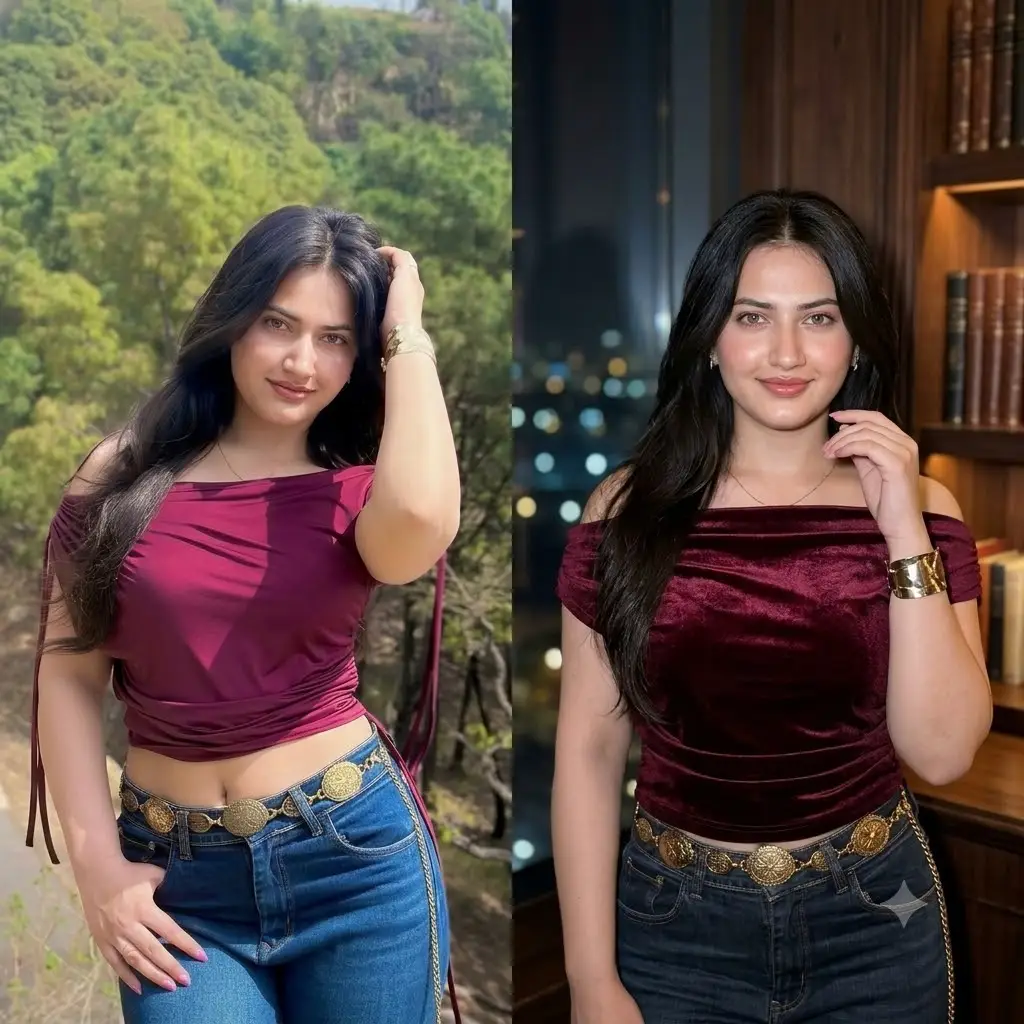
Prompt
Create an ultra-photorealistic Instagram flash portrait using the uploaded image as the only facial and identity reference. Preserve my exact face, hairstyle, beard, eyebrows, skin tone, eye color, facial expression, body proportions, clothing fit, and overall identity with absolute accuracy. Do not beautify, reshape, or replace any facial features. Generate the image as if it were captured using a Google Pixel 10 Pro or flagship smartphone in Night Mode with a powerful direct LED flash. Produce realistic flash falloff, bright but controlled highlights, soft natural skin texture, crisp eye detail, subtle catchlights, and authentic shadows behind the subject. Place me in a modern luxury environment such as an upscale café, rooftop lounge, designer apartment, boutique hotel, or fashionable city street at night with cinematic bokeh lights and realistic environmental reflections. Keep the composition perfectly balanced with true-to-life colors, premium HDR, detailed clothing fabric, natural hair strands, and lifelike depth. Avoid any signs of AI generation, excessive smoothing, unrealistic sharpening, or artificial facial symmetry. The final image should look like a genuine high-resolution Instagram post captured by a professional lifestyle photographer using a flagship smartphone, with no filters or heavy editing.
Negative Prompt
Low resolution, blurry face, cartoon, CGI, painting, anime, unrealistic skin smoothing, plastic skin, beauty filter, distorted hands, extra fingers, duplicate body, asymmetrical face, incorrect reflections, oversaturated colors, watermark, logo, text, cropped head, unrealistic background, excessive noise, AI artifacts.
Tips to Customize This Prompt
- Replace the night location with a luxury mall, airport, beach, gym, coffee shop, or modern office for a different vibe.
- Mention a specific outfit like monochrome streetwear, business casual, oversized hoodie, leather jacket, or ethnic wear.
- Add a camera angle such as mirror selfie, low-angle portrait, eye-level shot, or full-body composition.
- For an even more premium result, include details like 35mm lens look, shallow depth of field, cinematic bokeh, and realistic lens reflections.
- If you’re creating content for Instagram Reels or your profile, request a 4:5 portrait composition to match Instagram’s recommended feed format.
Instagram Flash Filter Prompt Aesthetic
When I experimented with aesthetic Instagram prompts, I found that simply asking for an “Instagram aesthetic” wasn’t enough. The results often looked over-edited or unrealistic. After testing different lighting setups, color grading, and camera styles, this prompt consistently created a clean luxury aesthetic with natural skin tones, cinematic lighting, and the polished look seen on top fashion and lifestyle creators.
What This Prompt Creates
This prompt generates a premium Instagram aesthetic with soft direct flash, luxury color grading, natural skin texture, subtle film tones, and a modern editorial style. It’s ideal for profile photos, fashion content, lifestyle posts, and influencer branding.
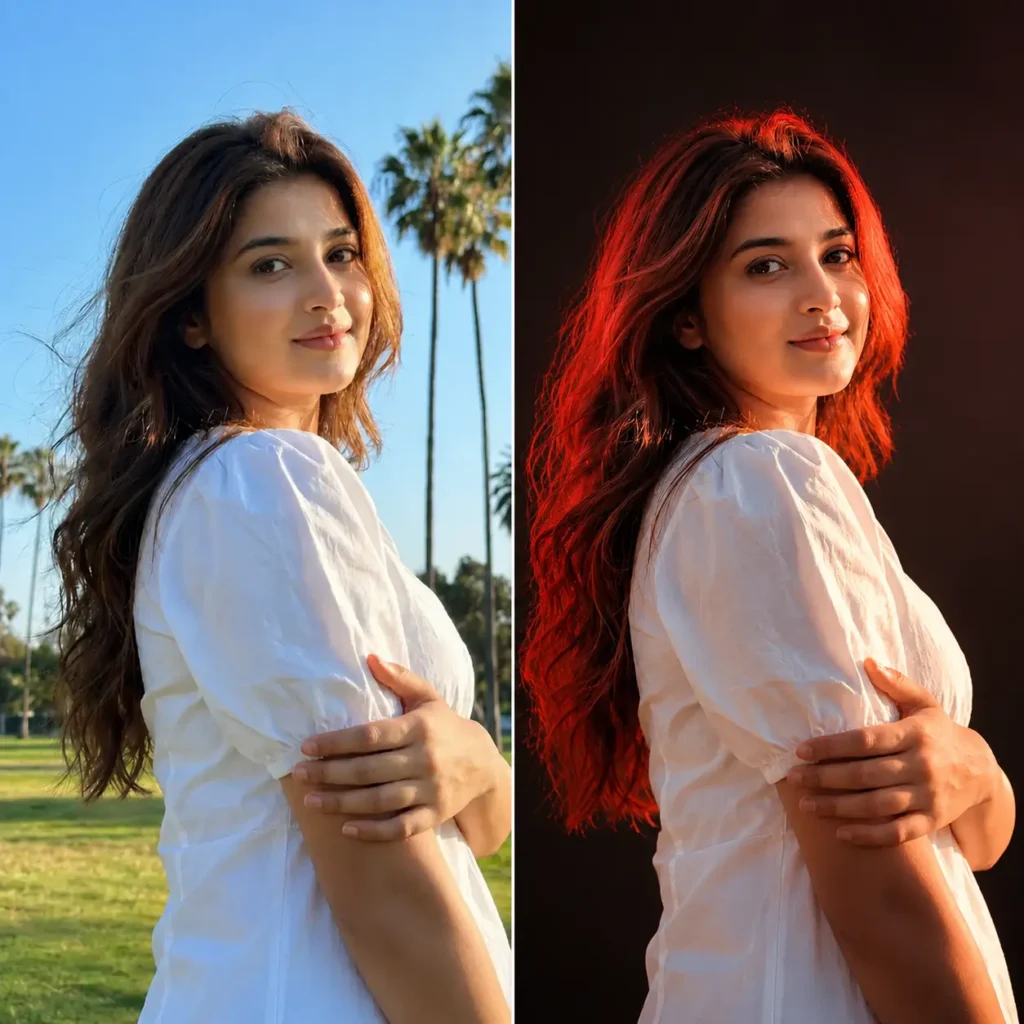
Prompt
Create an ultra-realistic Instagram aesthetic portrait using the uploaded image as the only facial and identity reference. Preserve my exact face, hairstyle, beard, eyebrows, skin tone, facial expression, body proportions, clothing, and overall identity without making any changes. Photograph me as if captured by a professional fashion photographer using a full-frame mirrorless camera with a 35mm prime lens and a soft direct flash. Produce realistic highlights, natural skin texture, crisp facial details, subtle shine, soft shadows, and authentic depth without excessive beauty retouching. Place me in a stylish luxury environment such as a modern café, designer apartment, boutique hotel, rooftop lounge, art gallery, or minimalist studio with elegant interior design and warm ambient lighting. Apply tasteful cinematic color grading with creamy whites, rich blacks, muted neutral tones, and gentle film grain for an authentic editorial finish. Maintain realistic reflections, detailed fabric textures, lifelike hair strands, and true-to-life colors. The final image should look like a premium Instagram fashion photo captured by a professional photographer, naturally edited with high-end Lightroom adjustments instead of artificial AI effects.
Negative Prompt
Cartoon, anime, CGI, painting, unrealistic beauty filter, plastic skin, waxy face, excessive smoothing, oversaturated colors, fake HDR, blurry image, low resolution, extra fingers, duplicate person, distorted body, watermark, logo, text, unnatural background, AI artifacts.
Tips to Customize This Prompt
- Replace the location with a luxury hotel, European street, bookstore, beach café, modern office, or flower garden.
- Change the color mood to warm golden tones, cool blue tones, monochrome, earthy colors, or vintage film.
- Add stylish accessories like sunglasses, a luxury watch, headphones, handbags, or jewelry for a stronger fashion aesthetic.
- Specify a pose such as walking naturally, sitting at a café, leaning against a wall, or looking away from the camera.
- For an even richer Instagram aesthetic, include subtle Kodak Portra film grain, realistic lens bloom, and natural background bokeh without making the image look overly processed.
Instagram Famous Flash Filter Prompt
I tested several celebrity-inspired flash prompts, and many either changed facial features or made the image look overly glamorous. This refined version keeps your identity intact while recreating the polished editorial flash style often seen in celebrity Instagram posts and fashion magazine shoots.
What This Prompt Creates
This prompt generates a luxury celebrity-style Instagram portrait with professional direct flash, premium fashion photography, realistic skin texture, clean composition, and a high-end editorial finish.
Prompt
Create an ultra-realistic celebrity-style Instagram flash portrait using the uploaded image as the only facial and identity reference. Preserve my exact face, hairstyle, beard, skin tone, facial expression, body proportions, and natural identity without altering any facial features. Photograph me as if I am attending an exclusive fashion event, luxury brand launch, or magazine photoshoot captured by a professional photographer using a full-frame mirrorless camera with a powerful on-camera flash. Produce clean direct flash lighting with bright highlights, natural shadows, detailed skin texture, sharp eyes, and realistic facial depth while avoiding excessive beauty retouching. Dress me in stylish luxury fashion that complements my appearance and place me in an elegant environment such as a red carpet, designer hotel lobby, luxury rooftop, private event venue, or upscale city location with softly blurred lights in the background. Apply subtle editorial color grading, balanced contrast, realistic reflections, premium image clarity, and authentic camera optics. The final result should look like a genuine celebrity Instagram photo published by a fashion influencer or public figure, with absolutely no AI-generated appearance.
Negative Prompt
Cartoon, CGI, painting, anime, plastic skin, fake beauty filter, blurry image, low resolution, distorted face, extra fingers, duplicate people, unrealistic lighting, oversaturated colors, watermark, logo, text, poor anatomy, AI artifacts.
Tips to Customize This Prompt
- Change the location to a luxury restaurant, fashion week venue, yacht, or airport lounge.
- Replace the outfit with a tuxedo, designer streetwear, evening dress, or luxury casual look.
- Add a confident pose such as walking, looking away, or candid laughing for a more natural celebrity feel.
Instagram Dirty Flash Filter Prompt
When I tested dirty flash prompts, I found that adding too much grain or blur made the images look low quality instead of stylish. After several refinements, this prompt recreated the raw disposable camera aesthetic with realistic flash lighting, natural imperfections, and the nostalgic party vibe that’s trending on Instagram.
What This Prompt Creates
This prompt creates an authentic dirty flash effect inspired by disposable film cameras. It combines harsh direct flash, subtle film grain, slight motion blur, and candid composition to produce a vintage party photo that still looks realistic.
Prompt
Create an ultra-realistic Instagram dirty flash portrait using the uploaded image as the only facial and identity reference. Preserve my exact face, hairstyle, beard, skin tone, facial expression, clothing, body proportions, and overall identity without changing any features. Capture the image as if it were taken with a vintage disposable camera at a late-night party using a harsh direct flash. Produce bright flash highlights, deep natural shadows, subtle overexposed areas, realistic film grain, slight motion blur, soft lens imperfections, and authentic digital camera noise without reducing image quality. Place me in a lively indoor party, nightclub, rooftop gathering, underground music venue, or dimly lit street with colorful ambient lights, people naturally blurred in the background, and a spontaneous candid atmosphere. Keep the composition slightly imperfect to mimic real party photography while maintaining sharp facial details and realistic skin texture. Apply faded film colors, natural contrast, and nostalgic early-2000s disposable camera styling. The final image should feel like an authentic photo uploaded straight from a vintage point-and-shoot camera rather than an AI-generated edit.
Negative Prompt
Cartoon, CGI, painting, plastic skin, perfect studio lighting, unrealistic beauty filter, oversharpened image, clean digital look, extra fingers, distorted face, duplicate people, watermark, logo, text, excessive blur, AI artifacts.
Tips to Customize This Prompt
- Change the location to a concert, house party, beach bonfire, or city nightlife scene.
- Adjust the film style by asking for stronger grain, warmer colors, or a classic 2000s disposable camera look.
- Add props like sunglasses, headphones, drinks, or party lights for a more authentic atmosphere.
Instagram Lo-Fi Dusk Filter Prompt
While experimenting with sunset and evening prompts, I noticed that most AI models either made the sky too vibrant or lost important facial details in low light. After several tests, I refined this prompt to balance warm dusk lighting with realistic skin tones, soft shadows, and a subtle lo-fi film look that feels natural instead of over-edited.
What This Prompt Creates
This prompt recreates the popular Instagram Lo-Fi Dusk aesthetic with warm sunset colors, soft ambient light, gentle film grain, muted tones, and a cinematic evening atmosphere. It’s perfect for travel photos, rooftop portraits, café shots, and relaxed lifestyle content.
Prompt
Create an ultra-realistic Instagram Lo-Fi Dusk portrait using the uploaded image as the only facial and identity reference. Preserve my exact face, hairstyle, beard, skin tone, facial expression, body proportions, clothing, and overall identity without changing any features. Photograph me during the final moments of golden hour, just before sunset transitions into blue hour. Illuminate the scene with soft natural dusk light, subtle warm orange highlights, cool blue shadows, and realistic ambient lighting instead of harsh direct flash. Place me in a visually appealing location such as a rooftop overlooking the city, a quiet café terrace, a coastal promenade, a peaceful street, or a scenic viewpoint with a glowing sunset sky in the background. Apply authentic film-inspired color grading with muted highlights, rich shadows, gentle Kodak-style grain, realistic lens softness, and natural dynamic range. Preserve detailed skin texture, sharp eyes, realistic hair strands, and true-to-life clothing textures. Keep the composition clean, cinematic, and emotionally warm so the final image looks like a professionally captured Instagram lifestyle photo rather than an AI-generated illustration.
Negative Prompt
Cartoon, CGI, painting, oversaturated sunset, unrealistic sky colors, plastic skin, blurry face, excessive HDR, heavy sharpening, extra fingers, distorted body, watermark, logo, text, AI artifacts, fake lighting.
Tips to Customize This Prompt
- Replace the location with a mountain viewpoint, beach, old city street, lakeside, or countryside road.
- Switch the color mood to warmer golden tones or cooler blue-hour lighting.
- Add natural elements like wind-blown hair, coffee cup, bicycle, or flowers to enhance the storytelling.
Instagram Trending Filter Prompt
I tested dozens of prompts inspired by viral Instagram posts and noticed that the best-performing images weren’t overloaded with effects. They looked natural, had balanced lighting, clean compositions, and just enough cinematic styling to grab attention. This prompt consistently recreated that trending creator aesthetic while keeping the photo realistic. Don’t forget to check out our Instagram Trending Funny Baggy Jeans AI Photo Editing Prompts blog.
What This Prompt Creates
This prompt creates a viral Instagram-style portrait with premium smartphone photography, soft flash lighting, cinematic color grading, realistic skin texture, and the polished look commonly seen on influencers, travel creators, and fashion bloggers.
Prompt
Create an ultra-photorealistic Instagram portrait using the uploaded image as the only facial and identity reference. Preserve my exact facial features, hairstyle, beard, skin tone, facial expression, body proportions, clothing, and overall identity without any modifications. Capture the image as if it were photographed by a professional lifestyle creator using a flagship smartphone with advanced HDR and a subtle direct flash. Create natural skin texture, sharp facial details, realistic eye reflections, balanced highlights, soft shadows, and lifelike colors. Place me in a visually appealing modern setting such as a luxury café, European-style street, rooftop terrace, boutique hotel, designer shopping district, or scenic travel destination with softly blurred background elements that create depth. Apply premium Instagram-inspired color grading with clean whites, rich blacks, subtle warmth, gentle contrast, realistic lens depth, and a naturally polished finish. Ensure every detail—from clothing fabric and hair strands to lighting and reflections—appears authentic. The final image should resemble a viral Instagram post captured by a top content creator, looking completely natural without any obvious AI-generated characteristics.
Negative Prompt
Cartoon, anime, CGI, painting, plastic skin, fake beauty filter, low resolution, blurry image, oversaturated colors, distorted anatomy, duplicate people, extra fingers, unrealistic lighting, watermark, logo, text, AI artifacts.
Tips to Customize This Prompt
- Change the scene to a beach, mountain, airport, luxury restaurant, or city nightlife.
- Mention a specific camera angle, such as eye-level, low-angle, or full-body portrait.
- Add accessories like sunglasses, a coffee cup, headphones, or a luxury watch to match your personal style.
What to do when instagram flash filter not working
If your Instagram flash filter is not working, don’t worry. This is a common issue that many users face after app updates or device changes. In most cases, the problem can be fixed in just a few minutes.
Here are the most effective solutions to try:
1. Update Instagram
An outdated version of Instagram may not support the latest camera effects or filters.
- Open the App Store or Google Play Store.
- Search for Instagram.
- Install any available updates.
- Restart the app and check the filter again.
2. Check Camera Permissions
Instagram needs access to your camera to apply live effects properly.
- Go to your phone’s Settings.
- Open Apps > Instagram > Permissions.
- Make sure Camera access is enabled.
3. Clear Instagram Cache (Android)
Corrupted cache files can prevent filters from loading.
- Open Settings > Apps > Instagram > Storage.
- Tap Clear Cache.
- Reopen Instagram.
(On iPhone, reinstalling the app usually clears temporary data.)
4. Restart Your Phone
A simple restart refreshes background services and often fixes temporary camera glitches.
5. Use Good Internet Connection
Many Instagram filters are downloaded from Meta’s servers before they can be used.
If you’re on a slow network:
- Switch between Wi-Fi and mobile data.
- Wait a few seconds for the effect to load.
6. Reinstall Instagram
If nothing works:
- Uninstall Instagram.
- Restart your phone.
- Install the latest version again.
- Log in and test the flash filter.
7. Try an AI Flash Effect Instead
Some viral Instagram flash effects are removed over time or aren’t available on every device. If you can’t access the original effect, you can create the same look using AI photo editing prompts in ChatGPT, Gemini, or other AI image generators. These tools recreate realistic DSLR-style flash lighting without relying on Instagram filters.
ChatGPT vs Gemini: Which Creates Better Instagram Filters?
After testing the same Instagram filter prompts in both ChatGPT and Gemini using identical reference photos, I noticed that each AI has its own strengths. Neither tool is better in every situation—it depends on the style you’re trying to create.
In my testing, ChatGPT consistently produced more realistic facial preservation and handled detailed instructions more accurately. Prompts that included camera settings, lighting direction, lens type, and skin texture generated polished, professional-looking images with fewer AI artifacts. It was especially reliable for cinematic portraits, luxury aesthetics, and editorial-style Instagram photos.
Gemini, on the other hand, performed well when creating bright, vibrant, and social-media-friendly images. It responded best to clear, structured prompts that described the environment, lighting, and mood in simple language. Gemini often generated colorful backgrounds and eye-catching compositions, making it a good choice for travel, lifestyle, and casual Instagram content.
| Feature | ChatGPT | Gemini |
| Face preservation | ⭐⭐⭐⭐⭐ | ⭐⭐⭐⭐☆ |
| Realistic flash lighting | ⭐⭐⭐⭐⭐ | ⭐⭐⭐⭐☆ |
| Cinematic portraits | ⭐⭐⭐⭐⭐ | ⭐⭐⭐⭐☆ |
| Vibrant colors | ⭐⭐⭐⭐☆ | ⭐⭐⭐⭐⭐ |
| Prompt accuracy | ⭐⭐⭐⭐⭐ | ⭐⭐⭐⭐☆ |
| Beginner friendly | ⭐⭐⭐⭐☆ | ⭐⭐⭐⭐⭐ |
My Recommendation
If your goal is to create highly realistic Instagram portraits with accurate facial details and professional flash photography, I recommend using ChatGPT. If you prefer colorful, creative, and quick social media images with minimal prompt adjustments, Gemini is an excellent alternative.
The good news is that all of the prompts shared in this guide can be adapted for both platforms. You may only need to make small changes to the lighting, background, or camera descriptions to get the best possible results from each AI model.
Also Read: