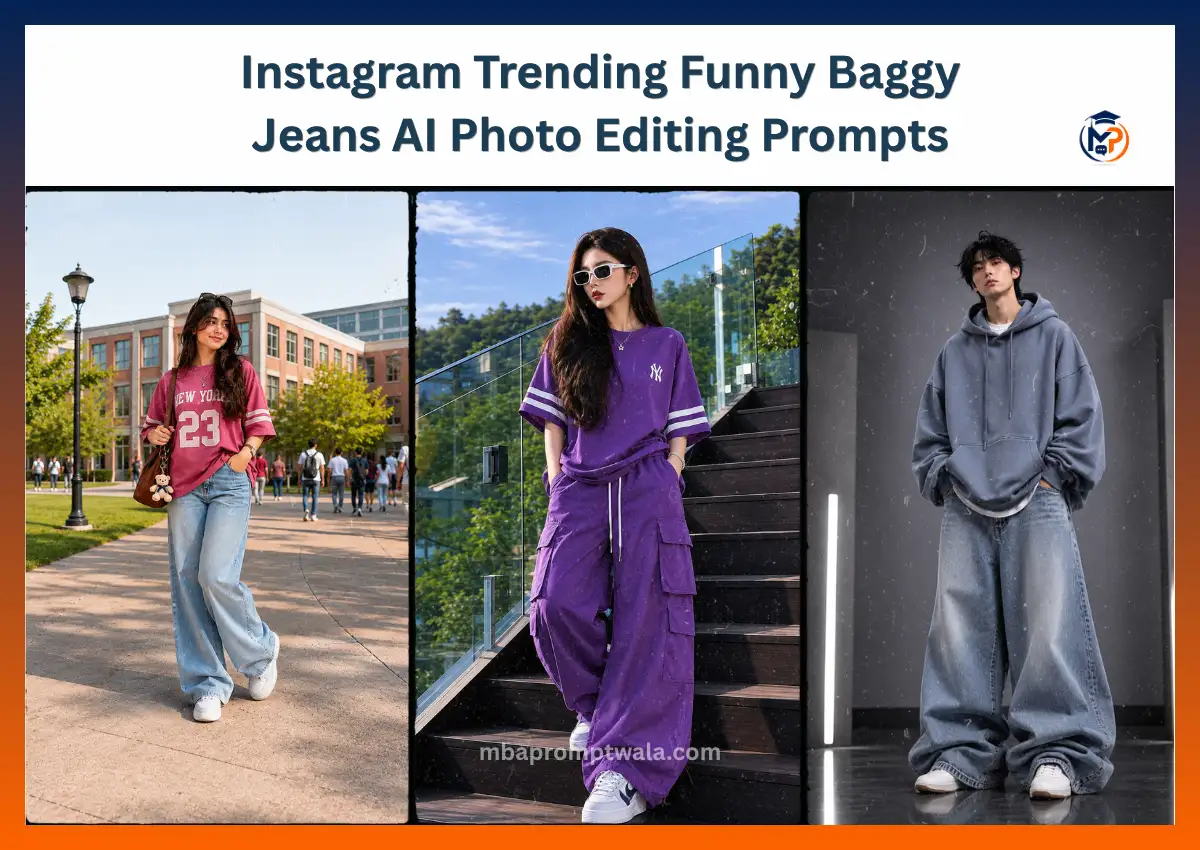
Have you noticed those funny oversized jeans photos all over Instagram and Reels? People are turning normal pictures into stylish AI edits where the jeans look huge, the clothes have extra fabric, and the final image looks like a luxury streetwear fashion poster.
The best part is that you don’t need Photoshop or editing skills. With the right Gemini AI prompt, you can upload a normal photo and create the same viral oversized look in just a few minutes.
I tested many different prompt styles before writing this guide. Small wording changes made a big difference. Some prompts changed the face, while others made the clothes look fake. The prompts shared below are written to help Gemini keep your face natural while creating realistic oversized clothing.
In this guide, you’ll find copy-and-paste Funny Baggy Jeans AI Photo Editing Prompts, simple editing tips, common mistakes to avoid, and easy ways to customize each prompt for your own style. Whether you want a funny meme photo or a high-fashion streetwear portrait, these prompts will help you get better results with less trial and error.
What Are Funny Baggy Jeans AI Photo Editing Prompts?
Funny Baggy Jeans AI Photo Editing Prompts are detailed text instructions that tell Gemini AI how to edit your uploaded photo. Instead of changing your face, the prompt focuses on making your clothes look much larger with an oversized streetwear style while keeping the rest of the photo natural.
A good prompt tells the AI exactly what to keep and what to change. This helps create realistic results instead of random edits.
Most Funny Baggy Jeans AI prompts include instructions like:
- Make the jeans 4–6 times larger than normal.
- Add natural fabric folds and realistic wrinkles.
- Keep the same face, hairstyle, and expression.
- Preserve the original background and camera angle.
- Create a modern streetwear fashion look.
- Keep the lighting and shadows realistic.
The more detailed your prompt is, the better Gemini understands what you want. Short prompts often produce inconsistent results, while detailed prompts usually create cleaner and more realistic oversized fashion edits.
Why Is the Funny Baggy Jeans AI Trend So Popular?
This trend became popular because it mixes humor with modern fashion. Oversized clothes look funny at first, but when they are generated with realistic lighting and fabric, the final image also looks stylish enough to share on Instagram.
Here are a few reasons why people love this trend:
- Funny oversized outfits instantly grab attention.
- Streetwear fashion is already popular on Instagram.
- AI makes the edit look realistic without manual editing.
- Perfect for Reels, profile pictures, and meme posts.
- Easy to create using Google Gemini with one good prompt.
- Friends are more likely to share and comment on unique AI edits.
The combination of comedy and fashion is what makes these images stand out in a crowded social media feed.
Before You Upload Your Photo
The quality of your original photo has a big impact on the final AI image. Even the best prompt cannot completely fix a poor-quality photo.
For the best results, use a photo that has:
- A full-body pose.
- Good natural lighting.
- Clear face visibility.
- Simple background with less clutter.
- Casual clothes like jeans, hoodies, or oversized shirts.
- High-resolution image without blur.
Avoid These Photos
- Cropped body shots.
- Group photos.
- Heavy filters.
- Very dark images.
- Blurry or low-quality photos.
- Photos where the legs are hidden.
Starting with a clean, well-lit photo gives Gemini more information to create realistic oversized clothing while keeping your face and pose unchanged.
How to Create Funny Baggy Jeans AI Photos in Google Gemini
Creating a viral oversized jeans photo is much easier than most people think. You only need a clear photo and a well-written prompt. Follow these simple steps for the best results.
Step 1: Open Google Gemini
Open the latest version of Google Gemini and switch to Image Generation or Image Editing mode.
Step 2: Upload Your Photo
Choose a high-quality image where your full body is visible. Standing photos usually produce the most realistic oversized clothing.
For better results, use:
- Full-body portrait
- Natural standing pose
- Bright lighting
- Simple background
- Clear face without sunglasses or heavy filters
Step 3: Copy and Paste the Prompt
Use one of the prompts shared below. Avoid making too many changes the first time. Generate the image once, then adjust the prompt if needed.
Helpful keywords include:
- Oversized baggy jeans
- Luxury streetwear
- Realistic fabric folds
- Korean fashion
- Urban editorial
- Photorealistic clothing
- Cinematic lighting
Step 4: Generate the Image
Click Generate and wait for Gemini to create your AI photo.
If the first result isn’t perfect, try generating it again. AI often creates slightly different results each time using the same prompt.
Step 5: Fine-Tune the Result
If needed, edit the prompt slightly by asking Gemini to:
- Make the jeans larger or smaller.
- Add more realistic fabric folds.
- Keep the face exactly the same.
- Increase clothing texture detail.
- Preserve the original lighting.
- Make the outfit look more fashionable instead of exaggerated.
A few small prompt changes can make the image look much more realistic.
Funny Baggy Jeans AI Photo Editing Prompt
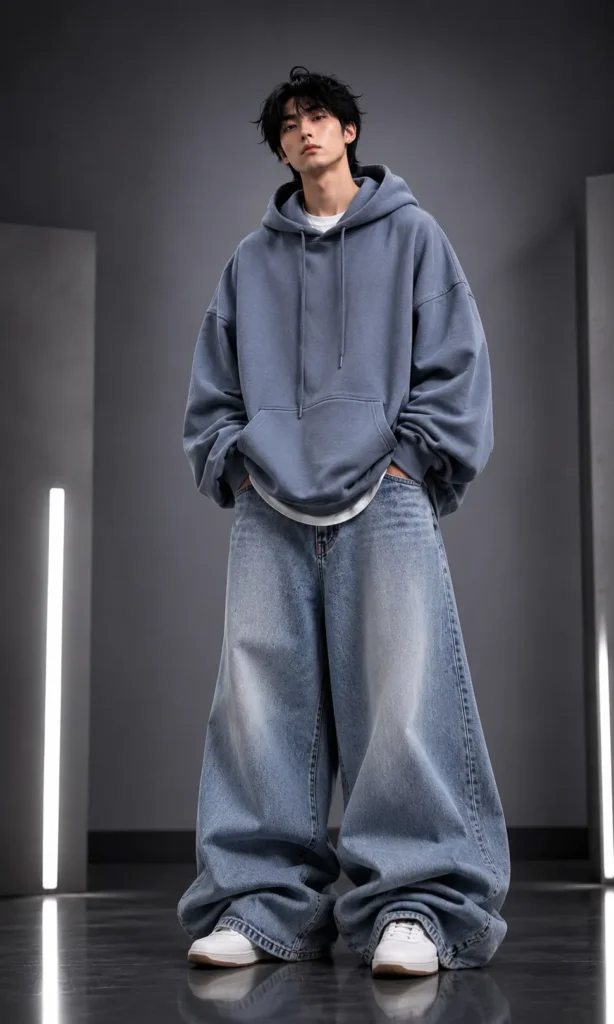
Prompt
Create a highly realistic AI fashion edit using the uploaded image as the only reference.


Keep the person’s face, hairstyle, skin tone, facial expression, body posture, camera angle, background, and lighting exactly the same. Do not change the person’s identity in any way.


Replace the existing outfit with an extreme oversized luxury streetwear version while keeping the original clothing colors recognizable.


Create ultra-wide baggy jeans with heavy fabric volume, realistic denim texture, deep natural folds, stacked fabric around the ankles, premium stitching, and natural cloth physics. The jeans should look intentionally oversized but still believable.


Transform the upper clothing into an oversized hoodie or T-shirt with dropped shoulders, extra-long sleeves, loose fabric, soft wrinkles, and realistic draping.


Create a modern Korean streetwear and luxury editorial fashion style with photorealistic clothing details.


Use soft cinematic lighting, realistic shadows, sharp focus, natural colors, and high-detail textures.


The final image should look like a premium fashion magazine photoshoot while keeping the original person’s identity completely unchanged.


Ultra realistic, 8K, photorealistic, HDR, professional fashion photography, premium streetwear, realistic denim texture, luxury editorial quality.


Negative Prompt:


face change, hairstyle change, beauty filter, skin smoothing, body deformation, unrealistic proportions, cartoon, anime, CGI, blurry image, low quality, extra limbs, background change, unrealistic fabric, distorted clothing, cropped body, identity change
Oversized Sweatshirt & Baggy Jeans AI Prompt
Prompt
Create a highly realistic AI fashion edit using the uploaded image as the only reference.


Keep the person’s face, hairstyle, skin tone, facial expression, body posture, camera angle, background, lighting, and overall identity exactly the same. Do not change the person’s appearance in any way.


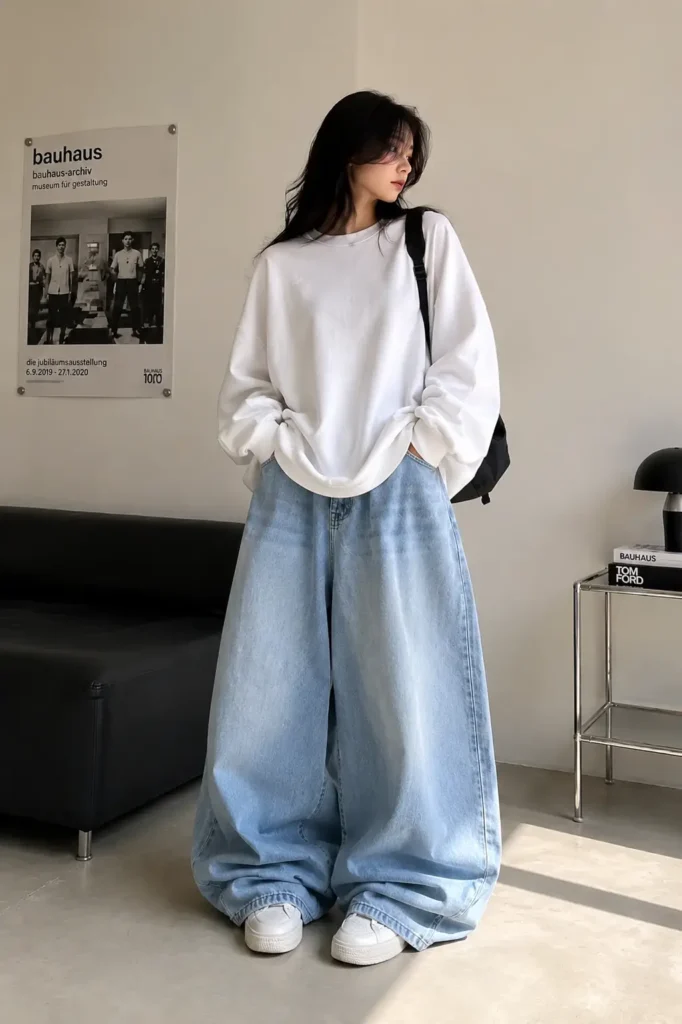
Replace the existing outfit with a cozy oversized casual streetwear look inspired by modern Korean fashion.


Transform the upper clothing into an extra-large white oversized sweatshirt made from premium heavyweight cotton. The sweatshirt should have massive dropped shoulders, extra-long loose sleeves covering part of the hands, soft realistic wrinkles, thick fabric, natural draping, and a relaxed oversized silhouette while keeping the clean minimalist design.


Transform the lower clothing into ultra-wide light blue oversized baggy jeans with exaggerated fabric volume, loose balloon-leg proportions, realistic denim texture, deep natural folds, premium stitching, heavy stacking around the ankles, and soft fabric bunching above clean white sneakers. The jeans should look intentionally oversized while remaining realistic.


Preserve the outdoor background, natural daylight, shadows, camera perspective, and composition exactly as in the original image.


Create a clean Korean streetwear aesthetic with a cozy, relaxed fashion vibe. The final image should resemble a premium fashion editorial featuring realistic oversized clothing, high-detail fabric textures, soft lighting, and natural colors.


Ultra realistic, photorealistic, HDR, 8K Ultra HD, fashion photography, premium streetwear, realistic denim texture, soft cotton fabric, cinematic quality, sharp focus.


Negative Prompt:


face change, hairstyle change, skin tone change, beauty filter, body deformation, unrealistic proportions, background change, cartoon, anime, CGI, blurry image, low quality, extra limbs, distorted anatomy, unrealistic fabric physics, oversaturated colors, cropped body, identity change.
College Campus Baggy Jeans AI Photo Editing Prompt
Prompt
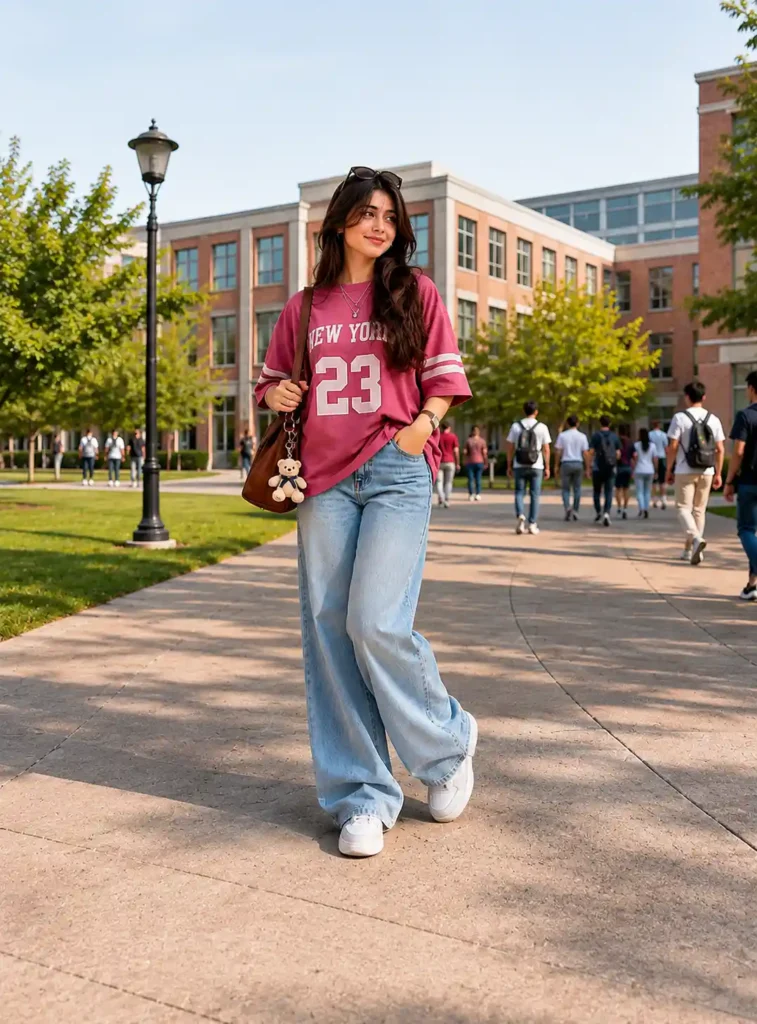
Create a highly realistic full-body portrait of a stylish young woman walking confidently along a modern college campus pathway during a bright sunny afternoon. She is wearing an oversized dark pink jersey-style T-shirt with bold white “NEW YORK 23” lettering on the front and white double stripes on the sleeves. The T-shirt has a relaxed oversized fit with dropped shoulders, loose half sleeves, soft cotton fabric, and natural wrinkles.


Pair the outfit with ultra-wide light blue baggy jeans featuring realistic denim texture, loose balloon-leg proportions, premium stitching, deep natural folds, and heavy stacking around the ankles. Complete the look with clean white sneakers.


She carries a brown leather shoulder bag decorated with a cute teddy bear keychain, wears layered silver necklaces, a smartwatch, and black sunglasses resting on top of her head. Her long, wavy dark brown hair falls naturally over her shoulders as she smiles softly while looking slightly to one side.


The background is a beautiful university campus with modern academic buildings, green lawns, flowering trees, paved walkways, students walking in the distance, and a peaceful outdoor atmosphere. Warm golden sunlight creates soft shadows and a fresh campus vibe.


Style the image like a premium fashion editorial with a Korean casual streetwear aesthetic, realistic lighting, natural skin tones, ultra-detailed fabric textures, HDR quality, sharp focus, and professional outdoor fashion photography.


Ultra realistic, photorealistic, 8K Ultra HD, fashion editorial, natural daylight, cinematic composition, premium streetwear, realistic denim texture, high-detail clothing, soft shadows.


Negative Prompt:


blurry image, low quality, cartoon, anime, CGI, distorted anatomy, extra limbs, duplicate person, unrealistic proportions, overexposed lighting, bad hands, watermark, logo, text, cropped body, background blur, unrealistic fabric, oversaturated colors
Purple Oversized Streetwear Cargo Outfit AI Photo Prompt
Prompt
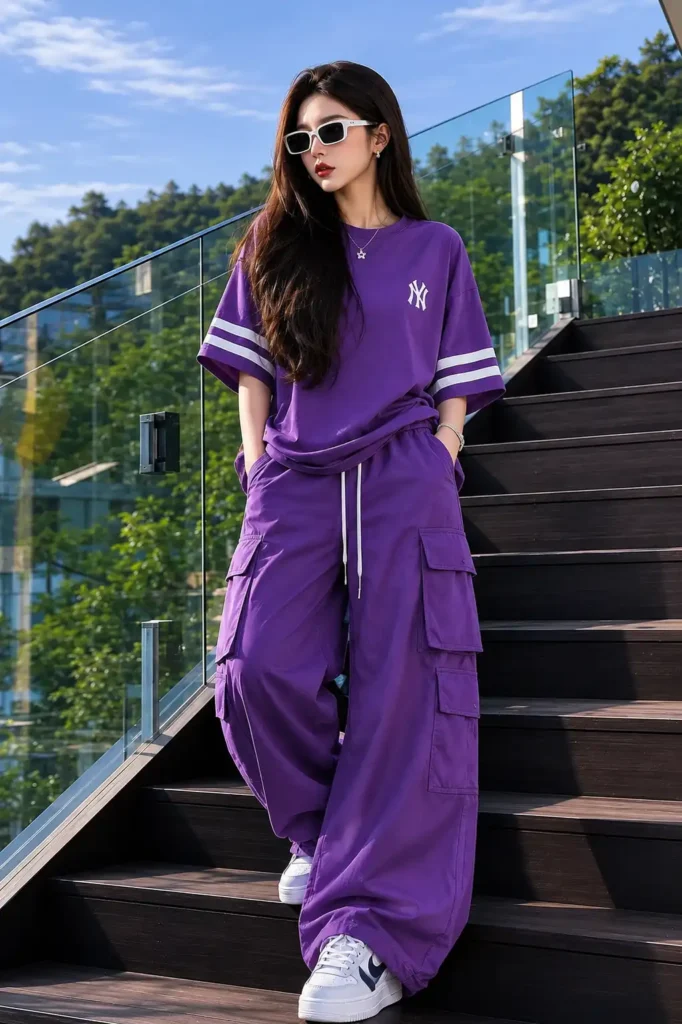
Create a highly realistic full-body fashion portrait of a stylish young Indian woman standing confidently on a modern outdoor staircase during a bright sunny day.


She has long, silky dark brown hair flowing naturally past her shoulders, wears rectangular white-framed sunglasses with dark lenses, soft matte red lipstick, natural makeup, small silver stud earrings, and a delicate silver pendant necklace.


She is dressed in a trendy oversized deep purple streetwear T-shirt made from premium heavyweight cotton. The T-shirt has a relaxed oversized fit with dropped shoulders, extra-wide half sleeves featuring double white athletic stripes near the cuffs, a small embroidered white logo on the left chest, soft natural wrinkles, realistic fabric draping, and a slightly tucked front for a casual fashion look.


She pairs it with matching deep purple ultra-wide cargo parachute pants featuring oversized flap pockets on both legs, a visible white drawstring waistband, premium nylon fabric, natural folds, relaxed balloon-leg proportions, and heavy fabric stacking around the ankles. Complete the outfit with clean white leather sneakers.


Her pose is relaxed and editorial, with one hand inside her pocket, the other resting naturally by her side, standing on the middle steps while looking slightly away from the camera with a calm, confident expression.


The location is a luxury outdoor staircase with dark wooden steps and a modern glass railing. Behind her is a lush green hillside filled with trees beneath a bright blue sky with soft white clouds. The background should have a soft natural bokeh effect while keeping the subject perfectly sharp.


Use warm natural daylight with soft directional sunlight, realistic shadows, vibrant colors, and premium fashion photography lighting. Capture rich tonal variation in the purple outfit with visible fabric texture and realistic highlights.


Style the image like a luxury Korean streetwear fashion campaign mixed with a modern editorial lookbook. The final image should feel clean, premium, stylish, and highly realistic.


Ultra realistic, photorealistic, HDR, 8K Ultra HD, fashion editorial, professional photography, premium streetwear, realistic fabric texture, natural skin tones, shallow depth of field, sharp focus, cinematic composition.


Negative Prompt:


low quality, blurry image, cartoon, anime, CGI, illustration, plastic skin, unrealistic colors, distorted anatomy, extra limbs, duplicate person, bad hands, bad feet, watermark, logo, text, cropped body, overexposed lighting, noisy image, unrealistic fabric physics, deformed face, background artifacts
Also Read: