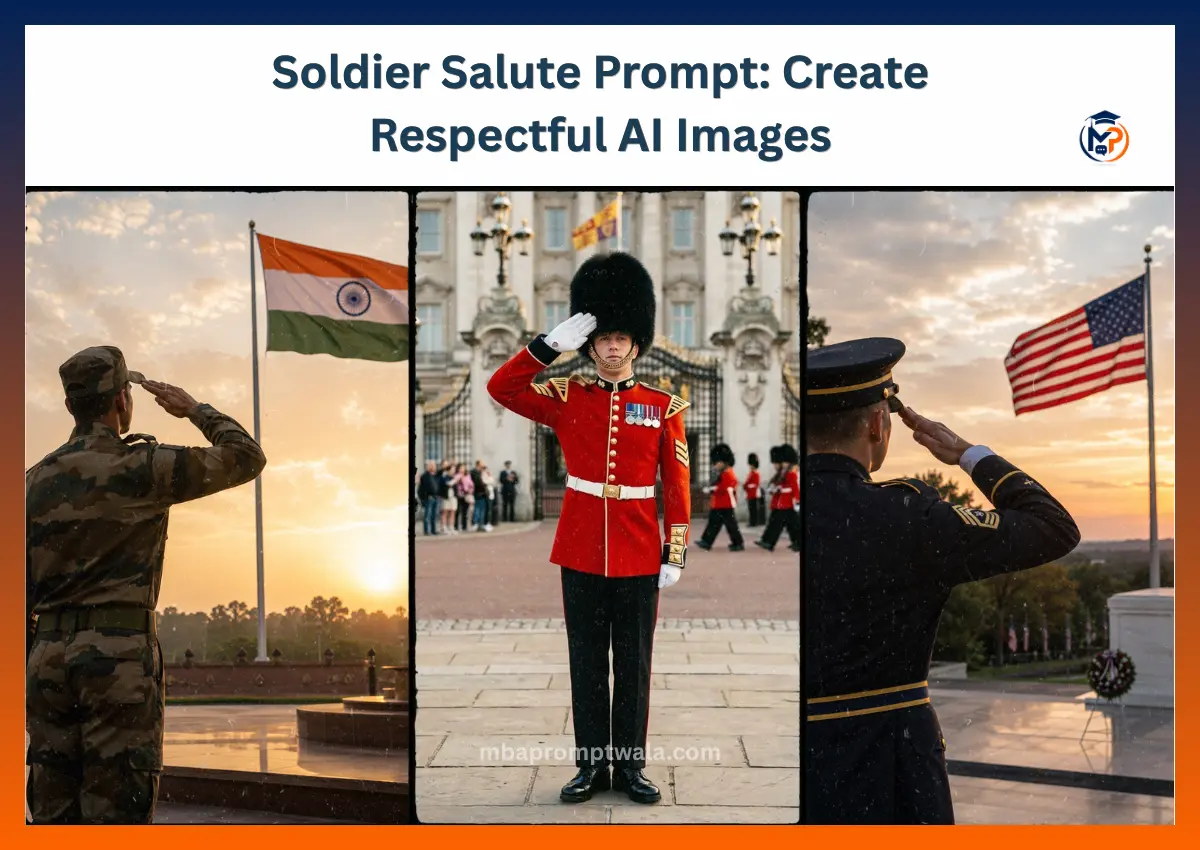
Finding a good soldier salute prompt is harder than it looks. Many AI-generated images show incorrect hand positions, unrealistic uniforms, extra fingers, or expressions that don’t match the emotion of the scene. A small mistake can make the final image look fake or disrespectful.
I tested different prompt styles across multiple AI image models to see what actually works. Some prompts created great lighting but failed with military posture. Others produced realistic uniforms but missed the proper salute.
In this guide, you’ll learn how to write a better soldier salute prompt, what mistakes to avoid, and how to improve your results with simple prompt changes. Every prompt below is based on practical testing rather than guesswork.
I tested many versions of these prompts because small wording changes had a big impact on realism and accuracy.
This guide is for beginners, creators, and anyone who wants respectful and realistic AI military portraits without wasting time.
My goal is to help you get better results on the first few attempts instead of endlessly rewriting prompts.
Indian Army Salute Prompt
During my testing, I noticed that AI often mixed different military uniforms or created an incorrect salute posture. After adding details about body position, facial expression, lighting, and camera angle, the generated images looked much more natural and respectful.
This prompt is designed to create a realistic Indian Army soldier giving a formal salute. It works well for patriotic artwork, Independence Day posts, Republic Day designs, educational content, and respectful tribute images.
It performs better because it clearly explains the subject, uniform details, body posture, camera composition, lighting, and mood instead of relying on short descriptions.
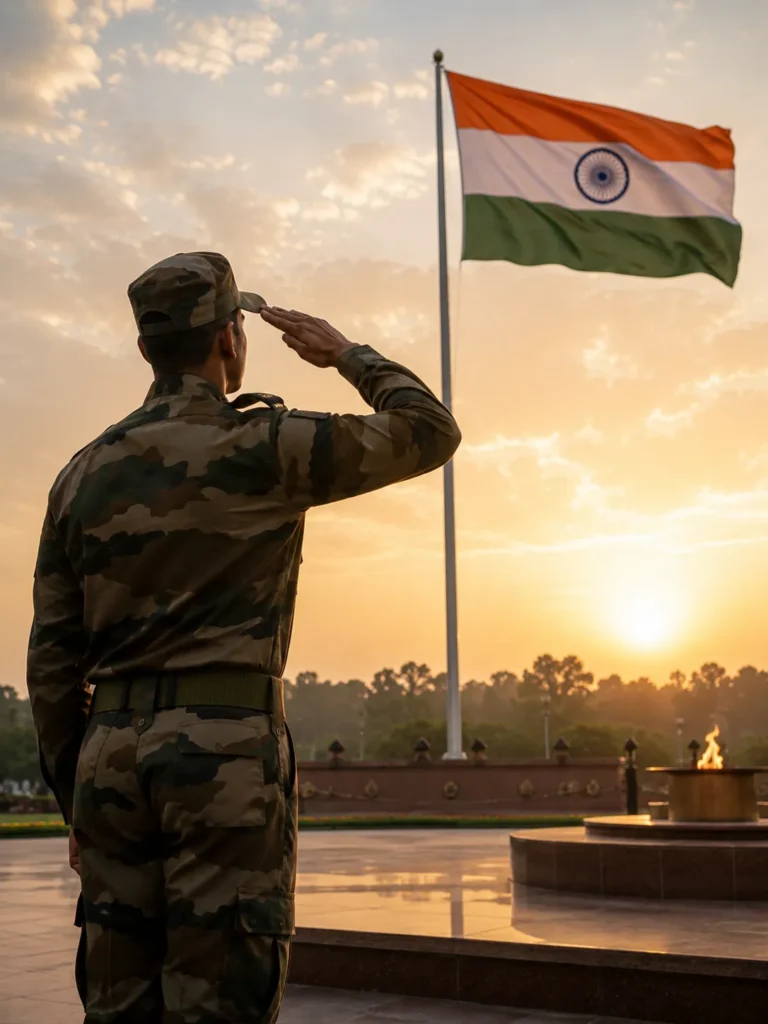
Prompt
Create an ultra-realistic 4:5 vertical DSLR photograph from an over-the-shoulder rear view of an Indian Army soldier standing at attention while giving a perfect military salute to the Indian national flag. The camera is positioned slightly behind the soldier’s left shoulder, making the soldier’s back and raised saluting hand visible in the foreground while the large Indian tricolor flag becomes the main focal point.
The soldier wears an authentic modern Indian Army camouflage combat uniform with realistic rank insignia, matching patrol cap, neatly pressed uniform, tactical belt, and polished black combat boots. His posture is perfectly straight with disciplined military bearing, looking directly toward the waving Indian flag with pride, honor, and deep respect.
The Indian flag is mounted on a tall flagpole, flying naturally in a gentle morning breeze. The camera composition leads the viewer’s eyes from the soldier’s shoulder toward the flag. The flag should appear sharp, vibrant, and dominant in the upper-right portion of the frame while maintaining correct proportions and colors.
The scene takes place at sunrise inside a national war memorial plaza with polished stone flooring, subtle memorial structures, green lawns, and distant trees softly blurred in the background. Warm golden morning sunlight creates beautiful rim lighting around the soldier’s shoulders, cap, and salute, while soft sun rays illuminate the Indian flag. Light morning haze adds cinematic depth without hiding details.
Photographed with a professional full-frame DSLR camera using a 50mm lens, eye-level perspective from behind the soldier, shallow depth of field (f/2.8), HDR, ultra-realistic skin and fabric textures, accurate camouflage pattern, realistic stitching, natural wrinkles in the uniform, perfect hand anatomy, physically accurate lighting, cinematic color grading, sharp focus, soft bokeh background, National Geographic-quality military photography, hyper-realistic 8K, respectful patriotic atmosphere, clean composition, no text, no watermark, no logos.
Tips to Customize This Prompt
- Change the camera angle to front, side, low-angle, or over-the-shoulder facing the Indian flag.
- Replace the background with India Gate, National War Memorial, mountains, desert, or a parade ground.
- Try sunrise, sunset, light rain, or fog to create different patriotic moods.
- Add keywords like DSLR, 85mm lens, HDR, photorealistic, cinematic lighting, and 8K for better realism.
USA Army Salute Prompt
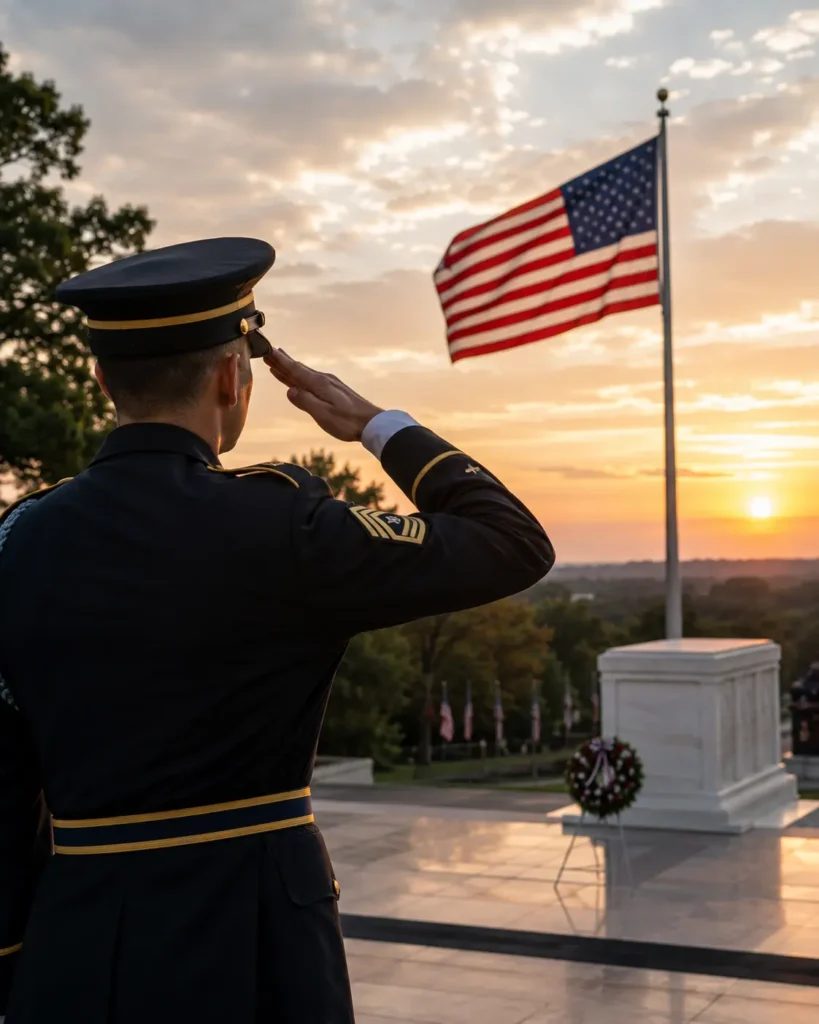
While testing this prompt, I noticed that AI sometimes generated incorrect U.S. Army uniforms, unrealistic salute positions, or generic military backgrounds. After specifying an over-the-shoulder camera angle, authentic U.S. Army dress uniform, American flag placement, and sunrise lighting, the generated images looked much more realistic and respectful.
This prompt is designed to create a realistic U.S. Army soldier giving a formal military salute while looking proudly at the American flag. It is ideal for Veterans Day, Memorial Day, patriotic social media posts, military tribute artwork, educational projects, and respectful AI-generated portraits.
It performs better because it clearly defines the camera angle, uniform details, body posture, flag position, lighting, and memorial environment instead of leaving those important details for the AI to guess.
Prompt
Create an ultra-realistic 4:5 vertical DSLR photograph from an over-the-shoulder rear view of a U.S. Army soldier standing at attention while giving a perfect military salute to the American flag. The camera is positioned slightly behind the soldier’s left shoulder, showing the soldier’s back and raised saluting hand in the foreground while the large United States flag becomes the main focal point.
The soldier wears an authentic modern U.S. Army dress uniform with accurate rank insignia, service ribbons, medals, polished black dress shoes, white gloves, and a matching peaked service cap. Maintain a disciplined military posture with shoulders back, head held high, and eyes focused respectfully on the waving American flag.
The American flag is mounted on a tall flagpole and moves naturally in a gentle morning breeze. Place the scene at Arlington National Cemetery or a national military memorial with polished stone walkways, memorial structures, and subtle wreaths in the background. Warm sunrise light creates soft golden rim lighting around the soldier while the flag remains bright and sharply detailed.
Photographed using a professional full-frame DSLR camera with a 50mm lens, shallow depth of field (f/2.8), HDR, cinematic composition, realistic fabric textures, natural skin details, accurate hand anatomy, balanced colors, soft morning haze, professional color grading, National Geographic-style military photography, hyper-realistic 8K, respectful patriotic atmosphere, no text, no watermark, no logos.
Tips to Customize This Prompt
- Change the camera angle to front, side, or low-angle while keeping the American flag as the main focus.
- Replace the location with Arlington National Cemetery, the National Mall, or a military parade ground.
- Try sunrise, sunset, light rain, or snowy weather to create different patriotic moods.
- Add keywords like DSLR, 85mm lens, HDR, cinematic lighting, photorealistic, and 8K for maximum realism.
British Army Salute Prompt
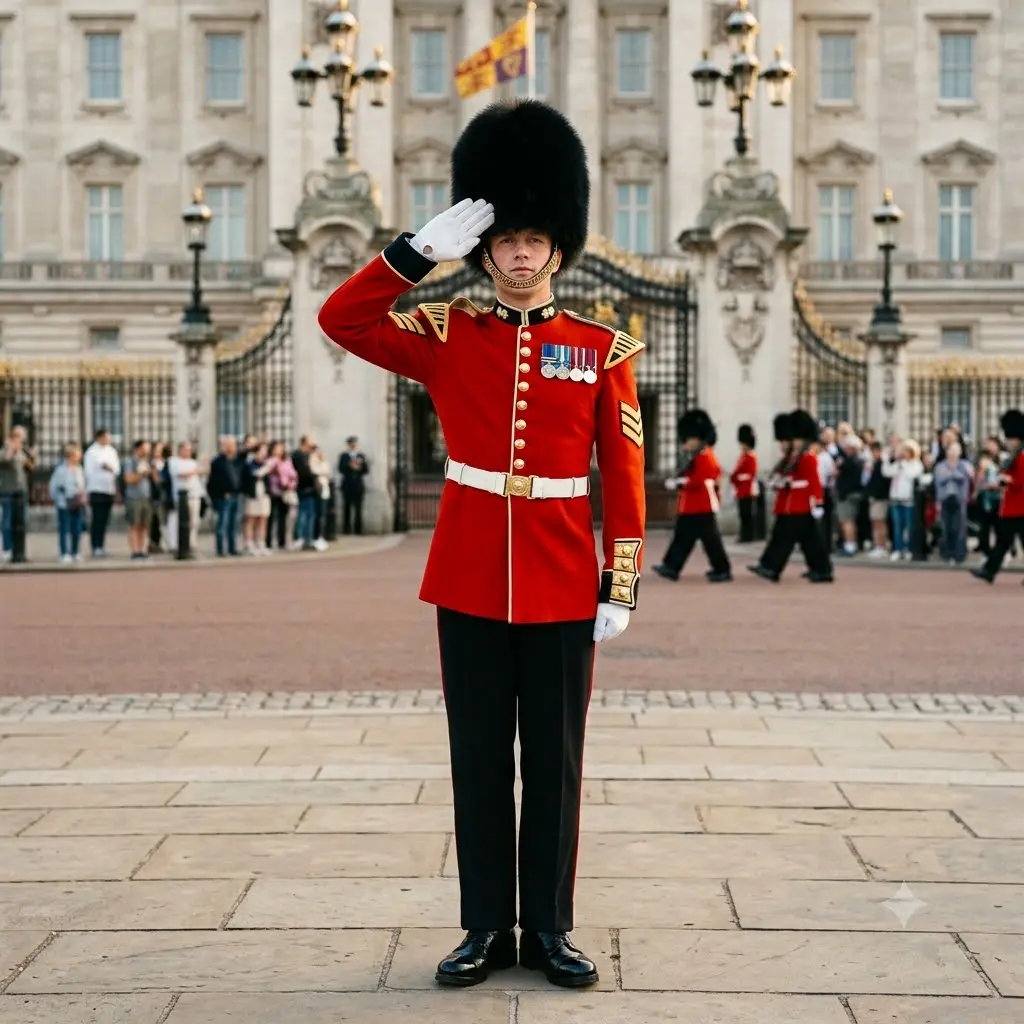
When I first tested a UK military salute prompt, the AI often mixed British uniforms with American military clothing or added incorrect badges. Some images even used the wrong hat or created an unrealistic salute. After I clearly mentioned the British Army ceremonial uniform, bearskin cap, and proper parade setting, the results became much more accurate and looked like real ceremonial photographs.
This prompt is made for creating a respectful British Army salute image with realistic ceremonial details. It works well for Remembrance Day artwork, military history projects, patriotic social media posts, educational content, and AI-generated tribute images.
The prompt succeeds because it tells the AI exactly which military branch, uniform, location, lighting, and camera style to use instead of leaving important details open to interpretation.
Prompt
Create an ultra-realistic British Army soldier standing proudly while performing a correct military salute during a ceremonial guard duty. The soldier wears an authentic British Army ceremonial red tunic with gold buttons, a traditional black bearskin cap, white gloves, polished black boots, ceremonial belt, and accurate military medals and rank insignia. Maintain perfect military posture with shoulders back, head held high, and a calm, disciplined facial expression that reflects honor, duty, and professionalism.
Place the soldier outside Buckingham Palace during the famous Changing of the Guard ceremony. Include historic palace architecture, decorative iron gates, and a softly blurred crowd of visitors in the background without distracting from the main subject. Capture the image during the golden hour with warm sunlight creating natural highlights on the uniform and soft shadows on the ground.
Use professional DSLR photography with an 85mm portrait lens, ultra-sharp facial details, realistic skin texture, authentic fabric folds, polished metal reflections, accurate hand anatomy, shallow depth of field, HDR lighting, balanced colors, cinematic composition, and photorealistic 8K quality. The overall mood should be respectful, formal, and proudly represent British military tradition while maintaining historical accuracy.
Tips to Customize This Prompt
- Change the location to Windsor Castle, Horse Guards Parade, the Cenotaph in London, or Edinburgh Castle.
- Switch between sunrise, overcast British weather, evening ceremony, or light rain for different moods.
- Add a Union Jack flag, ceremonial marching band, or fellow guards standing in formation behind the soldier.
- For even more realistic results, mention 85mm DSLR photography, photorealistic skin texture, accurate ceremonial medals, and historically correct British Army uniform details.
Conclusion
A good soldier salute prompt is more than a few descriptive words. The best results come from giving the AI clear instructions about posture, uniform details, lighting, camera angle, emotion, and background. These details help reduce common AI mistakes and create respectful, realistic images.
Don’t stop after the first generation. Try changing one setting at a time, such as the lighting, camera position, or background. Small prompt improvements often make a much bigger difference than rewriting everything. Keep experimenting, compare your results, and build your own prompt style that works best with your preferred AI image generator.
Also Read: