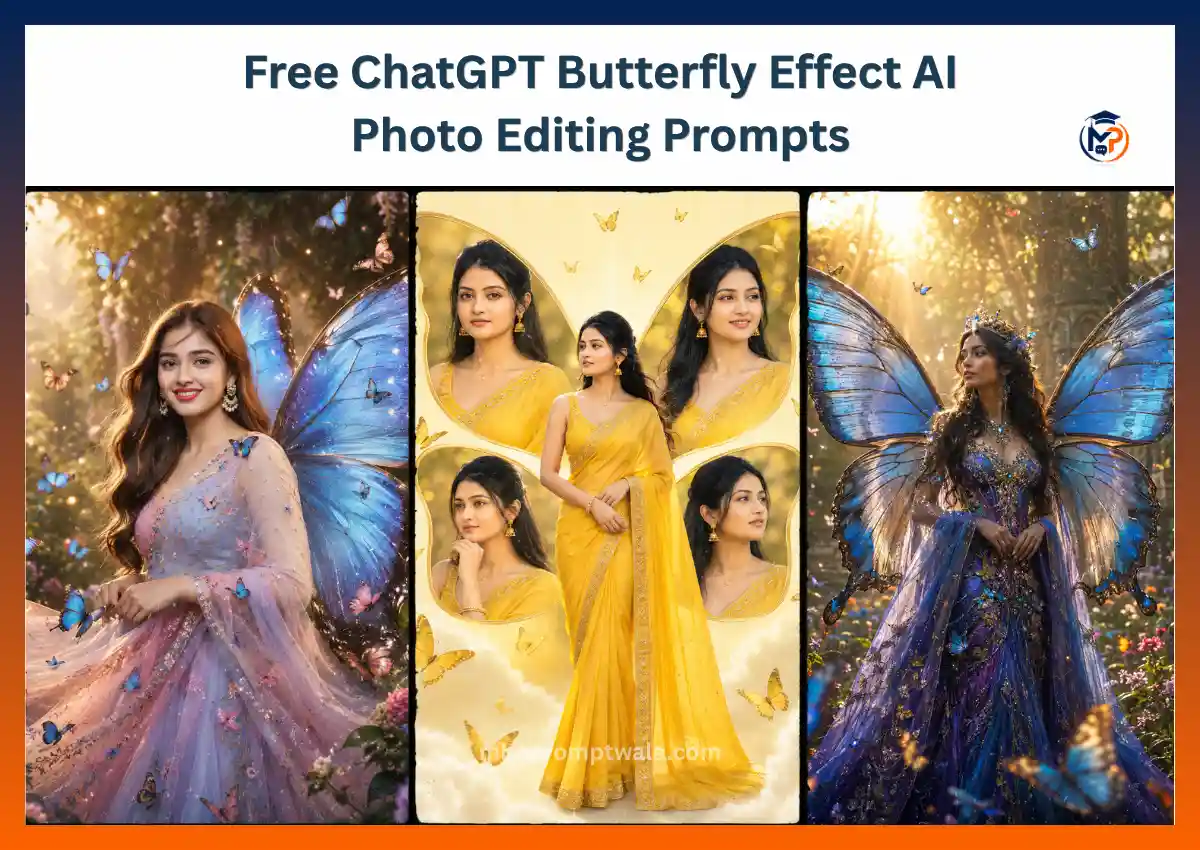
Butterfly AI photos have quickly become one of the biggest trends on ChatGPT, turning ordinary portraits into magical images filled with colorful wings, glowing butterflies, dreamy gardens, and cinematic lighting.
I tested hundreds of Butterfly Effect AI photo editing prompts on ChatGPT using different wing styles, lighting conditions, backgrounds, camera angles, and outfits. One thing became clear very quickly: simply writing “add butterfly wings” usually creates unrealistic images with awkward wing placement and artificial-looking colors. The most realistic results came from prompts that clearly described the butterfly species, wing texture, lighting, pose, environment, and photography style together.
In this guide, you’ll find prompts for butterfly girls, butterfly boys, fantasy portraits, romantic couples, photo editing, and trending social media styles.
Hi, I’m Keshav Chouhan, founder of MBA Prompt Wala. I regularly test AI image prompts across ChatGPT and other popular AI models to discover what actually works. Please reshare this post if you find it helpful.
What Is the Butterfly Prompt?
A Butterfly Prompt is an AI image prompt that creates realistic portraits with butterfly wings, flying butterflies, or magical butterfly effects. Detailed prompts describing lighting, wings, background, pose, and camera settings produce far more realistic, cinematic, and visually stunning results than simple or generic prompts.
Butterfly Prompt Formula
Creating a realistic butterfly AI image becomes much easier when you follow a simple prompt formula. Instead of writing random descriptions, combine each important element in the correct order to help ChatGPT understand exactly what you want.
Subject + Butterfly Type + Wing Color + Background + Lighting + Pose + Outfit + Camera Angle + Photography Style + Image Quality
Example:
A young woman + Blue Morpho butterfly wings + enchanted flower garden + golden hour lighting + walking pose + flowing white dress + eye-level shot + DSLR fashion photography + ultra-realistic HDR + 8K quality.
Butterfly Girl Collage Image Prompt
After experimenting with butterfly-inspired portraits, I found that the most elegant results came from treating the butterfly as a creative composition rather than simply adding wings. Instead of attaching wings to the subject, the butterfly shape is formed using multiple portraits of the same woman. A full-body portrait is placed naturally in the center while four close-up portraits fill the butterfly wings. Soft golden-yellow tones, graceful saree draping, realistic facial expressions, subtle butterflies, and a clean glowing background create a premium editorial artwork. Simple prompts often produce messy layouts or uneven proportions, but specifying a symmetrical butterfly collage, consistent lighting, and realistic photography results in a polished fashion poster.
Output
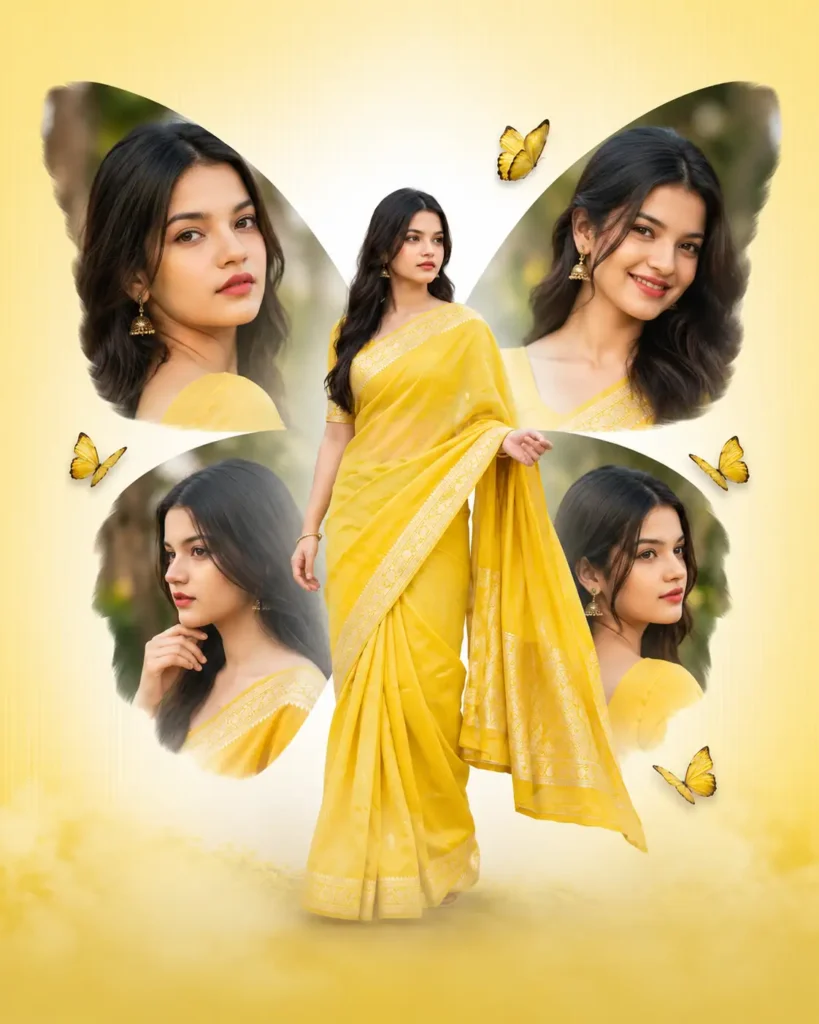
Prompt
Create a highly realistic artistic butterfly-shaped portrait collage featuring the same beautiful young Indian woman in every frame. Place a full-body portrait in the center, wearing an elegant bright yellow traditional saree with delicate embroidered borders, standing gracefully with a natural pose. Surround her with four large portrait images arranged symmetrically to form butterfly wings—two at the top and two at the bottom. Each portrait should show a different natural facial expression and angle, including smiling, side profile, thoughtful, and confident looks, while maintaining the exact same identity, hairstyle, makeup, and outfit.


The butterfly wings should be created entirely from these portrait cutouts with soft feathered edges instead of actual butterfly wings. Add a few realistic golden-yellow butterflies flying naturally around the composition without overwhelming the scene. Use a warm cream-to-golden gradient background with subtle glowing light rays and soft mist near the bottom. Maintain clean spacing between each portrait to preserve the butterfly silhouette. Capture realistic skin texture, soft golden-hour lighting, shallow depth of field, DSLR photography, 85mm lens, HDR, ultra-realistic lighting, cinematic composition, premium fashion editorial style, elegant color harmony, symmetrical layout, and 8K quality.


Negative Prompt


Actual butterfly wings, cartoon style, anime, unrealistic collage, messy composition, uneven spacing, duplicate faces, different outfits, inconsistent identity, extra people, distorted face, distorted hands, extra limbs, blurry image, low resolution, plastic skin, harsh shadows, oversaturated colors, cropped portraits, text, watermark, logo, poor lighting, low quality.
Butterfly Effect AI Photo Editing Prompt
While testing butterfly photo edits, I noticed that ChatGPT produced the best results when the prompt clearly instructed it to preserve the person’s identity while adding butterfly elements naturally. Detailed instructions about wing placement, lighting, and background created realistic edits instead of fantasy illustrations.
Output
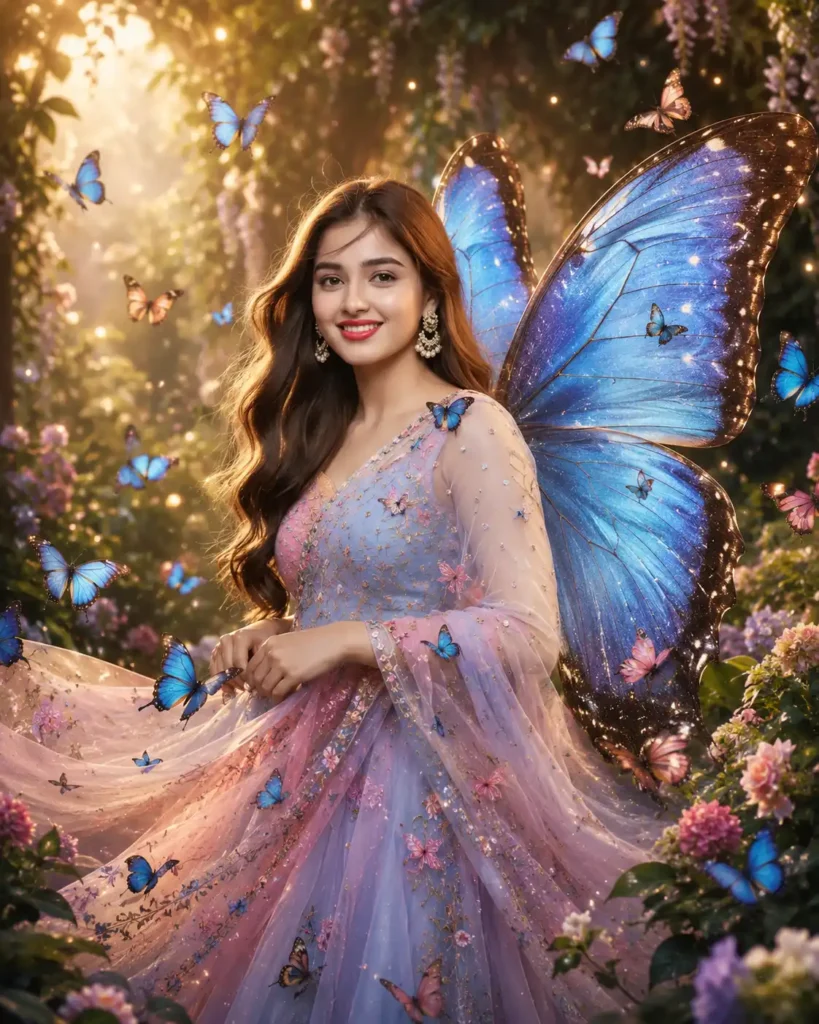
Prompt
Create a highly realistic 4:5 vertical AI photo edit using the uploaded image as the only reference. Preserve the person’s face, hairstyle, skin tone, facial expression, body proportions, pose, and overall identity exactly as in the original photo. Do not change facial features or make the person look different.


Transform the scene into a magical butterfly-inspired portrait by adding a pair of elegant large Blue Morpho butterfly wings attached naturally to the subject’s back. The wings should have realistic feather-like textures, semi-transparent edges, detailed vein patterns, and soft sunlight passing through them. Add dozens of realistic butterflies in different sizes flying naturally around the subject, with a few resting gently on the shoulders, hands, and nearby flowers.


Replace the background with a dreamy botanical garden filled with blooming flowers, lush green plants, soft mist, warm golden-hour sunlight, and creamy bokeh. Add floating light particles and subtle glowing dust to create depth without making the image look artificial.


Dress the subject in an elegant pastel butterfly-inspired gown with delicate embroidered butterfly patterns and naturally flowing fabric. The outfit should move softly with the breeze and match the fantasy atmosphere.


Use professional fashion photography composition with an 85mm portrait lens, f/1.8 aperture, shallow depth of field, HDR lighting, ultra-realistic skin texture, cinematic color grading, balanced highlights, natural shadows, premium editorial photography, extremely detailed, photorealistic, and 8K quality. Ensure the butterflies, wings, lighting, and environment blend seamlessly into the original photo for a believable final result.


Negative Prompt


Do not change the person’s identity, face shape, hairstyle, age, or body proportions. Avoid cartoon wings, anime style, plastic skin, blurry details, low resolution, extra arms, extra fingers, duplicate butterflies, distorted anatomy, oversaturated colors, unrealistic glowing effects, text, watermark, logo, cropped composition, or poor lighting.
Fantasy Butterfly Queen Prompt
While experimenting with fantasy butterfly portraits, I found that realism comes from balancing magical elements with natural photography. Oversized glowing wings and excessive visual effects often made the image look artificial, while elegant costumes, soft backlighting, and realistic butterfly movement created a premium cinematic fantasy portrait.
Output
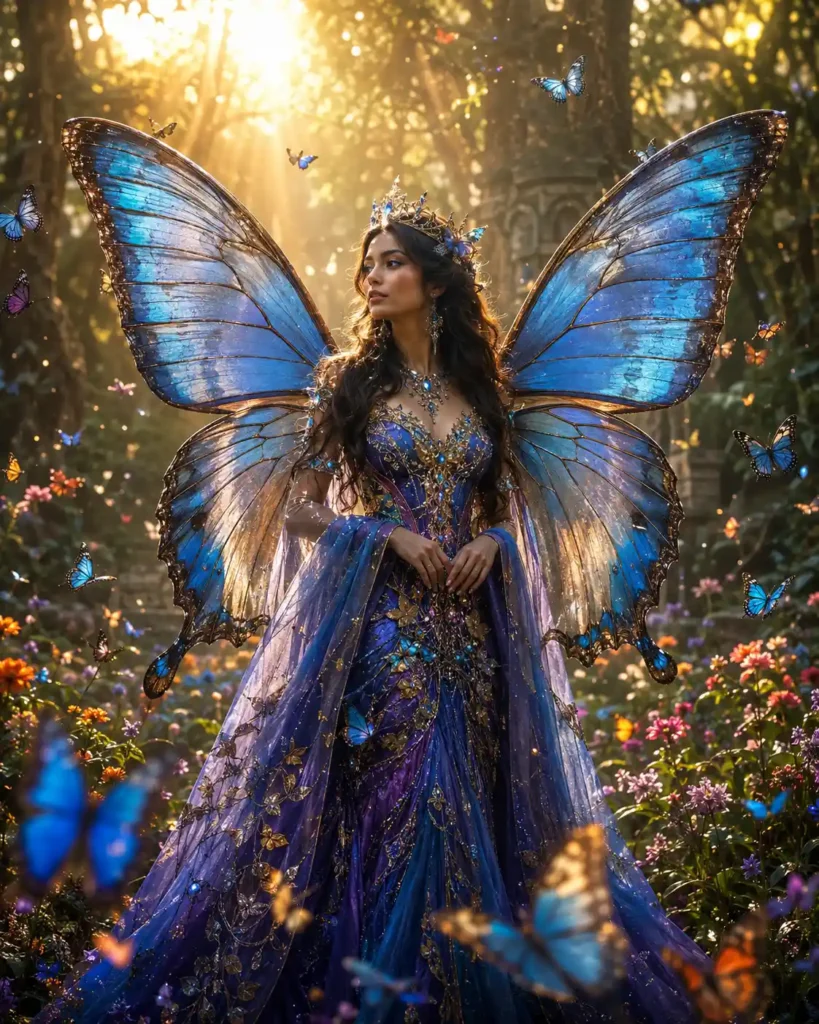
Prompt
Create a highly realistic 4:5 vertical fantasy portrait of a breathtaking young Butterfly Queen standing gracefully in the heart of an enchanted flower forest during golden hour. Give her a completely original, attractive face with expressive eyes, flawless natural skin, soft pink lips, and long, wavy dark brown hair flowing gently in the breeze. She wears a luxurious butterfly-inspired royal gown in shades of sapphire blue, violet, and gold with intricate embroidery, delicate crystal details, and a flowing cape that moves naturally.


Attach an enormous pair of majestic Blue Morpho and Glasswing butterfly wings to her back. The wings should feature realistic vein patterns, semi-transparent edges, shimmering iridescent textures, and natural sunlight glowing softly through them. Hundreds of colorful butterflies flutter gracefully around her at different distances, creating depth and movement without overcrowding the scene.


The enchanted forest is filled with blooming wildflowers, ancient trees, soft fog, glowing plants, floating golden particles, and warm sun rays filtering through the leaves. Add a subtle magical atmosphere while maintaining a photorealistic look. Capture the subject standing confidently with elegant posture, looking slightly away from the camera with a calm, regal expression.


Use professional fashion editorial photography, captured with an 85mm portrait lens, f/1.8 aperture, shallow depth of field, creamy bokeh, HDR lighting, cinematic color grading, ultra-realistic skin texture, premium dynamic range, highly detailed fabric textures, realistic butterfly motion, natural lighting, and 8K photorealistic quality.


Negative Prompt


Anime style, cartoon wings, fairy illustration, CGI appearance, blurry face, plastic skin, low resolution, extra limbs, distorted hands, duplicate butterflies, unrealistic glow, oversaturated colors, poor anatomy, text, watermark, logo, cropped image, low-quality rendering.
Trending Butterfly AI Photo Prompt
After testing dozens of viral butterfly edits on Instagram and Pinterest, I noticed that images become much more engaging when butterflies interact naturally with the subject instead of simply flying in the background. Golden-hour lighting, premium fashion styling, soft pastel colors, and dynamic butterfly movement consistently produced the most share-worthy AI portraits.
Output
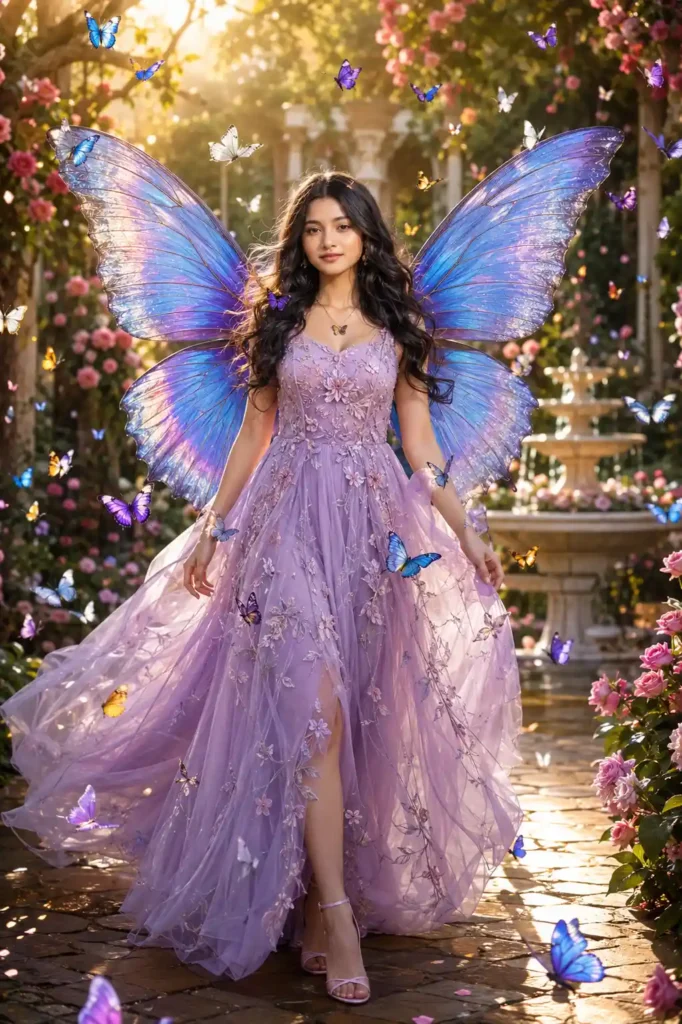
Prompt
Create a highly realistic 4:5 vertical viral butterfly portrait of a fashionable young woman with a completely original, attractive face, flawless natural skin, expressive eyes, and long, silky black hair flowing gently in the wind. She is confidently walking through a dreamy flower garden while looking slightly toward the camera with a soft, natural smile.


She is wearing an elegant pastel lavender couture gown with delicate floral embroidery, sheer flowing fabric, subtle crystal embellishments, matching high heels, minimalist jewelry, and soft glamorous makeup. Behind her is a breathtaking pair of enormous Blue Morpho butterfly wings with realistic feather-like textures, translucent edges, iridescent blue reflections, and intricate vein details that blend naturally with her body.


Hundreds of vibrant butterflies in shades of blue, purple, white, and golden yellow fly gracefully around her, while a few butterflies gently rest on her shoulders, fingertips, and flowing dress. The background features a luxurious botanical garden filled with blooming flowers, lush greenery, elegant stone pathways, glowing fountains, floating flower petals, and warm golden-hour sunlight streaming through the trees. Add subtle floating light particles, soft mist, creamy bokeh, and realistic depth for a premium cinematic atmosphere.


Capture the portrait using professional DSLR fashion photography with an 85mm portrait lens, f/1.8 aperture, shallow depth of field, HDR lighting, realistic skin texture, balanced highlights, soft natural shadows, editorial color grading, ultra-detailed butterfly textures, photorealistic composition, vibrant colors, and 8K ultra-HD quality. The final image should look like a luxury fashion campaign that is highly shareable on Instagram and Pinterest.


Negative Prompt


Cartoon butterflies, anime style, fake wings, blurry face, plastic skin, low resolution, extra limbs, distorted hands, duplicate butterflies, poor anatomy, unrealistic lighting, excessive glow, oversaturated colors, text, logo, watermark, cropped composition, low-quality render.
300 Writing Butterfly Prompt
After testing hundreds of butterfly photo prompts, I found that realistic results come from treating butterflies as part of the environment rather than adding them as random decorations. Natural lighting, accurate wing placement, premium fashion styling, and DSLR photography settings create images that look like professional editorial portraits instead of AI-generated artwork.
Output
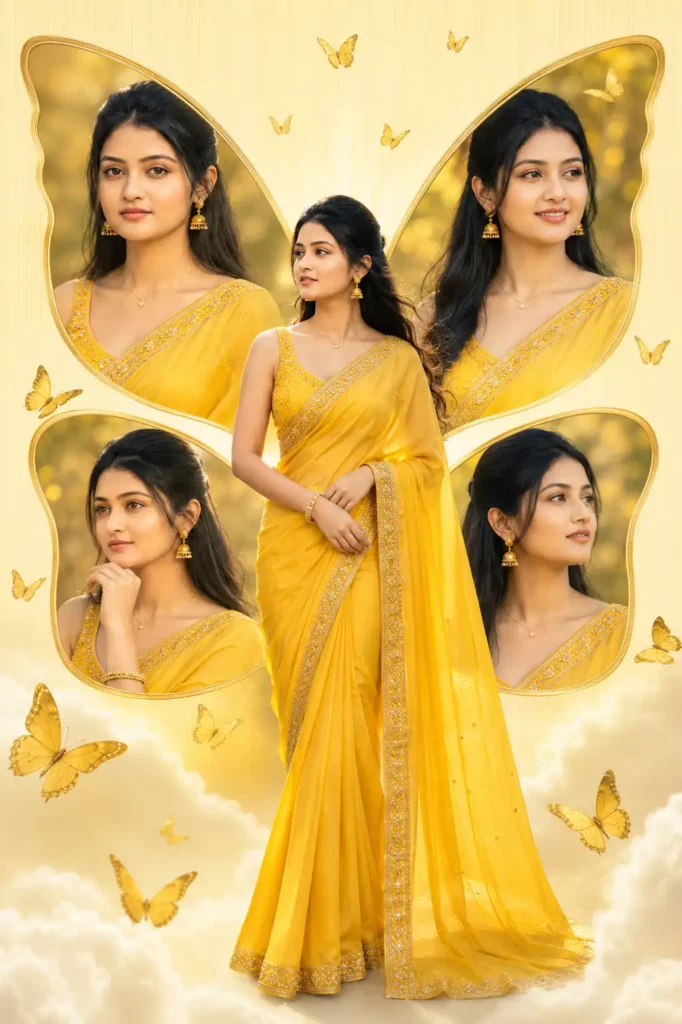
Prompt
Create a highly realistic 4:5 vertical DSLR fashion portrait of a breathtaking young Indian woman with a completely original and naturally attractive face. She has flawless wheatish skin with realistic pores, expressive almond-shaped brown eyes, naturally long eyelashes, soft matte pink lips, straight silky black hair flowing gently in the breeze, and subtle professional makeup that enhances her natural beauty without looking artificial. Her expression is calm, confident, and elegant as she looks slightly away from the camera.


She is wearing a luxurious bright yellow silk saree with intricate golden zari embroidery along the borders, paired with a matching sleeveless blouse featuring delicate handcrafted details. The saree drapes naturally with realistic fabric folds and soft movement created by a gentle breeze. Complete the look with elegant gold jhumka earrings, a delicate gold bracelet, a thin necklace, and a small traditional bindi that complements her appearance without overpowering the portrait.


Position the subject gracefully in the center of the frame with a full-body standing pose while creating a premium butterfly-inspired collage composition. Behind her, design four large butterfly-wing-shaped portrait frames containing different close-up angles of the same woman. The top-left portrait shows a calm front-facing expression, the top-right portrait captures a warm natural smile, the bottom-left portrait features a thoughtful side pose with her hand gently touching her chin, and the bottom-right portrait displays a graceful side profile looking into the distance. Every portrait must feature the same person with identical facial features, realistic skin texture, and consistent lighting.


Use a soft pastel yellow background with a clean white radial gradient emerging from the center behind the main subject. Add a subtle vertical texture to the canvas for depth while maintaining a minimal premium design. Place soft floating clouds near the bottom of the composition that gently fade into the background without hiding the saree. Scatter several realistic golden-yellow butterflies of different sizes around the collage, ensuring they appear naturally suspended in the air with accurate wing anatomy, soft shadows, and believable motion. The butterflies should enhance the composition without covering the subject’s face or important details.


Maintain a luxury editorial aesthetic with balanced symmetry, generous negative space, and clean visual hierarchy. Do not include typography, captions, logos, watermarks, signatures, borders, stickers, or graphic elements anywhere in the artwork. The final image should resemble a professionally designed magazine cover or premium social media poster created by an experienced graphic designer rather than an AI illustration.


Capture the composition using professional full-frame DSLR photography, 85mm portrait lens, f/1.8 aperture, shallow depth of field, natural HDR lighting, soft diffused sunlight, realistic skin texture, accurate color science, premium fashion retouching, cinematic color grading, ultra-high detail, photorealistic rendering, perfectly balanced exposure, crisp focus, and 8K ultra-HD quality. Every element should appear completely realistic with no cartoon, painting, CGI, or artificial AI-generated appearance.


Negative Prompt


Cartoon style, anime, painting, illustration, CGI, plastic skin, fake butterflies, oversized wings, blurry face, low resolution, bad anatomy, extra fingers, extra limbs, duplicate faces, distorted saree folds, oversaturated colors, harsh shadows, noisy background, text, logo, watermark, frame, border, cropped composition, unrealistic lighting, artificial glow, low-quality rendering.
Also Read:
Instagram Trending Funny Baggy Jeans AI Photo Editing Prompts