Hi, I’m Keshav Chouhan. I spend a lot of time working with AI photo prompts, and festival photos are interesting because getting a beautiful image is usually the easy part. Getting a believable one is harder.
Karwa Chauth is a good example.
A red saree, full moon, diya and decorated thali can immediately make an image look festive. But those same elements can create problems when too much is happening in one frame.
The moon can become unnaturally large. Jewellery can multiply. Mehndi can turn into random patterns. Fingers can merge with the thali. In couple photos, one face may stay accurate while the other changes.
That is why I have kept this collection focused.
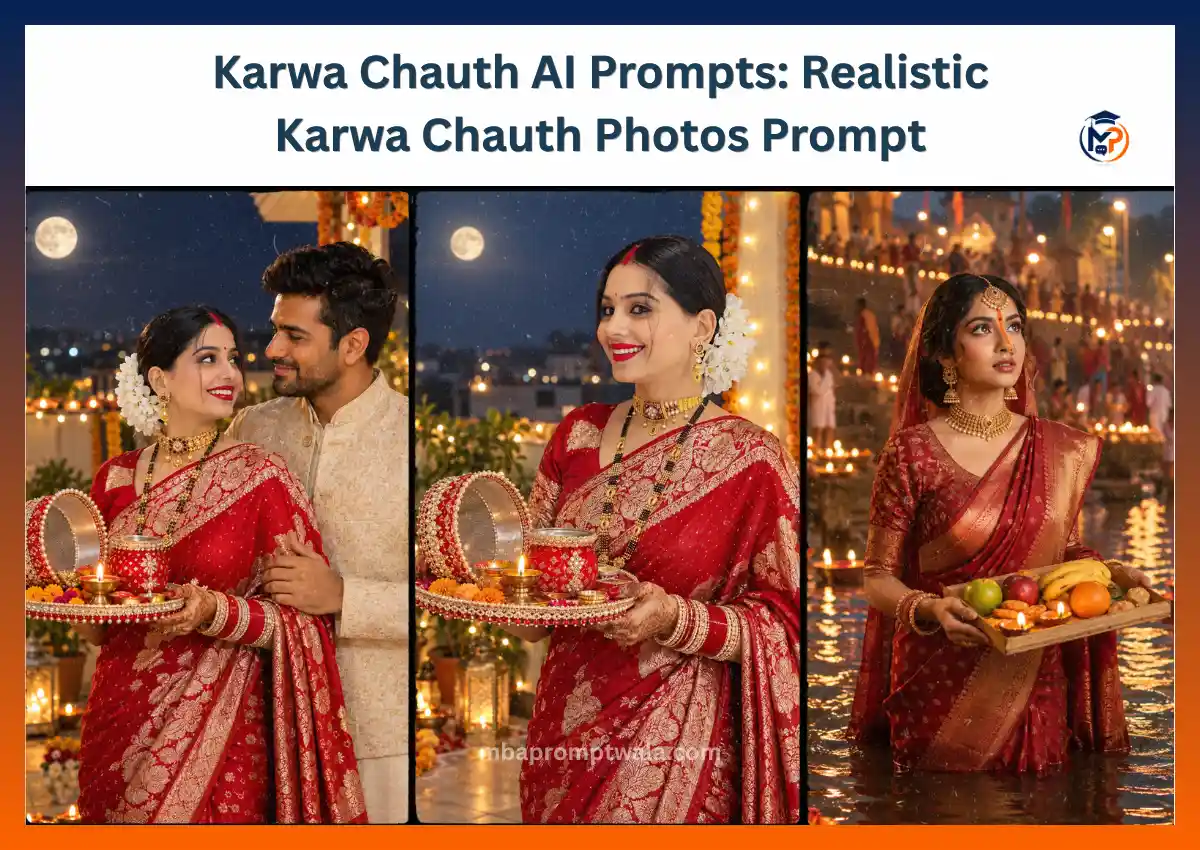
Instead of giving you 20 slightly different Karwa Chauth prompts, I have included three prompts for three different needs:
- A detailed traditional moonlight portrait
- A husband and wife Karwa Chauth portrait
- A simpler ChatGPT portrait with stricter realism instructions
You can use the prompt closest to the photo you want, then refine the result instead of starting over with a completely different prompt.
If you are using your own face, upload a clear reference photo before pasting the prompt.
What I Focus on in a Karwa Chauth AI Photo
There are a few details that matter more here than simply making the image “cinematic.”
Keeping the Face Recognizable
When a reference photo is used, the face should remain the priority.
Long prompts can ask the model to handle a saree, jewellery, mehndi, thali, moon, terrace, flowers, lights and a detailed pose at the same time. The more visual instructions you add, the more important it becomes to clearly state which details must not change.
That is why the prompts below put the identity instruction near the beginning.
Keeping the Moon in the Background
The moon is important to a Karwa Chauth scene, but it should not automatically become the largest object in the image.
If the model creates a giant moon behind the person, the result can start looking like a fantasy poster rather than a photograph.
I prefer treating the moon as part of the environment unless the intention is specifically to create a dramatic poster.
Making the Thali Look Usable
A decorated thali introduces several small objects close to the hands.
That combination can be difficult for image generation.
The diya, flowers, karwa, sieve, jewellery, fingers and thali edge can merge or appear duplicated. A simpler arrangement often looks more convincing than asking for every possible festival object at once.
Balancing Diya Light and Moonlight
Warm diya light and cooler evening light can work beautifully together.
The important part is keeping the lighting believable.
If every object glows independently, the image starts looking artificial. The diya should create local warm light, while the evening environment remains softer.
With those points in mind, here are the three prompts.
1. Traditional Karwa Chauth Moonlight Portrait
This is the most detailed option in this collection.
Use it when you want a traditional festive portrait with the saree, jewellery, mehndi, thali, decorated terrace and moon all visible in one composition.
The woman should remain the main subject. The decorations are there to establish Karwa Chauth, not compete with her.
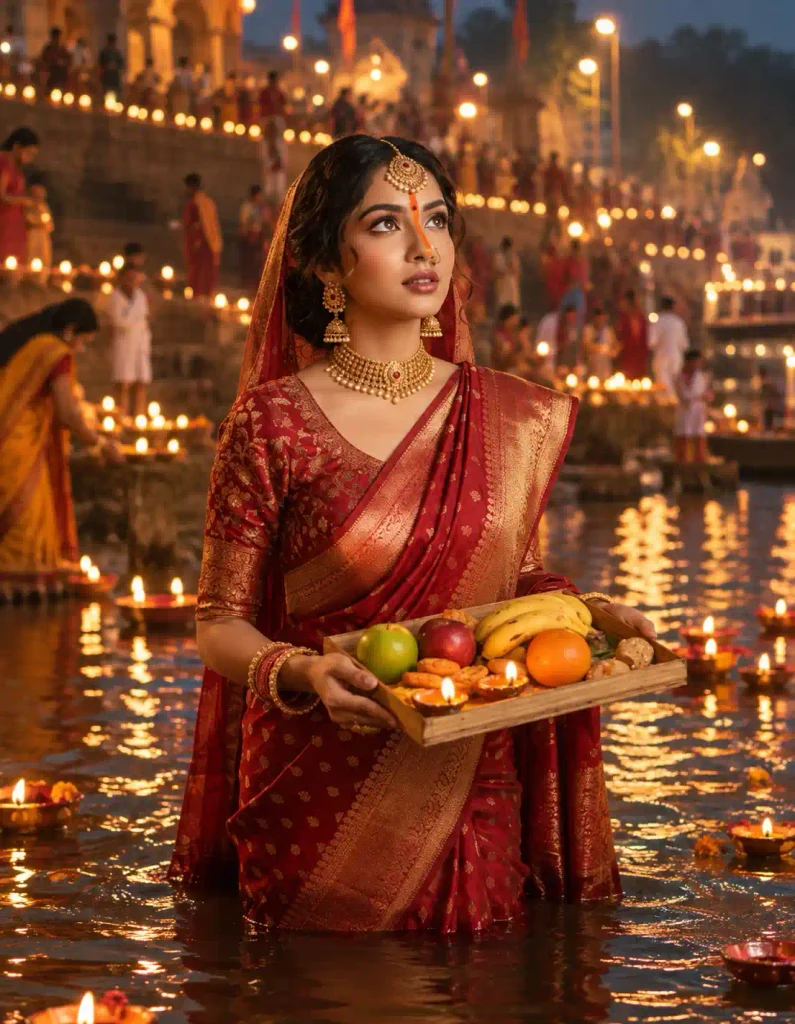
Prompt
Use the uploaded reference image as the primary identity reference. Preserve the woman’s facial identity exactly as shown in the original photo, including facial structure, eyes, eyebrows, nose, lips, skin tone, complexion, natural skin texture, and overall appearance. Do not redesign or replace her face.
Create a highly realistic traditional Indian Karwa Chauth evening portrait of the same woman standing gracefully on a beautifully decorated home terrace. She is dressed in an elegant deep red Banarasi silk saree with intricate golden zari work and a matching designer blouse with traditional embroidery. Her saree should look naturally draped with realistic fabric folds and texture.
She wears traditional Karwa Chauth jewelry including elegant gold earrings, a mangalsutra, red and gold bangles, a delicate necklace, and a traditional maang tikka. Add realistic mehndi designs on her hands without making them overly dark or artificial.
Her hair is styled in a neat traditional bun decorated with fresh jasmine flowers. Her makeup is elegant and natural with subtle eye makeup, a small red bindi, soft lipstick, and realistic Indian festive styling.
She gently holds a decorated Karwa Chauth thali containing a small karwa, diya, sieve, flowers, and traditional festive items. She looks toward the camera with a soft, natural smile.
The terrace is decorated with marigold flowers, warm fairy lights, diyas, and subtle traditional decorations. A realistic full moon is visible in the evening sky in the background, creating a beautiful Karwa Chauth atmosphere.
Use soft warm evening lighting combined with gentle moonlight. Keep the skin tones natural and realistic. Create realistic shadows, natural fabric texture, authentic jewelry reflections, and believable depth.
Capture the portrait using a professional full-frame camera with an 85mm portrait lens at f/1.8, creating natural background separation and soft cinematic bokeh.
Premium Indian festive fashion photography, realistic skin texture, natural facial details, authentic saree fabric, realistic hands and fingers, elegant composition, cinematic evening lighting, high-end editorial photography, ultra detailed, photorealistic, natural colors, professional portrait quality.
Aspect ratio 3:4 vertical.
What I Would Check After Generating It
Don’t judge the image only from the overall first impression.
Zoom in and look at the face, hands, thali and jewellery.
The thali is particularly important because the model has to place the fingers around an object that already contains several smaller objects.
Also check whether the moon looks like it belongs in the distant sky. If it dominates the portrait, correct the moon rather than rewriting the whole prompt.
If the Result Looks Too Busy
The first things I would simplify are the background decorations.
You do not need marigold flowers, fairy lights and multiple diyas to all be equally prominent.
Try a correction such as:
Keep the woman, face, saree, thali, pose and lighting unchanged. Simplify only the terrace decorations. Keep a few warm diyas and subtle marigold decorations, with the background clean and realistic.
This preserves the successful parts of the first image.
Easy Ways to Customize This Version
You can change the saree from red to maroon, wine, pink, emerald green or another colour without rebuilding the entire concept.
The terrace can also become a balcony, courtyard or garden.
I would make one major change at a time. If you change the clothing, location, lighting, pose and jewellery together, it becomes difficult to tell which change caused a new problem.
2. Karwa Chauth Couple AI Photo Prompt
A couple image is a different problem from a single-person portrait.
Now the model has to preserve two identities, while also creating believable eye contact, body position, hands, clothing and interaction.
The safest starting point is usually a simple pose.
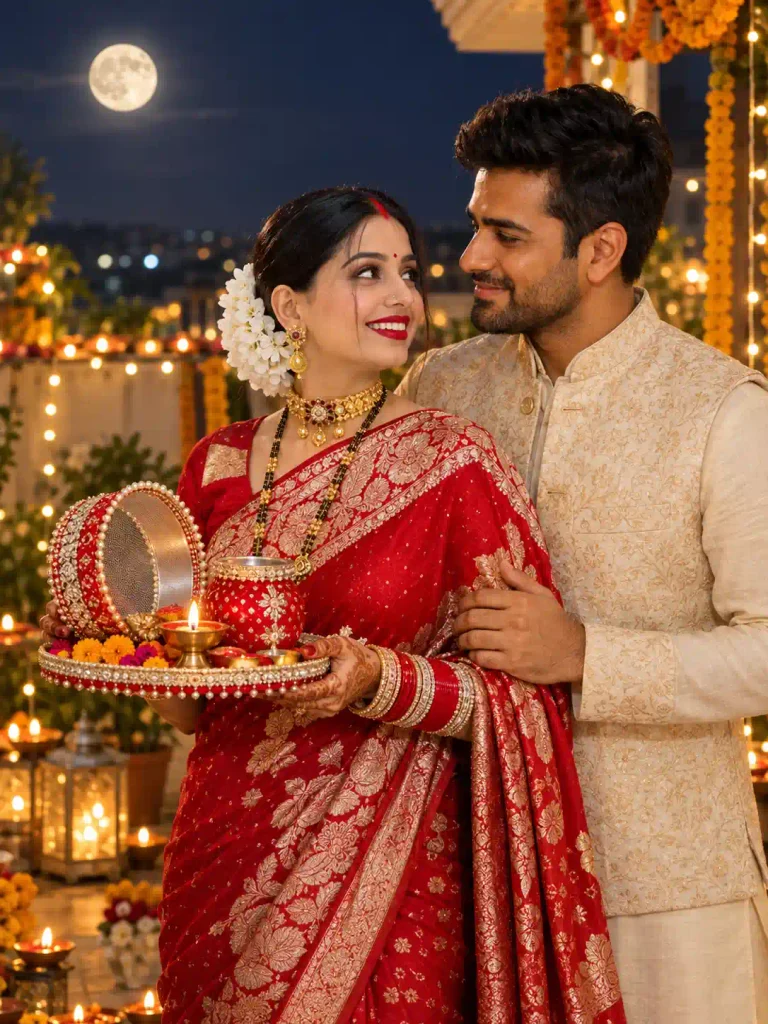
For this prompt, the wife holds the thali while the husband stands beside her. That gives the scene a clear visual structure without asking both people to perform complicated actions at once.
Prompt
Use the two uploaded reference images as the identity references for the husband and wife. Preserve both facial identities exactly as shown in the original photos without changing their facial structure, eyes, eyebrows, nose, lips, skin tone, complexion, hairstyle, or natural facial texture.
Create a highly realistic traditional Karwa Chauth couple portrait on a beautifully decorated home terrace during the evening. The wife wears an elegant deep red Banarasi silk saree with intricate golden zari work, traditional gold jewelry, red and gold bangles, a mangalsutra, maang tikka, and realistic Karwa Chauth mehndi on her hands. Her hair is styled in a neat traditional bun decorated with fresh jasmine flowers.
The husband stands naturally beside her wearing an elegant traditional ivory kurta with a subtle embroidered Nehru jacket. Both should look comfortable and naturally connected rather than posing stiffly.
The wife holds a beautifully decorated Karwa Chauth thali containing a traditional karwa, diya, flowers, and other simple festive elements. She gently looks toward her husband with a warm natural smile while he looks at her affectionately.
A realistic full moon appears naturally in the evening sky behind them. Add subtle marigold decorations, warm diyas, soft fairy lights, and a clean traditional terrace setting without overcrowding the background.
Use warm festive lighting mixed with soft natural moonlight. Create realistic skin texture, natural facial expressions, believable hands and fingers, realistic saree folds, authentic jewelry reflections, and natural shadows.
Capture the scene as professional Indian festive couple photography using an 85mm portrait lens at f/1.8 with beautiful background separation and soft cinematic bokeh.
Photorealistic Indian couple photography, authentic Karwa Chauth atmosphere, natural expressions, realistic fabric texture, cinematic evening lighting, elegant festive styling, premium editorial photography, highly detailed, natural colors, professional portrait quality.
Aspect ratio 3:4 vertical.
Why Couple Photos Need More Checking
A couple photo can look convincing at first glance even when one person’s identity has drifted.
Check each face separately.
Compare the husband’s face with his reference photo, then do the same with the wife’s.
Also look at where their bodies meet. Arms, shoulders and hands can become confused when two people stand close together.
If One Face Changes
Don’t immediately regenerate the entire photograph.
If everything else looks good, identify which person needs correction.
For example:
Keep the wife, clothing, thali, terrace, lighting, pose and overall composition unchanged. Correct only the husband’s facial identity using his uploaded reference image. Preserve his original facial structure, eyes, nose, lips, skin tone and hairstyle.
The reverse can be used if the wife’s face changes.
If the Couple Looks Too Stiff
Avoid solving this by asking for a much more complicated pose.
A small adjustment can be enough.
You can ask for softer eye contact, relaxed shoulders or a slight natural turn toward each other while keeping everything else unchanged.
3. ChatGPT Karwa Chauth AI Photo Prompt
This third version has a different purpose.
Instead of adding more festive detail, it puts stronger limits on common AI problems.
It specifically tells the model to avoid extra fingers, duplicated jewellery, excessive makeup, oversized objects, distorted saree folds, plastic skin and an unnaturally large moon.
I would start here if your previous Karwa Chauth generations keep looking overdecorated or obviously AI-generated.
Prompt
Use the uploaded reference image as the primary identity reference. Preserve the exact facial identity and natural appearance of the person. Do not redesign, replace, beautify, or modify the face. Keep the original facial structure, eyes, eyebrows, nose, lips, skin tone, complexion, and natural skin texture unchanged.
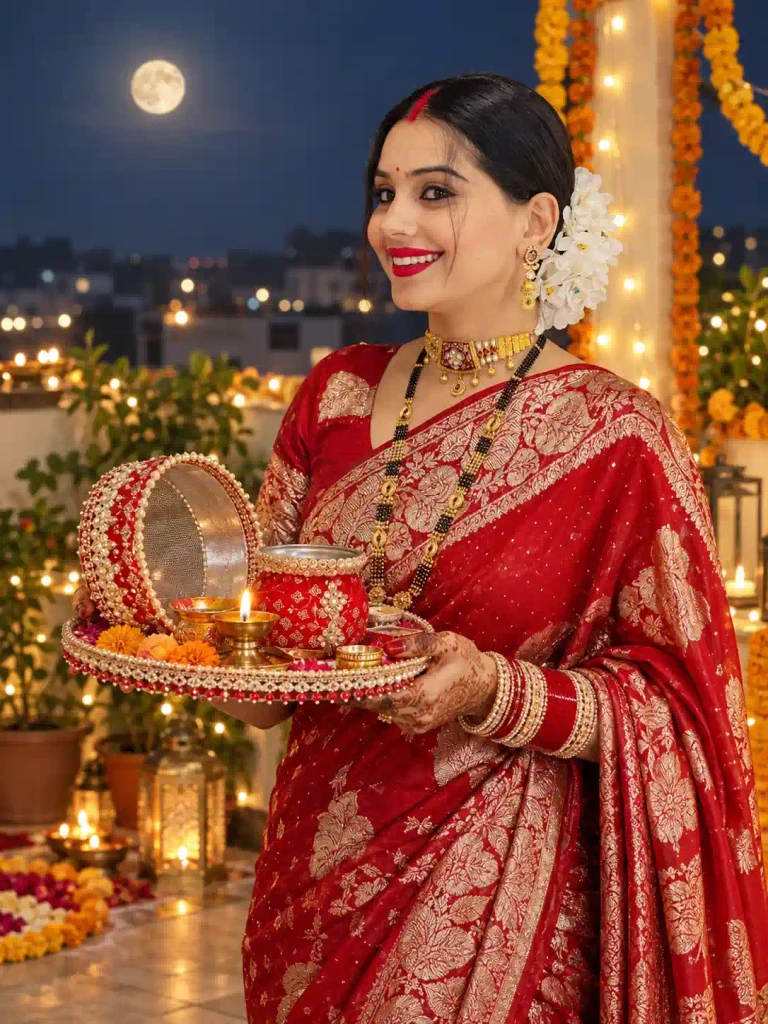
Create a realistic Karwa Chauth portrait with a naturally draped traditional red silk saree, elegant gold jewelry, subtle mehndi, a small red bindi, and a simple traditional hairstyle.
Place the woman on a naturally decorated home terrace during the evening. Include only a few authentic Karwa Chauth elements such as a decorated thali, diya, flowers, subtle fairy lights, and a realistic full moon in the background.
Keep the pose simple and natural. The woman gently holds the Karwa Chauth thali with realistic hands and naturally positioned fingers while looking toward the camera with a soft genuine smile.
Do not create extra fingers, distorted hands, duplicated jewelry, unrealistic facial features, excessive makeup, unnatural body proportions, overly large decorative objects, oversized moon, artificial-looking saree folds, or an excessively decorated background.
Maintain realistic proportions between the woman, thali, moon, furniture, and background objects.
Use soft warm evening lighting with subtle moonlight. Preserve natural skin tones and realistic shadows. Avoid excessive glow, oversaturation, artificial HDR effects, plastic-looking skin, or extreme cinematic effects.
Professional Indian festive portrait photography, realistic skin texture, authentic saree fabric, natural jewelry details, believable hands, realistic lighting, subtle background blur, photorealistic result, elegant Karwa Chauth atmosphere, high-end photography quality.
Aspect ratio 3:4 vertical.
When I Would Choose This Prompt
Use this version when realism matters more than decoration.
Prompt 1 gives the model more styling information.
This prompt gives it more restrictions.
That distinction matters.
A longer or more detailed prompt is not automatically better. Sometimes the useful instruction is telling the model what not to exaggerate.
Which Karwa Chauth Prompt Should You Use?
You do not need to test all three just because they are here.
Choose based on the photograph you actually want.
| Your Goal | Start With |
| Detailed traditional festive portrait | Prompt 1 |
| Husband and wife Karwa Chauth photo | Prompt 2 |
| Simpler realistic portrait | Prompt 3 |
| Strong saree and jewellery styling | Prompt 1 |
| Two-person identity preservation | Prompt 2 |
| Fewer decorations | Prompt 3 |
| Previous images look overly AI-generated | Prompt 3 |
If I were trying this for the first time, I would generate the closest version once without changing the prompt.
Then I would inspect the output before deciding what needs correction.
6 Common Karwa Chauth AI Photo Problems and How to Fix Them
This is where small corrections can save you from starting over.
1. The Face No Longer Looks Like the Reference
This is the first thing I would fix.
Do not compensate by adding even more descriptions of beauty, makeup or facial appearance. That can push the image further away from the reference.
Instead, bring the instruction back to identity:
Keep the entire generated image unchanged. Correct only the woman’s face using the uploaded reference image. Preserve her original facial structure, eye shape, eyebrows, nose, lips, jawline, skin tone and natural facial appearance.
If the reference itself is blurry or heavily filtered, try a clearer photo.
2. The Moon Is Far Too Large
This is a very noticeable failure in festival images.
The model understands that the moon is important to Karwa Chauth, but that can result in an enormous glowing moon dominating the background.
Try:
Keep everything else unchanged. Reduce only the full moon to a natural size and place it realistically in the distant evening sky. Maintain the existing lighting and composition.
You do not need to regenerate the woman’s face just to fix the moon.
3. The Hands or Fingers Look Wrong
Karwa Chauth scenes make hands particularly challenging because the woman may be holding a thali, sieve, diya or other objects.
First check whether the pose itself is too complicated.
Then try:
Keep the face, saree, jewellery, thali, background and lighting unchanged. Correct only the hands and fingers. Create anatomically natural hands with five clearly formed fingers positioned realistically around the thali.
If detailed mehndi is making the hands visually messy, simplify it.
4. The Thali Contains Strange or Duplicated Objects
More decoration is not always better.
A model may merge the diya with flowers, duplicate the karwa or produce objects that do not make physical sense.
Instead of asking for a “heavily decorated traditional thali,” identify the few objects you actually need.
For example:
Keep the thali simple and physically realistic with one diya, one small karwa, a sieve and a few flowers. Do not duplicate any objects.
This gives the model fewer small elements to resolve.
5. The Jewellery Keeps Multiplying
Long jewellery descriptions can sometimes lead to several necklaces, extra bangles or duplicated ornaments.
If this happens, simplify rather than adding another long negative instruction.
Choose the jewellery pieces that matter most to your concept and remove the rest.
The same principle applies to background decoration.
6. The Image Looks Too Perfect to Be a Photograph
This usually shows up as extremely smooth skin, glowing edges, oversaturated reds, perfect fabric and dramatic light coming from everywhere.
If you want a more photographic result, ask for:
Natural skin texture, realistic pores, restrained colours, believable fabric folds, physically consistent lighting, natural shadows and no excessive HDR or artificial glow.
The goal is not to remove all polish. It is to keep the polish from overpowering the photograph.
A Better Way to Refine the First Result
One habit I recommend is correcting one problem at a time.
Suppose the first image has:
- A good face
- A good saree
- Good lighting
- Bad hands
Don’t rewrite the whole prompt.
Tell the model to preserve the successful parts and fix the hands.
If the second version fixes the hands but changes the face, you now know exactly what happened.
When five instructions change at once, it becomes difficult to understand why one generation looks better or worse than another.
This is especially useful with long image prompts.
What Kind of Reference Photo Should You Upload?
The prompt can only do so much if the reference image gives the model poor identity information.
For a single-person Karwa Chauth portrait, I prefer a reference where:
- The face is clearly visible
- The image is reasonably sharp
- The face is not covered by sunglasses
- Hair does not hide most facial features
- There is no strong beauty filter changing the face
- Lighting is good enough to see the eyes, nose, lips and jaw clearly
A normal clear portrait can work.
You do not need to already be wearing a saree or festive clothing in the reference photo. The prompt handles the styling.
For the couple prompt, use clear reference images for both people.
If identity accuracy matters, avoid using one excellent photo of one person and one tiny, blurry photo of the other.
Should You Use a Selfie or Full-Body Photo?
It depends on what matters most.
A clear selfie or portrait usually provides more facial information.
A full-body image gives the model more information about body proportions and posture but may contain a smaller face.
For these prompts, facial identity is important, so I would prioritize a reference where the face is clear.
If your AI tool allows multiple reference images, you can experiment with a clear face photo plus another image showing more of the person.
How to Use These Karwa Chauth Prompts
The process itself does not need to be complicated.
- Open ChatGPT with image generation available.
- Upload a clear reference photo.
- Choose the prompt closest to your desired result.
- Paste it without changing everything on the first attempt.
- Generate the image.
- Check the face, hands, clothing, thali, moon and background.
- Correct the specific problem you find.
For the couple version, upload clear reference photos of both people before using Prompt 2.
I would avoid spending ten minutes customizing the prompt before seeing what the original version produces.
The first output gives you something concrete to evaluate.
Don’t Confuse a Longer Prompt With a Better Prompt
This is one lesson worth keeping in mind beyond Karwa Chauth.
Long prompts can be useful when several visual details need to work together.
But every extra instruction also gives the model another thing to interpret.
If the image already has:
- The correct person
- The right clothing
- A believable thali
- Good lighting
- A natural background
you do not need to keep adding adjectives.
More words can sometimes make the image busier rather than better.
That is also why the three prompts on this page are not simply three increasingly longer versions of the same idea.
Each has a different job.
See How I Use a Reference Photo With the Prompt
One thing that is easy to miss when copying a long AI photo prompt is that the prompt is only half of the process. The reference photo matters just as much when I want the generated person to remain recognizable.
Below is an example from my prompt workflow. I first upload the reference photo in ChatGPT, then give the complete image instructions.
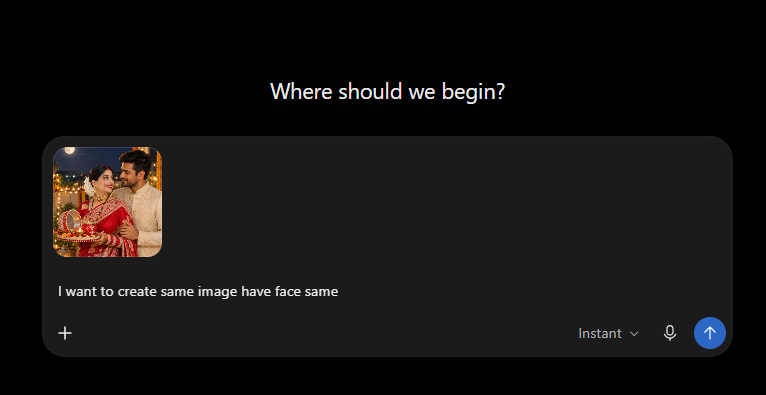
Example of my workflow, I upload the reference image first and then give ChatGPT the complete photo instructions.
The important part is that I do not ask ChatGPT to create a completely new person who merely looks similar.
I tell it to use the uploaded image as the identity reference and preserve details such as the facial structure, eyes, eyebrows, nose, lips, skin tone and natural appearance.
For a Karwa Chauth image, the AI then has two different jobs:
- Preserve what should stay the same, mainly the person’s identity.
- Create what should change, such as the saree, jewellery, mehndi, thali, terrace, evening lighting and moon.
Keeping those two jobs clear in the prompt usually gives the model better direction than simply writing:
“Make my photo look like a beautiful Karwa Chauth photoshoot.”
What I Check After the First Generation
I don’t immediately keep an image just because the overall scene looks attractive.
I zoom in and check a few details separately:
- Face: Does the person still resemble the uploaded reference?
- Hands: Are the fingers natural around the thali?
- Mehndi: Does it follow the hands rather than becoming random texture?
- Jewellery: Are any necklaces, earrings or bangles duplicated?
- Thali: Are the diya, karwa, flowers and other objects clearly separated?
- Saree: Do the folds and pallu look physically natural?
- Moon: Is it realistically placed in the distance rather than looking like a giant background graphic?
- Lighting: Does the warm diya light make sense with the evening environment?
If most of the image is already correct, I do not paste a completely different prompt.
I ask ChatGPT to preserve the successful parts and correct only the problem.
For example, if the face, saree and background are good but the fingers are distorted, I would use a follow-up instruction such as:
Keep the current face, identity, saree, jewellery, pose, thali, background, moon, lighting and composition exactly unchanged. Correct only the woman’s hands and fingers so they are anatomically natural and positioned realistically while holding the thali.
That small correction is often more useful than starting the entire image again.
Frequently Asked Questions
Why does ChatGPT change my face in Karwa Chauth photos?
The model is trying to combine your reference identity with new clothing, makeup, lighting, pose and surroundings. Use a clear reference image and keep identity preservation explicit. If the first result has the right composition but the wrong face, ask it to correct only the face instead of regenerating everything.
Why does the sieve distort the face?
A sieve placed directly in front of the face creates overlapping visual information. If you are having trouble with this pose, first create the woman with the sieve beside or slightly away from the face. Once the identity is stable, you can try refining the pose.
How can I keep both husband and wife faces accurate?
Use clear reference images for both people and identify them separately in the instruction. Start with a simple couple pose. After generation, check both faces individually rather than judging only the overall photograph.
Why does AI create bad mehndi or strange fingers?
Hands are already visually complex, and detailed mehndi adds another pattern on top of them. If the hands fail, simplify the mehndi and ask the model to correct only the hands while preserving the rest of the image.
How do I make the Karwa Chauth moon look realistic?
Ask for a naturally proportioned full moon in the distant evening sky. If the generated moon is already too large, request a correction to the moon only and preserve the existing person, lighting and composition.
Can I change the saree colour?
Yes. You can replace red with maroon, wine, pink, green, orange, blue or another colour.
I recommend changing the colour first while keeping the fabric, pose and scene unchanged. Once you like the result, make additional styling changes if needed.
Can I use a normal selfie?
Yes. A clear selfie can work well because it gives the model a good view of the face.
Avoid heavily filtered, very dark or blurry selfies if maintaining facial identity is important.
Can I use these prompts in Gemini?
The prompts describe visual instructions rather than relying entirely on one tool-specific command format, so you can experiment with them in other image-capable AI tools as well.
The result may differ because different models interpret reference images, identity instructions and long prompts differently.
Final Thoughts
For a Karwa Chauth AI photo, I would focus less on adding more festival decorations and more on getting a few important things right.
The person should still look like the reference.
The hands should interact naturally with the thali.
The moon should belong in the scene rather than overpower it.
The saree and jewellery should look physically believable.
The lighting should feel like one environment, not several effects layered together.
Start with the prompt closest to the image you want.
Generate it once.
Then look closely at what actually failed.
If the moon is wrong, fix the moon. If the fingers are wrong, fix the fingers. If the face changed, return to the reference identity.
That approach is more useful than repeatedly replacing one long prompt with another and hoping the next generation gets everything right.
The goal is not to create the longest Karwa Chauth prompt.
It is to give the model enough direction to create the photo you had in mind.