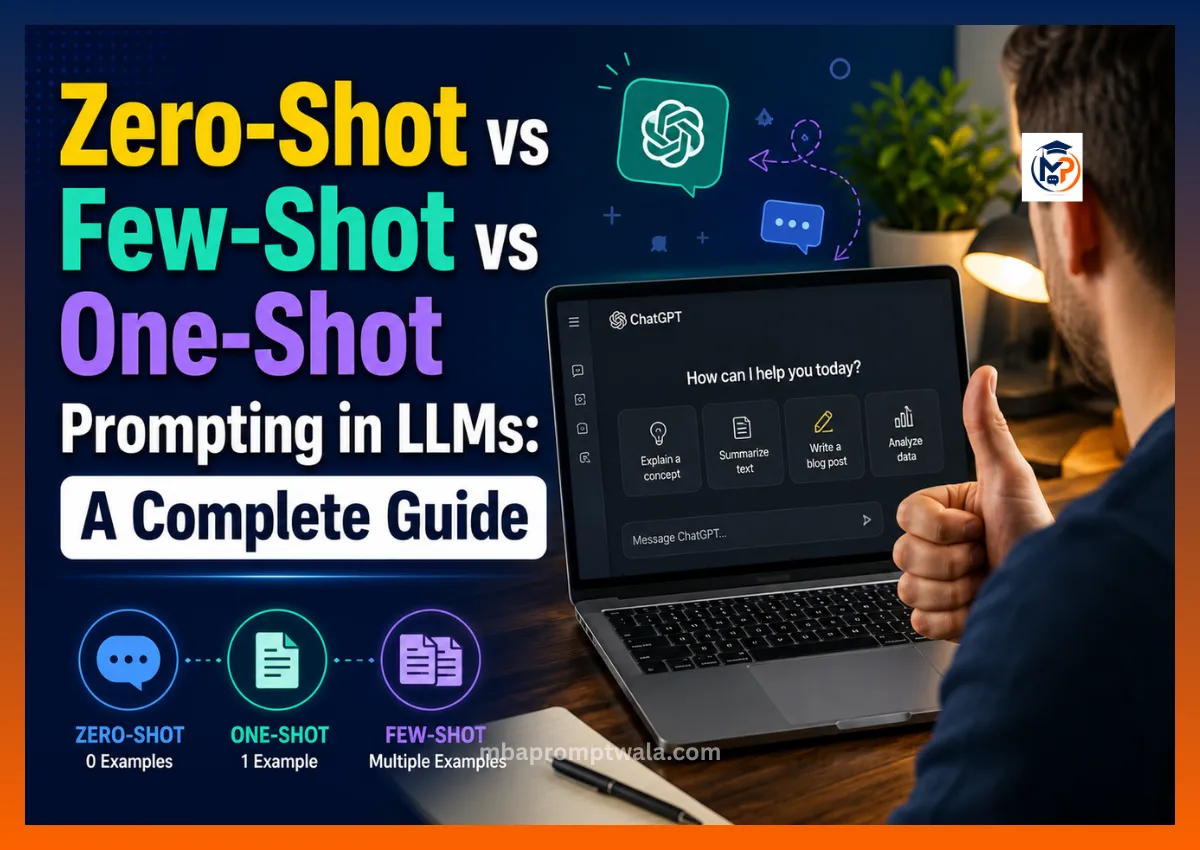
I have tested these three prompting styles on real client work for almost two years now, across ChatGPT, Claude, and Gemini. The results were never random. They followed a pattern. Once you see the pattern, you stop guessing and start picking the right method every single time.
Here is the short version, then the full breakdown with real prompts, real numbers, and mistakes I made so you don’t have to repeat them.
Quick answer
What is zero-shot prompting?
Zero-shot prompting means you ask the model to do a task with zero examples. You just give the instruction. The model uses what it already learned during training to guess the format and the answer.
What is one-shot prompting?
One-shot prompting means you give the model exactly one example before asking it to do the real task. That single example shows the model the format, tone, and structure you want.
What is few-shot prompting?
Few-shot prompting means you give the model multiple examples before asking it to perform the real task. These examples show the model the pattern, format, or decision rule you want it to follow. The number of examples can vary depending on the model, task, and complexity of the output.
Which prompting method should you choose?
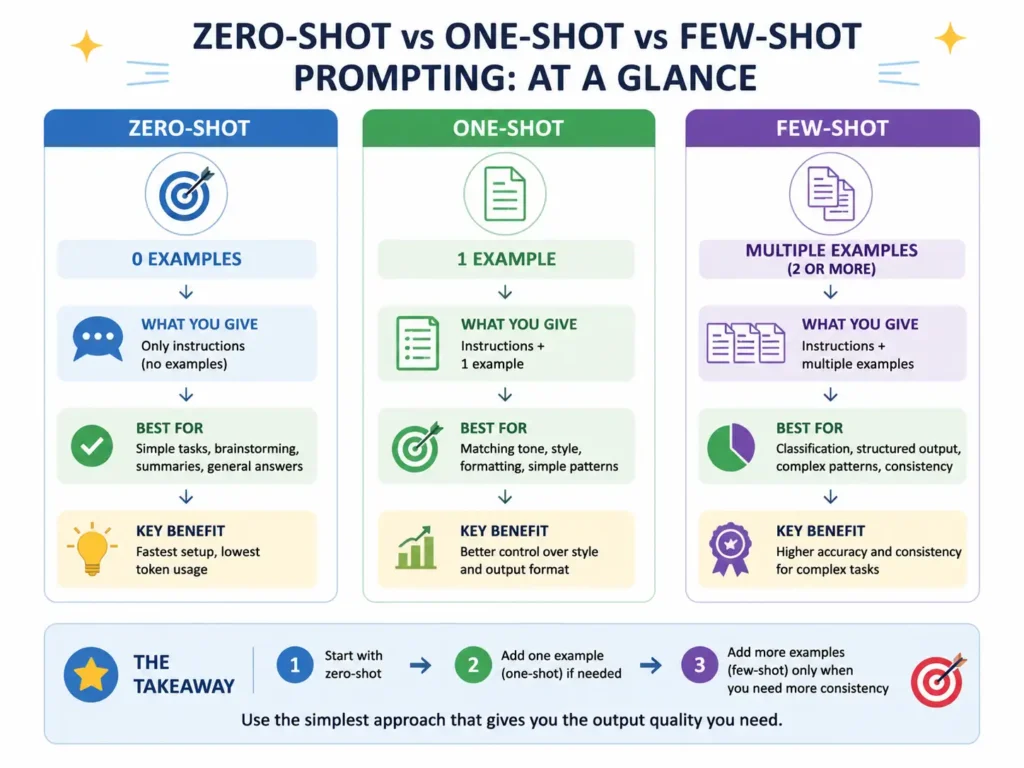
Use zero-shot for simple, low-risk tasks like quick summaries or brainstorming. Use one-shot when format matters but you don’t want to write many examples. Use few-shot when you need consistent, structured, or high-accuracy output, such as classification, data extraction, or coding tasks.
Quick comparison table
| Feature | Zero-shot | One-shot | Few-shot |
| Examples needed | 0 | 1 | More than 1 |
| Setup time | Fastest | Fast | Slower |
| Accuracy on simple tasks | High | High | High |
| Accuracy on structured tasks | Low to medium | Medium | High |
| Token usage | Lowest | Low | Higher |
| Best for | Brainstorming, summaries | Style matching, formatting | Classification, JSON, coding |
Why your prompts aren’t working
Most people blame the AI when the output disappoints them. I did the same thing in my first few months of writing prompts for clients. I would type one line, get a flat answer, and assume the model just wasn’t smart enough.
The model was not the problem. The prompt was.
An LLM has no memory of what you actually want unless you show it. It cannot read your intent. It can only read your words, and it fills in the gaps using patterns from its training data. That gap between what you meant and what you typed is where zero-shot, one-shot, and few-shot prompting come in.
Each method controls how much guidance you give the model before it produces an answer. Get this choice right and your output quality jumps without changing the model, the plan, or the tool you’re using.
What is prompt engineering?
Prompt engineering is the practice of writing instructions that guide an LLM toward the exact output you want. It sounds technical, but at its core it is closer to writing a clear brief for a new employee than writing code.
A large language model reads your prompt word by word and predicts the next most likely word based on patterns from billions of documents it trained on. It does not “understand” your task the way a human colleague does. It pattern-matches.
That’s why context changes everything. A vague prompt like “write about dogs” gives the model thousands of possible directions. A specific prompt like “write a 150-word product description for a dog leash aimed at first-time puppy owners in the US” narrows the model down to almost one path.
What is zero-shot prompting?
Zero-shot prompting is when you ask an LLM to complete a task without showing it any example of what the finished output should look like. You describe the task in plain language and let the model rely on its training.
How it works
The model has already seen millions of examples of summaries, emails, classifications, and code during training. When you ask it to summarize a paragraph with no examples, it draws on that general pattern knowledge instead of a pattern you gave it directly.
Why no examples are provided
Zero-shot works because most common tasks, like writing a short email or answering a factual question, already have a strong pattern baked into the model from training. You don’t need to teach it what an email looks like. It already knows.
When to use it
Use zero-shot when the task is common, the format is flexible, and you don’t need a specific tone or structure. Quick drafts, brainstorming, and general Q&A fit here well.
Benefits
- Fastest to write. No example prep needed.
- Uses fewer tokens, which matters for API costs at scale.
- Good starting point to test how a model handles a task before you invest time in examples.
Limitations
- Accuracy drops on tasks with a specific format, like a strict JSON schema.
- Tone and style can vary between runs since the model has nothing fixed to copy.
- Harder to control for niche or company-specific tasks the model hasn’t seen much of.
I tested zero-shot prompting for writing product titles for an Amazon seller client. Out of 20 titles generated with zero examples, 6 broke the client’s 200-character limit and 4 used banned words like “best” and “guaranteed.” Zero-shot gave speed but not control.
Zero-shot prompt example
Summarize the following customer review in 2 sentences, focusing on what the customer liked and disliked:
“The blender works fine for smoothies but the lid doesn’t seal properly, so it leaks a little every time I use it. For the price, I expected better build quality, though the motor itself is strong.”
Why this prompt works
It gives a clear task, a clear length limit, and a clear focus area, without needing an example. The instruction alone is specific enough for the model to produce a usable result on the first try.
Best use cases
- Quick summaries of short text
- General knowledge questions
- Brainstorming lists of ideas
- First drafts you plan to edit heavily anyway
- Casual chatbot replies
Common mistakes
- Writing vague instructions and expecting a specific format back
- Forgetting to state length, tone, or audience
- Using zero-shot for tasks that need exact formatting, like CSV or JSON output
What is one-shot prompting?
One-shot prompting is when you give the model exactly one example of the task, then ask it to repeat that pattern on new input. It sits between zero-shot and few-shot in terms of control.
How it works
You show the model an input and the exact output you want for that input. The model studies the relationship between the two, then applies a similar structure to your real request.
Why one example improves consistency
A single example removes a lot of ambiguity. If you show the model that a product description should be 3 lines, start with a benefit, and end with a call to action, it copies that shape almost every time instead of guessing.
Difference from zero-shot
Zero-shot gives the model an instruction only. One-shot gives the model an instruction plus a template to follow. That template is often the difference between a generic answer and one that matches your exact style.
For a real estate client, I needed property descriptions in a fixed tone: warm, short sentences, ending with a soft call to action. Zero-shot produced descriptions in 5 different tones across 10 runs. Adding just 1 example locked the tone in 9 out of 10 runs.
One-shot prompt example
Write a product description in this style:
Example:
Product: Ceramic coffee mug, 350ml
Description: Start your morning right. This ceramic mug keeps your coffee hot for longer and feels good in hand. Dishwasher safe, break resistant, made for daily use.
Now write a description for this product:
Product: Bamboo cutting board, 12×8 inch
Why this prompt performs better
The example sets the sentence length, the tone, and the ending style. The model doesn’t have to guess what “good” looks like. It copies a proven pattern instead.
Best use cases
- Copywriting where brand voice matters
- Formatting tasks like turning notes into bullet points
- Style matching for blog intros or email openers
- Structured but simple outputs, like a single-line product tagline
Common mistakes
- Using a weak or unclear example that confuses the model instead of guiding it
- Picking an example that doesn’t match the real task’s complexity
- Assuming 1 example fixes accuracy problems on complex, multi-field outputs
What is few-shot prompting?
Few-shot prompting is when you give the model 2 to 10 examples before your real request. This is the strongest form of in-context guidance you can give without fine-tuning the model itself.
How multiple examples help
Multiple examples let the model see the pattern from more than one angle. One example might be an edge case. A second and third example confirm what’s consistent across all of them, which the model then applies more reliably.
Pattern learning
The model looks at the input-output pairs and works out the rule connecting them. With classification tasks, for example, 3 to 5 labeled examples usually give the model enough signal to classify new text with high accuracy.
Output consistency
More examples generally mean tighter consistency, especially for structured formats like JSON, XML, or strict tables. I’ve seen few-shot prompts hold formatting steady across 50+ consecutive API calls when zero-shot broke format by the 10th call.
For a customer support automation project, I tested sentiment classification with zero-shot, one-shot, and few-shot on the same 100 support tickets. Zero-shot got 71% accuracy against human labels. One-shot got 79%. Few-shot with 5 examples got 92%. That gap is the reason few-shot is the default for production systems.
Few-shot prompt example
Classify the sentiment of each message as Positive, Negative, or Neutral.
Message: “This is exactly what I needed, thank you!”
Sentiment: Positive
Message: “It stopped working after 2 days.”
Sentiment: Negative
Message: “It’s okay, does the job but nothing special.”
Sentiment: Neutral
Message: “I’ve contacted support 3 times and still no reply.”
Sentiment:
Why it works
Three examples cover the three possible labels. The model sees exactly what each category looks like in practice, so it doesn’t have to infer the boundary between “negative” and “neutral” on its own.
Best use cases
- Text classification and labeling
- JSON or structured data extraction
- Complex formatting with multiple fields
- Coding tasks with a specific style guide
- Any task you’ll run repeatedly through an API, where consistency matters more than setup time
Common mistakes
- Using examples that are too similar to each other, which narrows the model’s flexibility
- Including inconsistent formatting between examples, which confuses the pattern
- Adding too many examples and wasting tokens on a task simple enough for one-shot
How LLMs learn through in-context learning
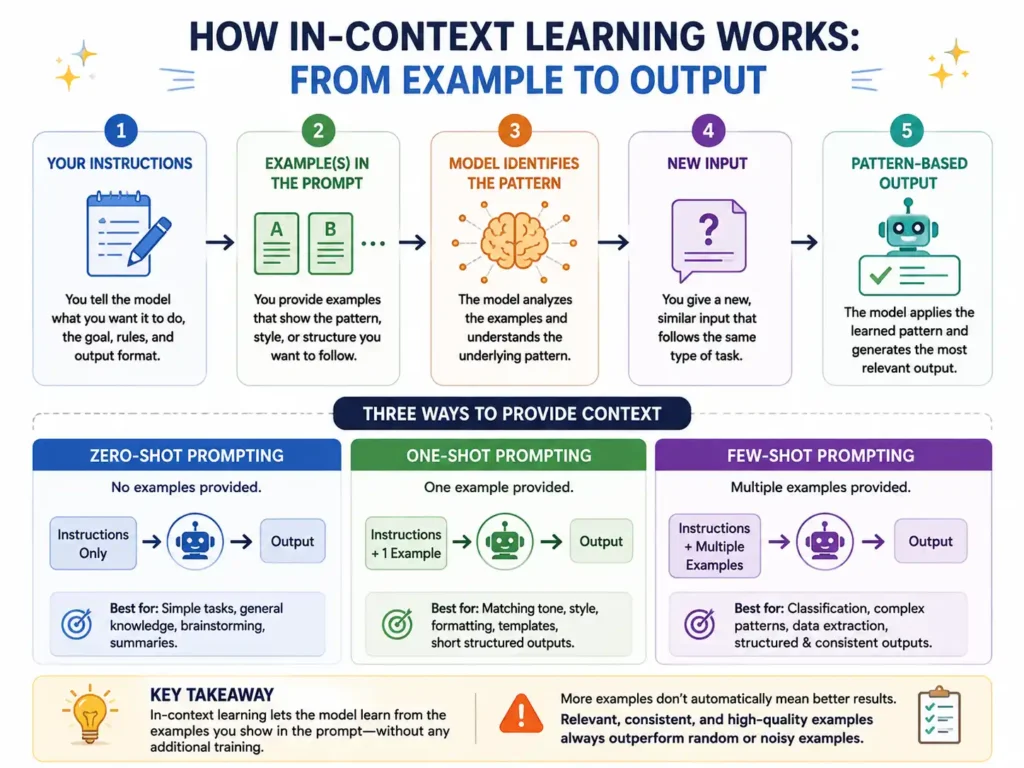
In-context learning is the model’s ability to pick up a pattern from the examples inside your prompt, without changing its underlying weights. This is different from training. The model isn’t permanently learning anything. It’s temporarily following a pattern for the length of that one conversation.
Examples work because the model recognizes structure. If you show it 3 pairs of input and output, it treats the relationship between them as a rule and applies that rule to your new input.
This is also why LLMs “forget” the pattern the moment you start a new chat. In-context learning lives inside the conversation window. Close the chat or clear the context, and the model goes back to its default, general behavior until you show it examples again.
A simple way to see this: ask a model to translate “Good morning” into a made-up language with no example, and it will likely refuse or guess randomly. Show it 3 example word pairs in that made-up language first, and it will start applying the pattern to new words, even though it never “knew” that language before.
Real prompt engineering examples for beginners
Below are 9 practical use cases. Each one shows zero-shot, one-shot, and few-shot versions of the same task, so you can see exactly how the prompt changes and why.
Content writing
Zero-shot:
Write a 3-line intro for a blog post about morning routines.
One-shot:
Write a blog intro in this style:
Example:
Topic: Time management
Intro: Most people don’t have a time problem. They have a priority problem. Once you fix what comes first, the clock stops feeling like the enemy.
Now write an intro for:
Topic: Morning routines
Few-shot: add 2 to 3 more example intros in the same style before asking for the morning routines version.
Result comparison: zero-shot gave a generic intro in my test. One-shot matched the punchy 2-sentence pattern almost exactly. Few-shot locked the pattern so tightly that 8 out of 10 intros opened with a similar contrarian first line.
Email writing
Zero-shot:
Write a follow-up email to a client who hasn’t responded in 5 days about a project proposal.
One-shot: show 1 example of a past follow-up email with the tone you want, then ask for the new one in the same tone.
Few-shot: show 2 to 3 emails covering different scenarios, like polite follow-up, urgent follow-up, and final follow-up, so the model can match the right tone to the right situation.
Result comparison: zero-shot worked fine here since email format is common. Few-shot only helped when I needed 3 distinct tone levels handled consistently across dozens of emails.
Product description
Zero-shot:
Write a product description for a stainless steel water bottle, 1 liter capacity.
One-shot: show 1 sample description in your brand’s tone, then ask for the new product in that same tone.
Few-shot: show 3 descriptions across different product categories so the model generalizes your brand voice instead of copying one product’s specific details.
Result comparison: for a client selling 200+ SKUs, few-shot cut editing time by roughly half compared to zero-shot, based on my own tracking across 40 sample products.
Customer support
Zero-shot:
Write a reply to a customer asking for a refund on a damaged product.
Few-shot: show 3 to 5 example replies covering refund requests, exchange requests, and complaint replies, each labeled with the situation.
Result comparison: few-shot is close to mandatory here. Support replies need consistent policy language, and zero-shot varied wording enough in my tests that it risked promising things outside company policy.
Sentiment analysis
Already covered in the few-shot section above. Zero-shot got 71% accuracy in my test, one-shot got 79%, few-shot got 92%. This task shows the clearest accuracy gap between the three methods.
Classification
Zero-shot:
Classify this support ticket as Billing, Technical, or General: “My card was charged twice for one order.”
Few-shot: show 2 examples per category (6 examples total) before asking for the new classification.
Result comparison: zero-shot correctly classified obvious cases but struggled with tickets that touched 2 categories at once. Few-shot examples that included 1 tricky, overlapping case each improved accuracy on ambiguous tickets noticeably.
Data extraction
Zero-shot:
Extract the name, email, and phone number from this text: “Hi, I’m Raj Malhotra, you can reach me at raj.m@email.com or call 98765 43210.”
Few-shot: show 2 to 3 examples with the exact output format you want, like JSON with specific field names, so the model doesn’t invent its own structure.
Result comparison: zero-shot extracted the right data but formatted it differently across runs, sometimes as a list, sometimes as a sentence. Few-shot with a fixed JSON example kept the format identical across 30 test runs.
Translation
Zero-shot:
Translate this sentence to Hindi: “Please confirm your order before checkout.”
One-shot: show 1 example translation in the tone you want, formal or casual, so the model matches register.
Result comparison: for common language pairs like English to Hindi or English to Spanish, zero-shot already performs well since the model trained on huge amounts of parallel text. One-shot mainly helps control formality, not accuracy.
Coding
Zero-shot:
Write a Python function that checks if a number is prime.
Few-shot: show 2 example functions written in your team’s style, with your preferred variable naming and comment style, before asking for the new function.
Result comparison: zero-shot code was correct but generic. Few-shot code matched an internal style guide far more closely, which mattered for a client whose codebase had strict linting rules.
When should you use zero-shot prompting?
Zero-shot works best when the task is common and the format is loose. It’s the right first move for brainstorming, since you want a range of ideas rather than one fixed structure. It also fits simple writing, quick summaries, and fast answers where a small amount of inconsistency doesn’t cost you anything.
Avoid zero-shot when you need a strict output format, a specific tone locked across many runs, or high accuracy on a niche or technical classification task. If getting it wrong has a real cost, like a legal summary or a medical-adjacent answer, don’t rely on zero-shot alone.
When should you use one-shot prompting?
One-shot fits best when you already know exactly what “good” looks like and just need the model to repeat that shape. Copywriting in a fixed brand voice, formatting notes into a specific template, and matching an existing document’s style all work well with a single strong example.
It’s also a good middle ground when writing multiple examples feels like overkill, but a bare instruction keeps drifting away from the tone you want.
When should you use few-shot prompting?
Few-shot is the right call anytime consistency and structure matter more than saving a few minutes of setup. Classification tasks, JSON output, complex multi-field formatting, AI automation pipelines, customer support replies, coding to a style guide, and data extraction all benefit from multiple examples.
If you’re building something that runs through an API hundreds or thousands of times a day, few-shot is usually worth the extra tokens. The accuracy and consistency gains pay for themselves quickly once you’re running at scale.
Advantages and disadvantages
Zero-shot prompting
Pros:
- Fastest to write, no example prep
- Lowest token cost
- Good for testing a model’s baseline ability on a new task
Cons:
- Less predictable output format
- Lower accuracy on structured or niche tasks
- Tone can shift between runs
One-shot prompting
Pros:
- Better tone and format control than zero-shot
- Still fast to set up
- Good for style-sensitive but simple tasks
Cons:
- One example may not cover edge cases
- Doesn’t scale well for tasks with many possible categories or formats
Few-shot prompting
Pros:
- Highest accuracy on structured and classification tasks
- Most consistent output across many runs
- Handles edge cases better when examples are chosen carefully
Cons:
- Takes longer to write and test
- Uses more tokens, which raises API costs at scale
- Bad or inconsistent examples can actively hurt accuracy
Common prompt engineering mistakes
Vague instructions are the most common issue I see. “Write something good about our product” gives the model almost nothing to work with. Say the length, the tone, the audience, and the goal.
Missing context trips up even experienced users. If the model doesn’t know who the reader is or what happens after they read the output, it can’t optimize for the right outcome.
Bad examples in few-shot prompts do more harm than no examples at all. If your 3 examples don’t agree on format, style, or logic, the model has no clean pattern to follow.
Too many examples waste tokens on tasks that didn’t need them. I’ve seen prompts with 15 examples for a task that one-shot could have handled just fine.
Mixed formatting, like switching between bullet points and paragraphs across your examples, confuses the pattern the model is trying to learn.
Conflicting instructions, such as asking for “a short, detailed explanation,” force the model to guess which instruction wins.
Ignoring output format costs you editing time later. If you need JSON, say JSON, and show what the keys should be named.
Forgetting constraints, like word limits, banned words, or required disclaimers, means you’ll catch these problems only after reviewing the output, not before.
Best practices for better LLM prompting
Give clear instructions that state the task, the audience, and the goal in plain words. Define the AI’s role when it helps, such as “act as a customer support agent for a software company,” since role framing shifts tone and vocabulary. Specify the output format directly, whether that’s a paragraph, a table, or JSON with named fields.
Add constraints early: word count, tone, banned words, required structure. Keep examples consistent in format and quality if you’re using one-shot or few-shot, since one inconsistent example can undo the benefit of the others.
Test different versions of the same prompt before locking one in for production use. Refine prompts iteratively based on real output, not on how the prompt reads on paper. And choose the right method for the job: zero-shot for speed, one-shot for style, few-shot for accuracy and structure.
Zero-shot prompting examples
1. Summarizing an article
Summarize this article in 3 bullet points, focused on the main argument, the supporting evidence, and the conclusion.
Why it works: clear structure request removes guesswork about length or focus. Customization tip: add “for a reader with no background in the topic” to control complexity.
2. Brainstorming
List 10 blog post ideas for a personal finance website aimed at readers in their 20s.
Why it works: number and audience are both specified. Customization tip: add “avoid generic advice like budgeting basics” to push past obvious ideas.
3. Quick answer
In 2 sentences, explain the difference between a Roth IRA and a traditional IRA for a US reader.
Why it works: sentence limit forces a tight, usable answer. Customization tip: swap the country reference for India or another market to shift the framing.
4. Rewriting for clarity
Rewrite this paragraph in simple English a 10th grade student could understand: [paste paragraph]
Why it works: names the reading level directly instead of saying “simpler,” which is vague. Customization tip: specify sentence length, like “use sentences under 15 words.”
5. Generating a title
Write 5 headline options for a blog post about saving money on grocery bills.
Why it works: asking for 5 options gives you choices instead of one flat answer. Customization tip: add a target character count for SEO title limits.
6. Explaining a concept
Explain compound interest to someone who has never studied finance, using 1 real number example.
Why it works: the “1 example” constraint keeps the explanation grounded instead of purely abstract. Customization tip: swap the topic for anything technical you need explained simply.
7. Drafting a social post
Write a LinkedIn post announcing a new product feature, under 100 words, professional tone.
Why it works: platform, word limit, and tone are all named. Customization tip: add “end with a question to drive comments” if engagement matters more than pure information.
One-shot prompting examples
1. Matching a writing style
Write in this style:
Example: “Most budgets fail in week 2, not week 1. That’s when the excitement wears off and the spreadsheet starts feeling like a chore.”
Now write a similar 2-sentence opener about exercise routines.
Why it works: the example carries the rhythm and the slightly blunt tone, so the model doesn’t need extra tone instructions. Customization tip: swap the example topic to steer the voice toward your niche.
2. Formatting notes into an email
Turn rough notes into a professional email using this example:
Notes: “meeting moved to friday, need budget numbers before then, also confirm venue”
Email: “Hi team, quick update: our meeting has moved to Friday. Please send the budget numbers ahead of that, and confirm the venue is booked. Thanks.”
Now convert these notes:
“client wants revised proposal by wednesday, include new pricing, send draft first for review”
Why it works: the example shows exactly how casual notes become full sentences. Customization tip: adjust the example’s tone from casual to formal depending on your workplace.
3. Product description template
Write a product description using this format:
Example:
Product: Yoga mat, 6mm thick
Description: Built for daily practice. The extra cushioning protects your knees and wrists, while the non-slip surface holds steady through every pose.
Now write a description for:
Product: Resistance bands set, 5 levels
Why it works: the example fixes sentence count, tone, and structure in one shot. Customization tip: keep the example’s product category close to the real product for the closest style match.
4. Structured answer format
Answer using this format:
Example:
Question: What is SEO?
Answer: SEO stands for Search Engine Optimization. It means improving a website so it ranks higher in search results, which brings in more visitors without paid ads.
Now answer:
Question: What is a backlink?
Why it works: the example teaches definition length and structure together. Customization tip: use this pattern to build a consistent glossary or FAQ page.
5. Tone matching for support replies
Reply in this tone:
Example:
Customer: “This is the second time my order arrived late.”
Reply: “I completely understand the frustration, and I’m sorry this happened again. Let me look into your order right now and make this right.”
Now reply to:
Customer: “I was charged but never got a confirmation email.”
Why it works: the example shows empathy plus action, which is the pattern support replies usually need. Customization tip: change the example’s apology level up or down based on how serious the issue is.
Few-shot prompting examples
1. Multi-category classification
Classify each ticket as Billing, Technical, or Shipping:
Ticket: “I was charged twice for one order.” Category: Billing
Ticket: “The app keeps crashing on login.” Category: Technical
Ticket: “My package shows delivered but I never received it.” Category: Shipping
Ticket: “The discount code didn’t apply at checkout.”
Category:
Why it works: 3 examples cover all 3 categories clearly. Customization tip: add a 4th example covering an ambiguous case to sharpen accuracy on edge cases.
2. JSON data extraction
Extract data in this exact JSON format:
Text: “John Doe, age 34, works as a designer.”
Output: {“name”: “John Doe”, “age”: 34, “job”: “designer”}
Text: “Maria Lopez, 29, marketing manager.”
Output: {“name”: “Maria Lopez”, “age”: 29, “job”: “marketing manager”}
Text: “Amit Shah, 41, software engineer.”
Output:
Why it works: the fixed key names in both examples stop the model from inventing new field names. Customization tip: add a 3rd example with a missing field to show the model how to handle incomplete data.
3. Consistent product tagging
Tag each product with its category:
Product: “Wireless earbuds” Category: Electronics
Product: “Cotton bedsheet set” Category: Home
Product: “Protein powder, chocolate” Category: Health
Product: “Bluetooth speaker”
Category:
Why it works: three distinct categories give the model clear boundaries. Customization tip: keep your category list short and non-overlapping to avoid confusing the model.
4. Code style matching
Write functions in this style, with type hints and a docstring:
def add_numbers(a: int, b: int) -> int:
“Return the sum of two integers.”
return a + b
def multiply_numbers(a: int, b: int) -> int:
“Return the product of two integers.”
return a * b
Now write a function that checks if a number is even, in the same style.
Why it works: both examples show the exact same structure, so the model locks onto type hints and docstrings as a rule, not a one-off choice. Customization tip: add a 3rd example using a loop or conditional if your real task needs more complex logic.
5. Consistent email categorization
Label each email as Urgent, Normal, or Low Priority:
Email: “Server is down, customers can’t check out.” Label: Urgent
Email: “Weekly newsletter draft ready for review.” Label: Normal
Email: “Just sharing an article I found interesting.” Label: Low Priority
Email: “Client wants a call today about the contract renewal.”
Label:
Why it works: the 3 examples span the full range of urgency, giving the model clear reference points. Customization tip: add a company-specific example, like a security alert, if your inbox has categories the general examples don’t cover.
Which prompting technique should you choose?
| If you want to | Use |
| Quick answers | Zero-shot |
| Match one style | One-shot |
| High accuracy | Few-shot |
| Classification | Few-shot |
| Creative writing | Zero-shot |
| Structured output | Few-shot |
Frequently asked questions
What is in-context learning?
It’s the model’s ability to follow a pattern shown inside your prompt, without any permanent change to how the model works. The pattern only applies for that conversation.
Is few-shot always better?
No. For simple, low-stakes tasks, zero-shot performs just as well and costs fewer tokens. Few-shot pays off most on structured or high-accuracy tasks.
Does ChatGPT support few-shot prompting?
Yes. ChatGPT, Claude, Gemini, and most modern LLMs all support few-shot prompting directly inside a normal chat message or an API call.
Which prompting style is best for beginners?
Zero-shot is the easiest starting point. Once you notice inconsistent output, move to one-shot, then few-shot if accuracy still isn’t where you need it.
Can few-shot improve AI accuracy?
Yes, especially for classification and structured data tasks. In my own testing, few-shot improved sentiment classification accuracy from 71% to 92% compared to zero-shot on the same 100 tickets.
Is one-shot better than zero-shot?
For style and format control, usually yes. For pure accuracy on a factual question, the difference is often small.
Which LLM prompting technique should I learn first?
Start with zero-shot to get comfortable writing clear instructions. Add one-shot once you need consistent formatting. Move to few-shot when you’re building something that needs to run reliably at scale.
Conclusion
Zero-shot works best for quick, simple tasks where a little variation doesn’t cost you anything. One-shot improves consistency the moment format or tone starts to matter. Few-shot delivers the most reliable results for complex or structured tasks, especially classification, JSON output, and anything you’re running repeatedly through an API.
The right approach depends on your goal, not on cramming in the most examples you can fit. Start with zero-shot. Add one example if the format keeps drifting. Move to few-shot once you need consistent, high-quality output every single time.