
Writing a weekly report sounds simple until you have to organize everything you completed, explain delays, and summarize your progress in a clear way. Many people spend 30 minutes or more every week just formatting updates instead of focusing on their actual work.
That’s where Amazon AI Prompts for Weekly Reports can help. With the right prompt, you can turn rough notes into a professional report in just a few minutes.
I tested different prompt styles while creating this guide.
You’ll find copy-and-paste Amazon AI prompts for different reporting needs, along with tips to improve AI-generated reports, avoid common mistakes, and customize every prompt for your own workflow.
Hello, I am Keshav Chouhan, the founder of MBA Prompt Wala, where I share practical AI prompts, productivity workflows, and automation guides.
I regularly test prompts across different AI models to discover what produces the most accurate, useful, and time-saving results.
My goal is to help professionals, students, and businesses use AI more effectively through simple, ready-to-use prompts.
Why Use Amazon AI Prompts for Weekly Reports?
Writing the same report every week can quickly become repetitive. You have to organize your notes, explain what you completed, mention any problems, and plan the next steps.
Even if you know what happened during the week, turning everything into a clear report often takes longer than expected.
Here are some of the biggest benefits of using Amazon AI prompts for weekly reports:
- Save time by generating reports in just a few minutes.
- Turn messy notes into a clean, organized summary.
- Keep a consistent format every week.
- Write reports in simple, professional language.
- Highlight achievements, challenges, and next steps clearly.
- Reduce repetitive writing without missing important details.
- Make reports easier for managers, clients, or team members to read.
Before You Use These Prompts
To get the best results, collect your weekly updates before asking Amazon AI to write the report.
Include information like:
- Tasks completed during the week.
- Projects currently in progress.
- Any blockers or challenges?
- Important metrics or KPIs.
- Meetings, client updates, or milestones.
- Goals for next week.
- Questions or decisions that need approval.
Quick Weekly Summary Prompt
If you only need to send a short update to your manager or client, this prompt is a great choice. It turns your notes into a clean report without adding unnecessary details. The report stays brief, easy to read, and focuses only on the most important updates.
Best For
- Daily or weekly stand-up updates
- Freelancer progress reports
- Manager check-ins
- Personal work summaries
Prompt
Act as a professional business assistant.
Turn my notes into a clear and concise weekly report.
Use the following sections:
• Weekly Summary (2–3 sentences)
• Tasks Completed
• Current Work
• Challenges or Blockers
• Next Week’s Priorities
Rules:
– Keep the report under 180 words.
– Use simple and professional English.
– Write in bullet points where appropriate.
– Do not add information that isn’t provided.
– If any information is missing, write “Needs Confirmation” instead of guessing.
– Keep the tone positive and factual.
Here are my weekly notes:
[Paste your notes here]
Customize This Prompt
You can easily change it for different situations.
- Add “Write in first person” if you’re submitting your own report.
- Add “Write in third person” for employee reports.
- Change the word limit to fit your company’s reporting style.
- Add “Include project names” if you’re handling multiple projects.
- Ask AI to highlight the biggest achievement of the week for leadership updates.
Team Status Report Prompt
Managing a team means more than listing completed tasks. A good weekly report should show overall progress, highlight achievements, explain delays, and make it clear what needs attention next. This prompt creates a structured report that managers and stakeholders can quickly understand.
Best For
- Team leaders
- Project managers
- Startup founders
- Agency owners
- Department updates
Prompt
Act as an experienced project manager.
Create a professional weekly team status report using the information below.
Organize the report into these sections:
1. Executive Summary
2. Project Progress
3. Key Achievements
4. Challenges & Risks
5. Pending Tasks
6. Decisions Required
7. Next Week’s Plan
Instructions:
– Use clear business language.
– Keep the report between 250–350 words.
– Use bullet points whenever possible.
– Highlight completed milestones.
– Explain delays without assigning blame.
– Do not invent missing information.
– If information is incomplete, write “Needs Confirmation.”
– Keep the tone professional, honest, and easy to understand.
Here are the weekly updates:
[Paste your project updates here]
Customize This Prompt
You can improve the report even further by adding one or more of these instructions:
- Add Project Completion Percentage for each project.
- Include Red, Amber, Green (RAG) Status.
- Rank tasks by priority.
- Mention team members responsible for each task.
- Highlight overdue work separately.
- Add an estimated completion date.
- Include project budget updates.
- Summarize client feedback.
Amazon PPC Weekly Campaign Performance Report Prompt
If you manage Amazon Sponsored Products, Sponsored Brands, or Sponsored Display campaigns, reviewing performance every week is essential. However, analyzing multiple reports manually can take a lot of time.
This prompt helps Amazon AI review your PPC reports, compare this week’s performance with last week’s, identify what improved or declined, explain possible reasons, and recommend actionable optimizations.
It’s ideal for Amazon sellers, PPC specialists, agencies, and e-commerce managers who want a professional performance report in minutes.
What You’ll Need
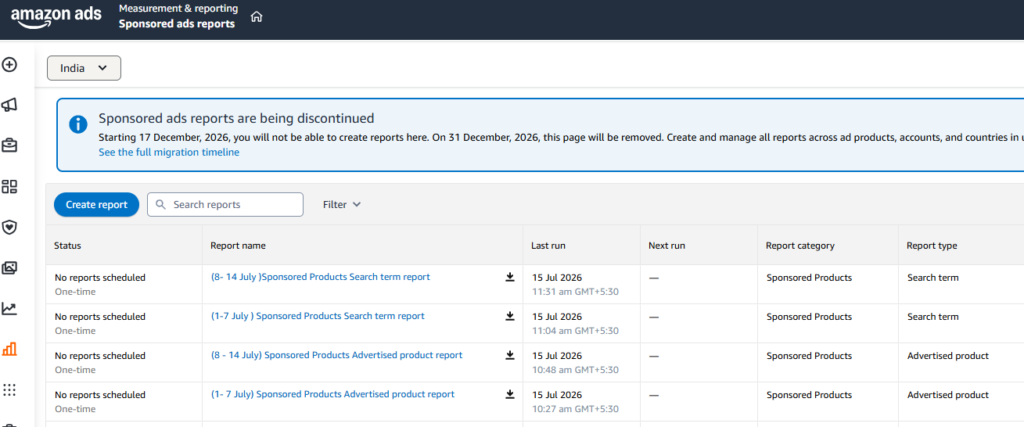
Before using this prompt, download your Amazon PPC reports.
Step 1: Log in to Amazon Ads
Open your Amazon Advertising Console and select the correct marketplace.
Step 2: Download These Reports
Download the following reports for the same date range (for example, Monday to Sunday).
Campaign Report
Includes:
- Campaign Name
- Impressions
- Clicks
- CTR
- CPC
- Spend
- Sales
- Orders
- ACOS
- ROAS
Search Term Report
Includes:
- Search Terms
- Clicks
- Orders
- Sales
- Spend
- ACOS
Targeting Report
Includes:
- Keywords
- Match Types
- Performance Metrics
Advertised Product Report
Includes:
- SKU
- ASIN
- Spend
- Sales
- Orders
- ACOS
Step 3: Export as Excel or CSV
Save each report in either:
- Excel (.xlsx)
- CSV (.csv)
Step 4: Upload All Reports to Amazon AI
Upload every report together before using the prompt.
The AI can compare the data across campaigns, keywords, and products to generate a much more accurate weekly performance summary.
Prompt
Act as a Senior Amazon PPC Manager with over 10 years of experience managing Amazon Advertising campaigns.
I have uploaded my Amazon PPC reports for this week’s performance.
Carefully analyze every uploaded report before writing the summary.
Generate a professional Weekly Amazon PPC Performance Report using simple business language.
Include the following sections:
1. Executive Summary
Provide a short overview of overall account performance.
2. Performance Highlights
Analyze:
• Sales
• Orders
• Ad Spend
• ACOS
• ROAS
• CTR
• CPC
• Impressions
• Clicks
• Conversion Rate
Mention whether each metric improved, declined, or remained stable.
3. Campaign Analysis
Identify:
• Best Performing Campaigns
• Worst Performing Campaigns
• Campaigns wasting budget
• Campaigns with high ACOS
• Campaigns with low impressions
• Campaigns that deserve more budget
Explain why.
4. Keyword Analysis
Identify:
• Top converting keywords
• High spend keywords without sales
• Negative keyword opportunities
• Match type recommendations
5. Product Performance
Analyze each advertised product.
Highlight:
• Best-selling products
• Low-performing products
• Products with high ACOS
• Products that need optimization
6. Budget Recommendations
Suggest:
• Which campaigns should receive more budget
• Which campaigns should be reduced
• Which campaigns should be paused
7. Optimization Opportunities
Recommend practical actions including:
• Bid adjustments
• Budget changes
• Keyword optimization
• Placement optimization
• Search term harvesting
• Negative keywords
• Campaign restructuring
8. Priority Action Plan
Create a priority list:
High Priority
Medium Priority
Low Priority
9. Overall Performance Score
Give the account a score out of 10.
Explain why.
Important Rules:
• Never invent numbers.
• Only analyze uploaded reports.
• Explain every recommendation with a reason.
• Use simple English.
• Write like a professional Amazon PPC consultant.
• Highlight both positive and negative trends.
• Keep the report easy to understand.
Also Read: