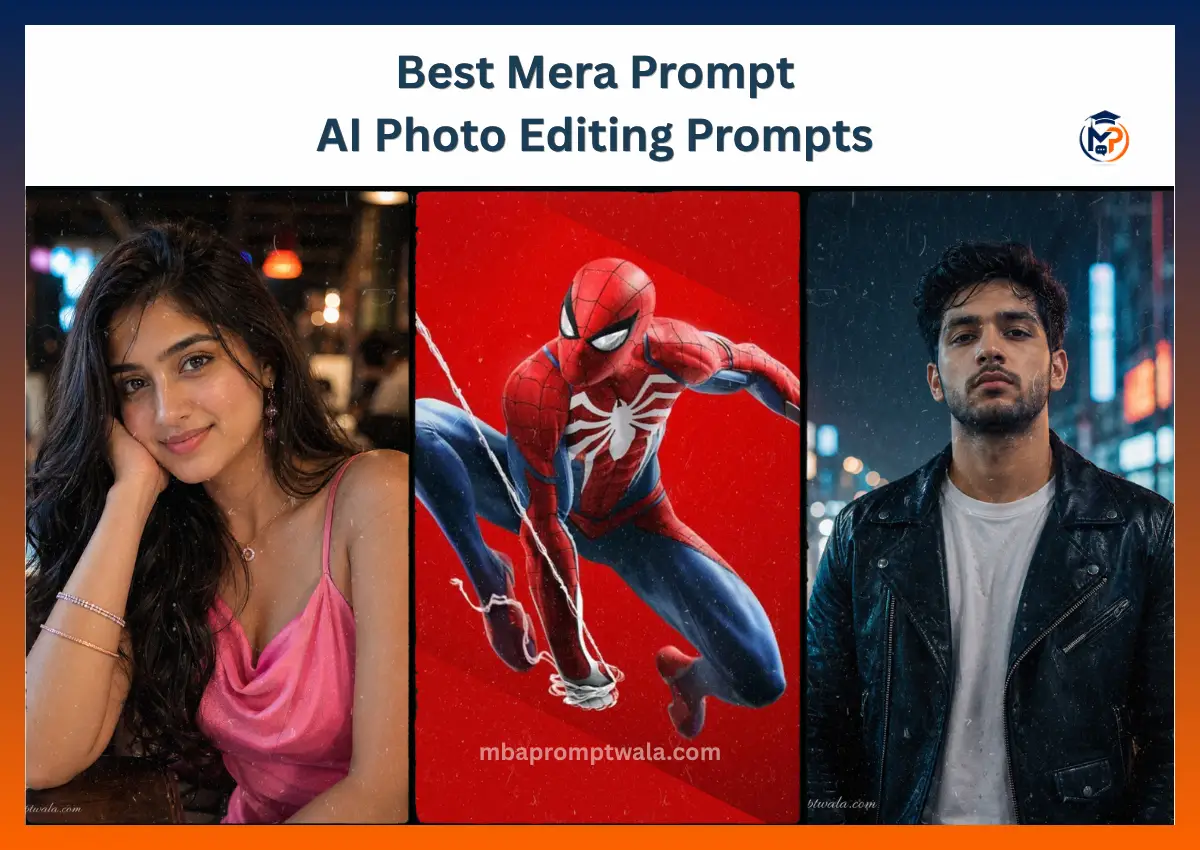
Mera Prompt is blowing up on Instagram and YouTube Shorts right now. If you’ve scrolled through reels and seen those perfect cinematic photos of boys, girls, superheroes, and motorcycles, that’s the trend.
Here’s the thing: these aren’t just regular photos edited in Lightroom. They’re AI-generated images created using really specific text descriptions called prompts.
The more detailed your prompt, the better your image looks.
This guide shows you exactly which prompts work, which AI tools to use, and how to create your own Prompt images that actually look good.
What Is Mera Prompt AI Photo Editing?
“Mera Prompt” means “my prompt” in Hindi. The trend started as people realized that detailed text descriptions sent to AI image generators produce way better results than simple requests.
Instead of saying “make a photo of a boy,” you’d say something like: “A cinematic portrait of a confident young man, leather jacket, moody blue lighting, 35mm lens, rain-soaked street at night, photorealistic, detailed face, high resolution.”
That’s the difference. Small details change everything.
AI lets anyone create them in minutes. No camera. No photo shoot. Just a good prompt.
How it works
You use an AI image generator (ChatGPT, Gemini, Midjourney, Flux, or others). You type in a detailed prompt.
The AI reads your description and generates an image that matches it. If you’re using your own photo as a reference, you upload it too, and the AI edits it to match your prompt.
The quality depends on three things:
- How detailed your prompt is
- Which AI tool you use
- Whether you give it a clear reference photo
Best AI Models for Mera Prompt Images
Not all AI image generators are the same. Some make realistic photos. Others are better for artistic styles. Here’s what works best for Mera Prompt.
ChatGPT (DALL-E) ChatGPT’s image generation is solid for beginners. It’s free to try. The images look good but sometimes feel a bit plastic or not quite realistic enough. Best for: social media posts, not professional work.
Google Gemini Gemini has improved a lot. It handles face consistency well if you give it a reference photo. The results are realistic and natural. It’s my personal go-to for Mera Prompt work. Best for: cinematic portraits, consistent character creation.
Midjourney Expensive ($10+ monthly). Creates the most visually polished images. The problem: sometimes faces look weird or inconsistent. Best for: artistic styles, non-realistic images.
Flux Newer tool that’s free and surprisingly good. Very realistic. Less dramatic lighting than Midjourney but more natural-looking. Best for: budget-friendly, realistic results.
Ideogram Good for text in images and stylized results. Not the best for photorealistic Mera Prompt work. Best for: design elements, posters.
Mera Prompt Boy
I used Gemini to create this prompt. I uploaded a reference photo of a confident young man. The result came out in two tries—the first version had weird lighting, the second one was perfect.
Creates a cinematic portrait of a young man in a dramatic, moody setting. Works best with a reference photo. The AI maintains facial features while adding the mood, lighting, and outfit.
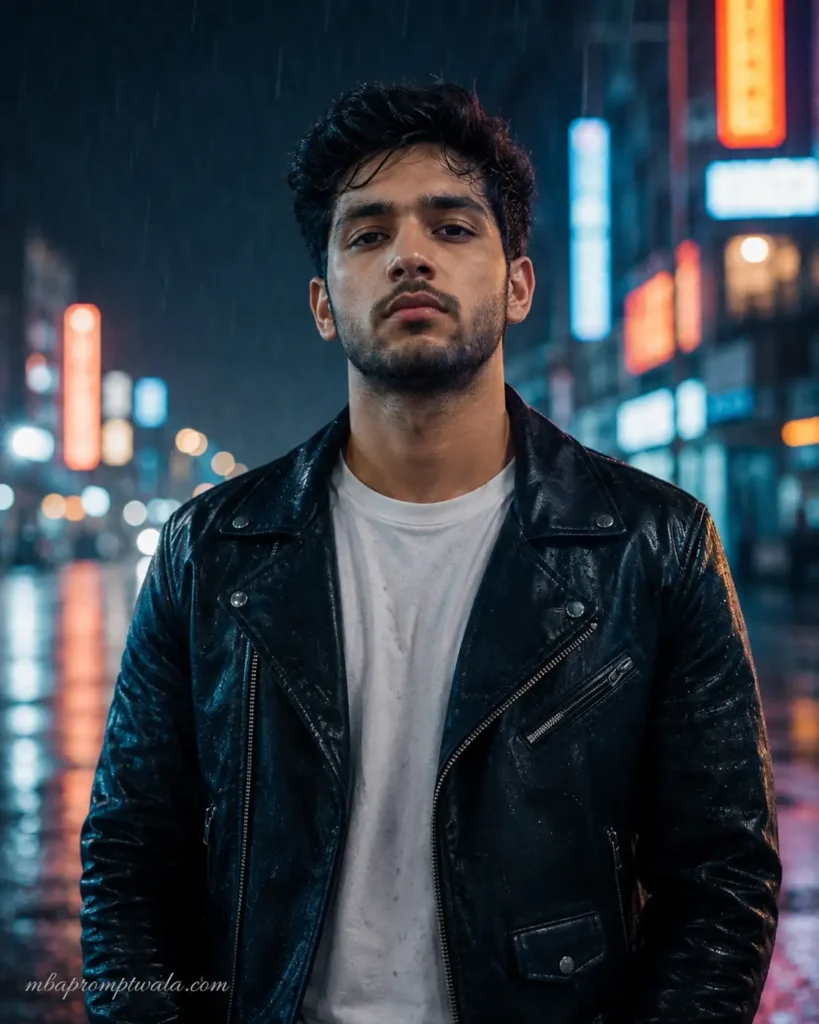
Prompt
Create a cinematic portrait of a confident young north indian man with a serious expression. He’s wearing a black leather jacket over a white t-shirt. Setting: a rain-soaked street at night with neon signs in the background. Lighting: moody blue and orange. Camera: 35mm lens, shot from the front, shallow depth of field. Style: photorealistic, high resolution, detailed face, sharp focus, professional photography. Avoid: blurry, cartoon, artistic style.Background blurred. Medium Eye Level Shoot Aspect ratio 4:5 vertical.
Add “mbapromptwala.com” as a small elegant watermark in the bottom-left corner using Petit Formal Script font with thin white semi-transparent lettering.
Prompt breakdown
- Subject: “confident young man” tells the AI the mood and age
- Expression: “serious expression” is specific—not smiling, not angry
- Clothing: “black leather jacket over white t-shirt” is exact
- Setting: “rain-soaked street at night with neon signs” creates atmosphere
- Lighting: “moody blue and orange” sets the color mood
- Camera details: “35mm lens, shallow depth of field” makes it look professional
- Style: “photorealistic, high resolution” keeps it from looking cartoonish
- Negative prompt: tells the AI what NOT to do
Customization tips
Want to change it? Just swap these parts:
- Jacket → blazer, hoodie, windbreaker
- Rain-soaked street → abandoned warehouse, parking garage, forest
- Blue and orange lighting → golden hour, neon purple, cool white
- Serious expression → confident smirk, intense stare, tired look
Mera Prompt Girl Instagram
This prompt is super popular on Instagram right now. Tested it on Gemini with a reference photo. I got great results immediately. The key is the lighting description—it’s what makes the difference between an okay photo and one that gets likes.
Creates a beautiful Instagram-ready portrait of a young woman. The prompt focuses on soft but dramatic lighting. Works with or without a reference photo.
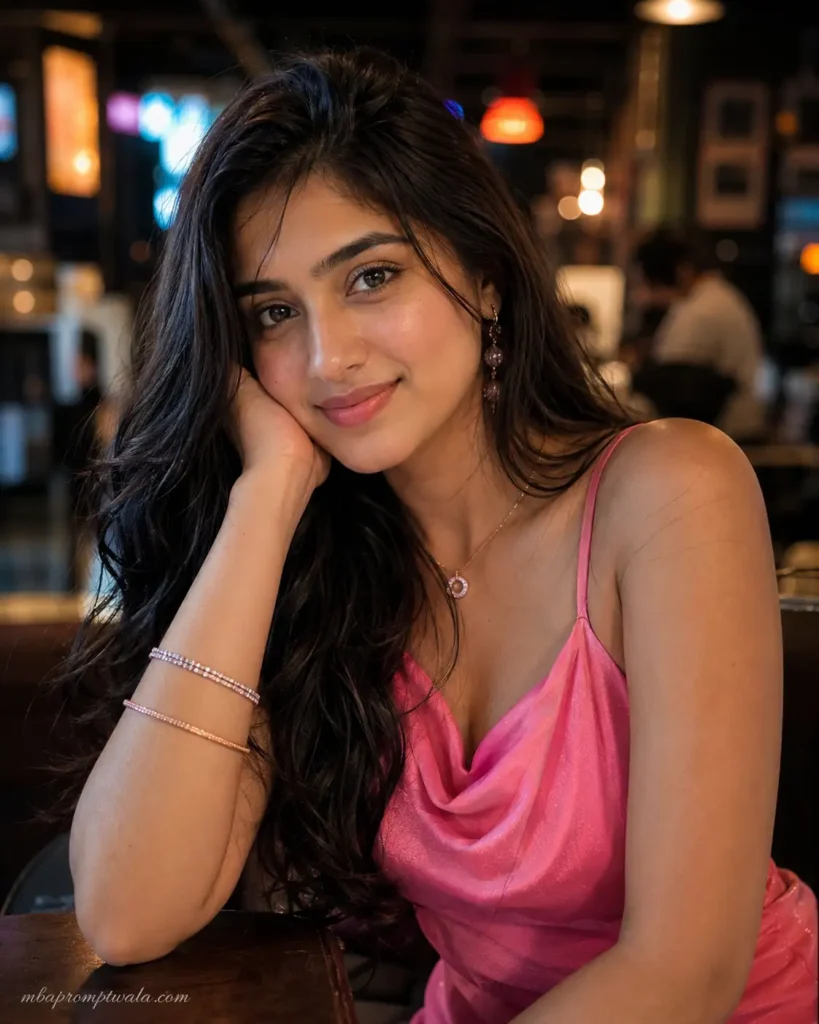
Prompt
Create a stunning portrait of a beautiful young Indian college woman age 23 with confident, glowing eyes. She’s wearing fashionable clothing (choose:party wear fashionable pink color ). Her hair flows naturally. Setting: modern urban cafe background. Lighting: warm night club mixed with soft shadows, creating a three-dimensional face. Camera: 50mm lens, professional photography style, sharp focus on face, soft bokeh background. Style: photorealistic, Instagram-ready, magazine-quality, high resolution, detailed skin texture. Avoid: overly filtered, fake, overdone makeup, blurry.
Aspect ratio 4:5 vertical.
Add “mbapromptwala.com” as a small elegant watermark in the bottom-left corner using Petit Formal Script font with thin white semi-transparent lettering.
Prompt breakdown
- Confidence: “confident, glowing eyes” creates an emotion, not just appearance
- Open clothing choice: “choose: casual, elegant, or trendy” lets you customize without rewriting
- Hair detail: “flows naturally” prevents stiff, plastic-looking results
- Lighting magic: “warm golden hour mixed with soft shadows” is the secret to Instagram appeal
- Camera choice: “50mm lens” is the gold standard for portraits
- Texture detail: “detailed skin texture” keeps it realistic, not smoothed out like a filter
Customization tips
- Change outfit for different vibes: red dress, black leather, casual sweater
- Modify setting: coffee shop, beach, luxury apartment, rooftop
- Adjust lighting: golden hour, sunset, studio lights, neon glow
- Change expression: shy smile, fierce look, peaceful gaze, playful expression
Spider-Man Mera Prompt
This one’s fun. Created it on Flux and got a really cool cinematic result. The trick is being specific about which Spider-Man version you want. The web effects and pose details matter a lot.
Creates a dramatic Spider-Man portrait. Can be realistic or stylized. This works especially well on Midjourney or Flux.
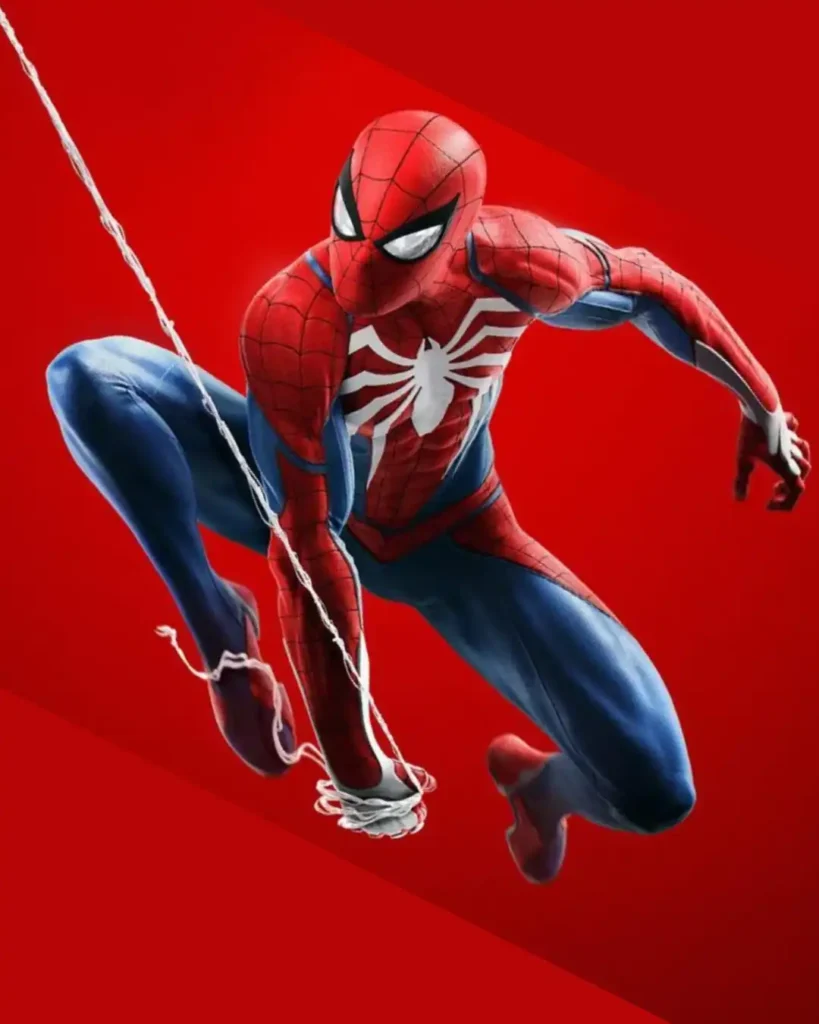
Prompt
Create a cinematic Spider-Man portrait. He’s in the iconic red and blue suit with the detailed web pattern. Pose: dynamic action pose. Setting: New York city skyline at night, tall buildings around him, glowing windows. Lighting: dramatic blue and red from neon signs, strong shadows. Camera: 35mm lens, dynamic angle, looking up at the hero. Style: photorealistic, superhero movie quality, high resolution, dynamic composition. Avoid: cheap costume, blurry, cartoon style.
Aspect ratio 4:5 vertical.
Add “mbapromptwala.com” as a small elegant watermark in the bottom-left corner using Petit Formal Script font with thin white semi-transparent lettering.
Prompt breakdown
- Character detail: “red and blue suit with detailed web pattern” is specific
- Action: “mid-swing through a city” creates movement, not a static pose
- Setting: “New York skyline at night” gives location context
- Dynamic angle: “looking up at the hero” makes it more dramatic
- Movie quality: “superhero movie quality” sets the professional bar
Customization tips
- Change version: “Miles Morales Spider-Man,” “classic Spider-Man,” “Iron Spider suit”
- Modify pose: swinging, crouching, mid-punch, web-shooting
- Change setting: abandoned warehouse, Times Square, rain-soaked street
- Adjust lighting: neon red-blue, golden sunset, dark night
Mera Prompt Bullet (Royal Enfield)
This is huge in India. I created a version with a Royal Enfield 350 and it looked incredible. The key is the rider pose and the background details.
Creates a cinematic scene of someone riding a motorcycle, usually a Royal Enfield or Bullet. Creates that cool, badass vibe people want.
Prompt
Create a cinematic portrait of a young man confidently riding a Royal Enfield motorcycle. The bike is black/maroon (classic colors). He’s wearing a leather jacket, helmet with the visor up, and a cool attitude. Scene: Empty highway at dusk with mountains in the background, warm golden lighting, slight motion blur on the bike wheels. Camera: Shot from the side-front angle, low perspective, 50mm lens. Lighting: golden hour sunset, warm orange tones. Style: cinematic, photorealistic, magazine-worthy, high resolution, sharp focus on rider and bike. Avoid: blurry face, cheap motorcycle, artificial lighting.
Aspect ratio 4:5 vertical.
Add “mbapromptwala.com” as a small elegant watermark in the bottom-left corner using Petit Formal Script font with thin white semi-transparent lettering.
Prompt breakdown
- Bike detail: “Royal Enfield motorcycle, black/maroon” is specific
- Rider pose: “confidently riding” sets the attitude
- Lighting: “golden hour sunset, warm orange tones” makes it look premium
- Motion detail: “slight motion blur on bike wheels” creates movement
- Low angle: Makes the bike and rider look bigger and cooler
Customization tips
- Change bike: “Hero MotoCorp,” “Bajaj,” “BMW bike”
- Modify setting: mountain roads, desert highway, city streets, rain
- Change rider: casual t-shirt, military outfit, formal jacket
- Adjust time: golden hour, night ride with lights, morning commute
Mera Prompt Couple
Created a few couple prompts. The trick is giving specific instructions about closeness, pose, and emotion. AI sometimes makes hands look weird, so specifying hand placement helps.
Creates a romantic portrait of two people. The prompt focuses on emotion and connection, not just appearance.
Prompt
Create a romantic cinematic portrait of a young couple. They’re close together, looking at each other with genuine affection. The man wears a dark shirt, the woman wears a soft flowing dress or elegant top. Setting: Beautiful location (choose: sunset beach, rooftop city view, forest with golden light, intimate indoor setting with warm lighting). Camera: 50mm lens, soft focus on faces, blurred background, romantic shallow depth of field. Lighting: warm, soft, golden tones, natural and flattering. Style: photorealistic, romantic, magazine-quality, high resolution. Composition: Focus on faces and connection, bodies close but not overly posed. Avoid: awkward hand positions, stiff posing, artificial look.
Aspect ratio 4:5 vertical.
Add “mbapromptwala.com” as a small elegant watermark in the bottom-left corner using Petit Formal Script font with thin white semi-transparent lettering.
Prompt breakdown
- Connection: “looking at each other with genuine affection” defines the emotion
- Closeness: “close together” without being too specific lets AI figure out natural positioning
- Specific hand note: “Avoid awkward hand positions” prevents weird fingers
- Shallow depth of field: Makes them pop from the background
- Multiple setting options: Lets you reuse the prompt with different locations
Customization tips
- Clothing: formal wear, casual, summer clothes, winter coats
- Location: beach, garden, city rooftop, cozy bedroom
- Lighting: sunset, sunrise, golden hour, blue hour night
- Mood: romantic, joyful, intimate, casual and fun
Mera Prompt Free Fire
This works great on Midjourney. The prompt needs to balance realistic character with gaming vibes. The result looks like a game character but photorealistic.
Creates a portrait inspired by Free Fire game characters. Dramatic, action-oriented, with gaming aesthetic but realistic faces.
Prompt
Create a cinematic portrait of a Free Fire game character. Young confident warrior with gaming aesthetic. He’s wearing tactical gear, combat outfit, tech-inspired clothing with straps and pockets. Pose: dynamic, action-ready stance. Setting: Post-apocalyptic or tactical environment with cool tech elements, warm lighting mixed with cool blues. Lighting: dramatic gaming-style lighting, neon accents, strong shadows. Camera: 35mm lens, cinematic angle, dynamic composition. Style: character design meets photorealism, hyper-detailed, high resolution, game-inspired but realistic face. Avoid: too cartoonish, overly animated, fake looking.Aspect ratio 4:5 vertical.
Add “mbapromptwala.com” as a small elegant watermark in the bottom-left corner using Petit Formal Script font with thin white semi-transparent lettering.
Prompt breakdown
- Gaming aesthetic: “game character,” “gaming-style lighting” tells AI the style direction
- Tactical details: “tactical gear, combat outfit” gets specific without too many words
- Dynamic pose: “action-ready stance” prevents static boring photos
- Neon lighting: Adds that gaming vibe without being cartoonish
- Balance: “hyper-detailed” + “realistic face” keeps it photorealistic
Customization tips
- Character type: assassin, sniper, commando, hacker
- Outfit: different tactical gear, armor pieces, tech items
- Environment: desert, urban ruins, futuristic base, dark warehouse
- Lighting: cool blue-green, warm orange-red, mixed neon
Mera Prompt Ghost
This is harder to get right. Ghost/horror prompts can look either really cool or really cheesy. The key is being specific about what “ghost” means—spooky, mysterious, supernatural, creepy—and the lighting matters more than anything.
Creates a spooky, mysterious portrait. Can be ghostly, haunted, or eerie. The approach matters: are we going for the supernatural or just moody?
Prompt
Create a mysterious portrait of a ghostly figure or supernatural being. They have an ethereal, otherworldly appearance with pale skin, mysterious eyes, dark elegant clothing. Setting: Abandoned mansion, dark forest, misty graveyard, or supernatural environment. Lighting: Cold blue tones, dim and moody, glowing eyes or subtle luminescence, fog and shadows. Camera: 50mm lens, atmospheric depth, shadows emphasizing mystery. Style: dark fantasy, photorealistic but ethereal, cinematic, high resolution, moody color grading. Composition: Focus on face and eyes, ethereal atmosphere. Avoid: cartoonish ghost, overly transparent, cheap horror look.Aspect ratio 4:5 vertical.
Add “mbapromptwala.com” as a small elegant watermark in the bottom-left corner using Petit Formal Script font with thin white semi-transparent lettering.
Prompt breakdown
- Specific ghost type: “ghostly figure or supernatural being” not just “ghost”
- Physical appearance: “pale skin, mysterious eyes” is concrete
- Environment: Multiple options to match the vibe
- Lighting cold tones: This is what makes it feel otherworldly, not warm
- Glowing detail: “glowing eyes or subtle luminescence” adds supernatural touch
- Avoid list: Prevents cheap horror movie look
Customization tips
- Ghost type: Victorian ghost, dark angel, shadow being, cursed spirit
- Setting: ancient temple, underwater ruins, old hospital, dark castle
- Clothing: tattered dress, formal Victorian wear, modern clothes, supernatural robes
- Mood: sad and lonely, menacing, mysterious, trapped
Mera Prompt Horse
Tested this with a cinematic warrior on horseback. The challenge is keeping the horse realistic while making the rider look good. Specifying the horse breed helps a lot.
Creates a dramatic scene of someone riding a horse. Works well for warrior/royal themes or cinematic portraits.
Prompt
Create a cinematic portrait of a confident warrior or prince on horseback. The horse is a powerful Arabian or thoroughbred, dark with glossy coat, dynamic pose. The rider wears royal or warrior clothing (armor, cape, elegant outfit). Pose: riding confidently, straight posture, commanding presence. Setting: Open field at dusk, mountains in background, golden hour lighting, or rocky terrain. Camera: Shot from the side, 50mm lens, cinematic angle. Lighting: golden hour warm tones, dramatic shadows, epic atmosphere. Style: fantasy cinematic, photorealistic, magazine-quality, high resolution, sharp focus. Avoid: blurry horse, awkward rider position, artificial lighting.Aspect ratio 4:5 vertical.
Add “mbapromptwala.com” as a small elegant watermark in the bottom-left corner using Petit Formal Script font with thin white semi-transparent lettering.
Prompt breakdown
- Horse detail: “Arabian or thoroughbred, dark with glossy coat” is specific
- Rider status: “warrior or prince” sets the personality
- Posture: “straight posture, commanding presence” creates authority
- Dynamic pose: “dynamic pose” for the horse prevents static look
- Golden hour: Creates that epic, timeless feeling
- Cinematic atmosphere: “epic atmosphere” tells AI the mood
Customization tips
- Horse color: white stallion, black thoroughbred, brown mare
- Outfit: knight armor, royal court dress, warrior leather, modern casual
- Setting: desert, forest, mountain pass, sandy plains
- Time: sunset, sunrise, middle of day, stormy weather
- Mood: majestic, adventurous, powerful, peaceful
Why Some Mera Prompts Fail
Not every prompt creates a great image. Here’s what usually goes wrong.
Missing face reference If you don’t upload a photo to work from, the AI creates a random face. Sometimes it looks good, sometimes it looks weird. Always upload a clear reference photo of the person.
Weak descriptions like “Make a photo of a boy” doesn’t work. The AI needs details: what kind of boy? What’s he wearing? What’s the mood? Add specifics.
No lighting instructions Lighting is 50% of the image quality. If you don’t specify it, the AI guesses. Always include: time of day, lighting style (golden hour, neon, studio lights, candlelight), and color tones.
No camera angle “Looking straight at camera” vs “shot from above” creates totally different vibes. Include the angle.
Missing realism details If you don’t specify “photorealistic” and “high resolution,” you might get something that looks painted or illustrated instead of like an actual photo.
Conflicting instructions Don’t say “photorealistic” and “artistic oil painting” in the same prompt. Pick one style direction.
Tips for Better Mera Prompt AI Photo Editing
Upload a high-quality reference photo Blurry photos create blurry results. A clear, well-lit reference photo is your starting point. The AI works from it. Bad photo = bad result.
Keep facial identity consistent If you want the person to look like your reference, describe the key features: face shape, eye color, hair type. “Keeping the same facial features as the reference” works too.
Add camera lens details 35mm = cinematic wide view. 50mm = portraits, neutral look. 85mm = closeup detail. This one detail changes everything.
Mention lighting style Don’t just say “bright.” Say “golden hour,” “studio lights,” “neon blue,” “candlelight,” or “overcast natural light.”
Specify clothing exactly “Black leather jacket” > “nice jacket.” Details matter.
Define the pose clearly “Standing confidently” > “standing.” “Mid-jump” > “jumping.” Be specific about body position.
Use cinematic backgrounds. Blank backgrounds look boring. “City skyline at night,” “mountain vista,” “abandoned warehouse” makes it way better.
Add a negative prompt telling the AI what NOT to do. “Avoid: blurry, cartoon style, overly filtered, fake looking.” This prevents bad results.
Choose the right aspect ratio Square (1:1) for Instagram. Vertical (9:16) for Stories and Reels. Horizontal (16:9) for wider scenes. It changes the composition.
Best Prompt Formula for Mera Prompt Images
This is the structure that works. Use this template and customize it:
Subject → Pose → Clothing → Expression → Camera Angle → Lens → Lighting → Background → Environment → Realism → Color Grading → Output Quality → Negative Prompt
Master template (copy and customize)
Create a [realism style] portrait of [subject description]. He/She is [pose]. Wearing [clothing details]. Expression: [specific emotion/look]. Camera: [angle description], [lens type] lens. Lighting: [time of day], [lighting type], [color tones]. Background: [specific location or element]. Style: [photorealistic/cinematic], [mood], high resolution, [additional quality descriptors]. Avoid: [what not to include].
Example filled in
Create a photorealistic portrait of a confident young woman. She’s standing against a brick wall, hand in hair. Wearing a black leather jacket over a white crop top. Expression: serious, intense gaze. Camera: shot from front, 50mm lens, shallow depth of field. Lighting: golden hour sunset, warm orange tones, soft shadows. Background: urban city street, slightly blurred. Style: cinematic, magazine-quality, high resolution, sharp focus on face. Avoid: overly filtered, fake makeup, stiff posing.
Use this structure every time. It works.
Mera Prompt ChatGPT vs Gemini Images
Both are popular. Here’s the real difference.
ChatGPT (DALL-E)
- Free trial version available
- Good for learning and experimenting
- Faces sometimes look a bit plastic
- Can’t always handle complex prompts
- Fast generation
- Best for: social media, casual use
Google Gemini
- Free to use with Google account
- Better at understanding detailed prompts
- Faces look more realistic
- Handles consistency better
- Slightly slower but better quality
- Better at emotions and expressions
- Best for: serious content, consistent results, Instagram
Common Mistakes Beginners Make
Using blurry reference photos
If your reference is blurry, your result will be too. Use clear, well-lit photos.
Writing very short prompts
“Make a boy” doesn’t work. “Confident boy, black jacket, moody lighting, cinematic” works.
Forgetting facial identity
If you want them to look like the reference, you have to mention it. “Keeping the same facial features as the reference photo” is one line that makes the difference.
Overloading with effects
Don’t ask for “lens flare AND motion blur AND bokeh AND glowing eyes AND neon lighting” all at once. Pick 2-3 effects maximum.
Mixing multiple themes
“Spider-Man motorcycle ghost warrior” confuses the AI. Pick one main theme.
Ignoring aspect ratio
If you’re posting to Instagram (square), don’t ask for horizontal images. It will look bad cropped.
Using conflicting style instructions
“Photorealistic AND cartoon AND artistic oil painting” doesn’t work. Choose one style direction.
FAQs
What is Mera Prompt AI photo editing?
Text-based instructions given to AI image generators to create custom photos or edit existing ones. “Mera Prompt” means “my prompt” in Hindi. The trend exploded because detailed prompts create professional-looking results.
Which AI tool is best for Mera Prompt images?
Gemini and Flux are the best free options. Midjourney (paid) creates the most polished results but is expensive. ChatGPT works but has lower quality. For most people: use Gemini.
Can I use ChatGPT for Mera Prompt photo editing?
Yes, ChatGPT’s DALL-E works. Results are decent but not as good as Gemini. If you have access to Gemini, use that instead.
Is Mera Prompt free?
It can be. Gemini is free. ChatGPT has a free trial. Flux is free. Midjourney costs $10+/month. So yes, you can do it without paying.
Which AI model creates the most realistic results?
Flux is surprisingly good for free. Midjourney if you’re willing to pay. Gemini is the best free option that balances quality and ease of use.
Why doesn’t my image look like the reference photo?
Three reasons: (1) You didn’t upload the reference, (2) You didn’t describe facial features, or (3) The prompt conflicts with the reference. Upload it and mention “keeping the same face” in your prompt.
Can I create Instagram-ready images using Mera Prompt?
Yes. Make sure to specify “square 1:1 ratio” for feed posts, add Instagram-relevant hashtags to your caption after, and focus on faces and expressions that work on social media.
How do I improve AI photo quality?
Use more specific details. Upload a clear reference photo. Include detailed lighting descriptions. Specify camera lens. Use high-resolution output settings. Test the same prompt 2-3 times—sometimes the second attempt is better.
Conclusion
Mera Prompt works because detailed descriptions create better AI images. The formula is simple: the more specific you are, the better your result.
Focus on these five things every time:
- Upload a clear reference photo
- Describe lighting in detail
- Specify camera lens and angle
- Use specific clothing and pose details
- Add a negative prompt to avoid bad results
The best way to learn is to start experimenting. Take your favorite photo, write a detailed prompt based on the template above, and try it on Gemini. If it doesn’t look perfect, adjust one detail and try again.
After 5-10 attempts, you’ll see patterns in what works. Then you can create consistent, high-quality Mera Prompt images that look like professional photography.
Start with the prompts in this guide, customize them for your style, and build your collection. The more you test, the better you get at writing prompts.
Also Read: