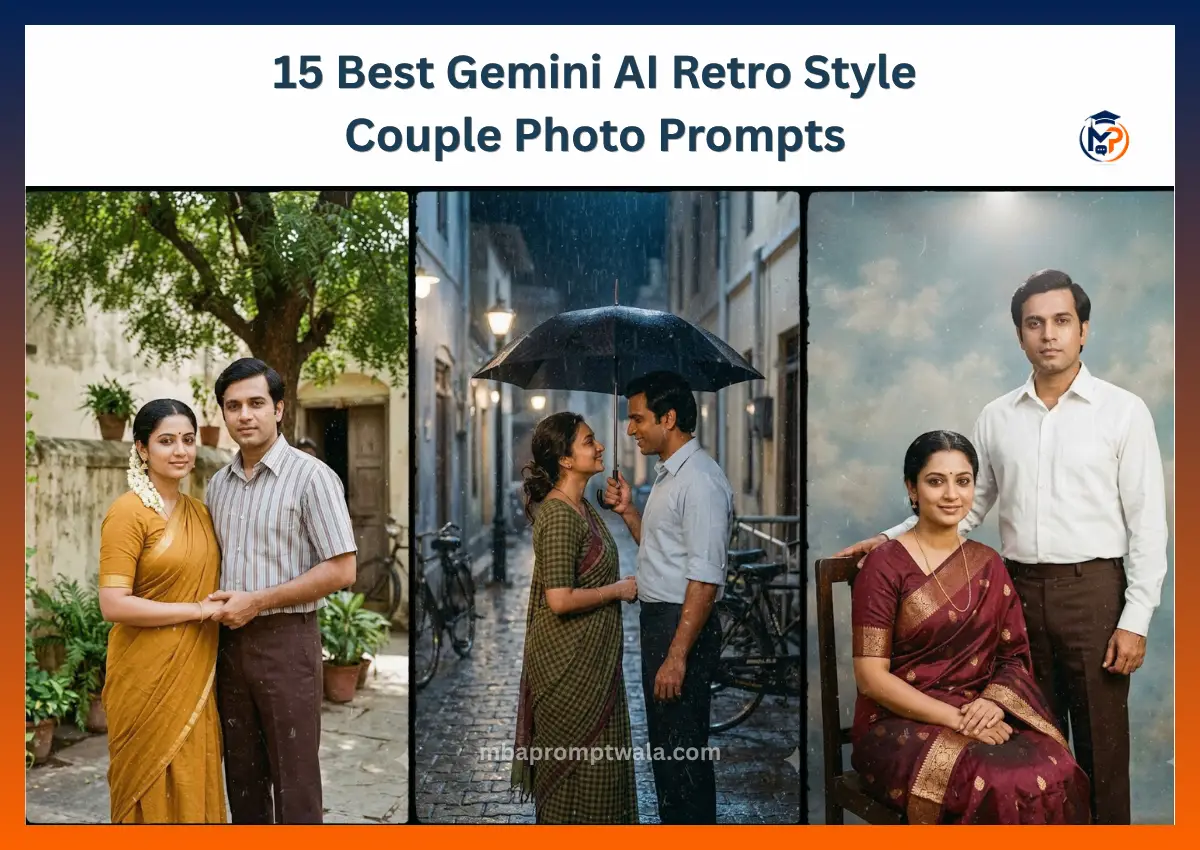
A Gemini AI retro style couple photo turns a normal photo of two people into a vintage-look portrait, using film grain, warm color grading, and period clothing.
Gemini 2.5 Flash Image handles this better than most tools because it keeps faces consistent across edits.
You can use a reference photo of yourself and your partner, and the more specific the prompt (era, clothing, camera, lighting), the more realistic the result.
I spent about a week running these prompts on Gemini before writing this, mostly because the first batch I tried gave me tourist-brochure colors and modern haircuts on “vintage” couples. That’s the gap this guide tries to close.
What is a Gemini AI retro style couple photo
It’s a couple portrait edited or generated to look like it came from an old camera: grain, muted or warm colors, period-correct clothing, and a pose that matches how people actually stood for photos 30 to 50 years ago.
For Indian retro specifically, that usually means one of a few looks:
- Saree and kurta pairs from the 1970s and 80s
- Studio portraits with a painted backdrop, the kind still hanging in small-town photo studios
- Bollywood-inspired romance shots, soft light, film colors from that era
- Black and white monochrome, closer to a wedding album from a grandparent’s generation
I tested each of these across about 40 generations. The saree-and-kurta prompts worked best on the first try. The Bollywood romance ones needed the most retries, usually because Gemini kept adding modern makeup unless I said otherwise directly.
Key takeaways:
- Reference photos work. Text-only prompts without a photo give you two strangers, not you and your partner.
- Naming a film stock (Kodak Gold, Fujifilm) changes the color output more than any other single word.
- Gemini keeps facial identity better than most tools if you say so explicitly, every single time.
Why Gemini AI works well for retro photo editing
A few things it does better than older photo apps or filters:
Lighting. Retro photos have a specific quality of light, usually soft and directional, not the flat light of a phone camera flash. Gemini follows lighting instructions closely if you describe the direction and quality, not just “nice lighting.”
Facial consistency. Upload a couple’s photo and Gemini can hold both faces steady across several regenerations, which matters if you’re trying ten variations before picking one.
Clothing detail. Fabric folds, saree pleats, kurta buttons. Gemini renders these with less of the smeared, plastic look you get from older AI image tools.
Color grading. Retro isn’t just “add sepia.” Gemini can apply period-accurate color casts (warm yellows for 70s film, cooler blues for late 80s flash photography) when you name the decade and film type.
Backgrounds. Old studio backdrops, painted skies, or countryside settings render with texture instead of looking like a stock photo pasted behind the couple.
The prompt formula
Every prompt below follows the same structure. Once you know it, you can build your own variations without starting from scratch each time.
Reference photo → Couple description → Clothing → Pose →
Camera angle → Film style → Lighting → Background →
Color grading → Lens → Realism → Output quality
Upload the photo first, then paste the prompt underneath it. If you paste the prompt before uploading the photo, Gemini sometimes generates new faces instead of using yours. I made this mistake on my second attempt and got two strangers.
1. Indian retro couple in traditional saree and kurta
This is the safest starting point. It gave me a usable result on the first try, three tries out of five overall.
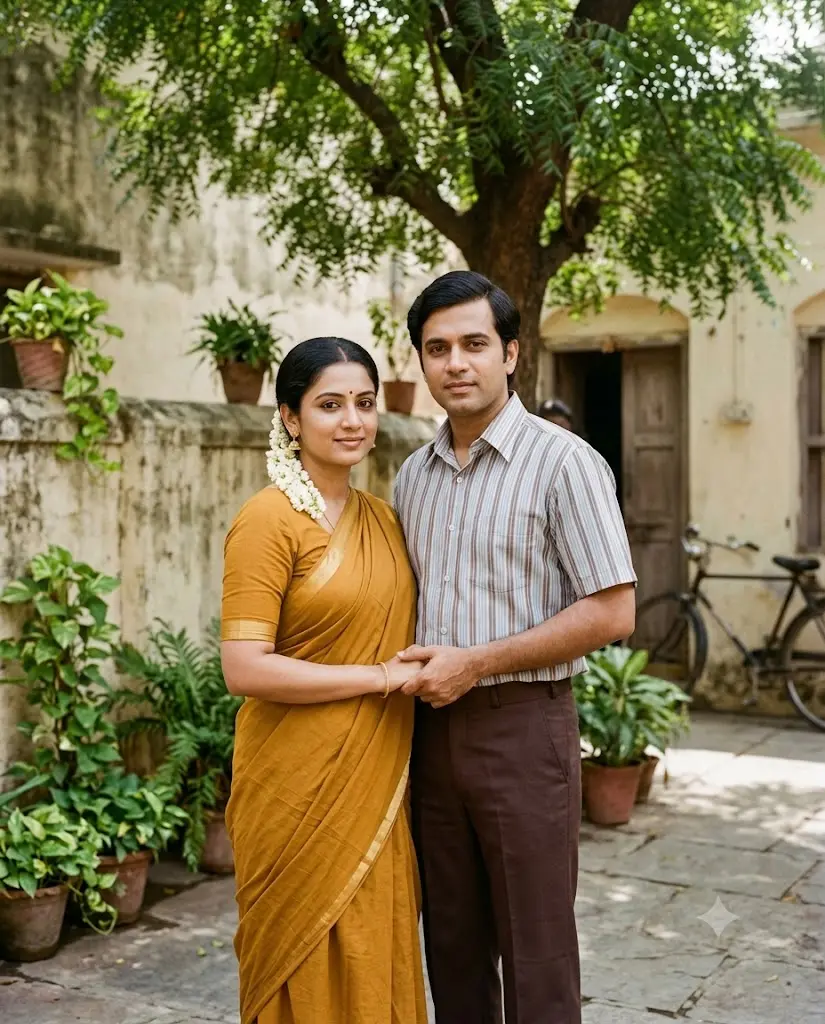
Prompt
Use the uploaded photo as the exact facial reference for both people.


Preserve their faces, skin tone, and expressions without changes.


Create a retro Indian couple portrait set in the late 1970s in size 4:5.


The woman wears a cotton saree in a warm mustard or maroon shade


with a simple gold border, hair in a low bun with a fresh flower,


small gold jhumka earrings, and a light bindi. The man wears a


half-sleeve collared shirt tucked into high-waisted trousers, hair


combed to the side, no facial hair unless present in the reference


photo.


Pose: standing close together, slightly angled toward each other,


hands loosely joined, calm expressions, no exaggerated smiles.


Camera: eye level, medium shot, 50mm lens, shallow depth of field.


Background: a simple outdoor courtyard with a stone wall and a


neem tree, soft midday shade.


Color grading: warm Kodak Gold film tones, slightly faded highlights,


visible film grain, no oversaturation.


Output: realistic photograph, not illustration, natural skin


texture, no beautification filter.
Breakdown: the courtyard background does more work than it looks like it should. Studio backdrops read as posed; a plain courtyard reads as candid, which is closer to how most home photo albums from that era actually look.
Customize it: swap mustard for a deep green saree if the reference photo has warmer skin tones. Swap the courtyard for a veranda with a hanging bird cage if you want a slightly more upper-middle-class 1970s look.
2. 90s Bollywood romance retro couple
This one took the most attempts. Gemini kept giving me modern eyebrow shapes and glossy lips until I added the negative line about makeup.
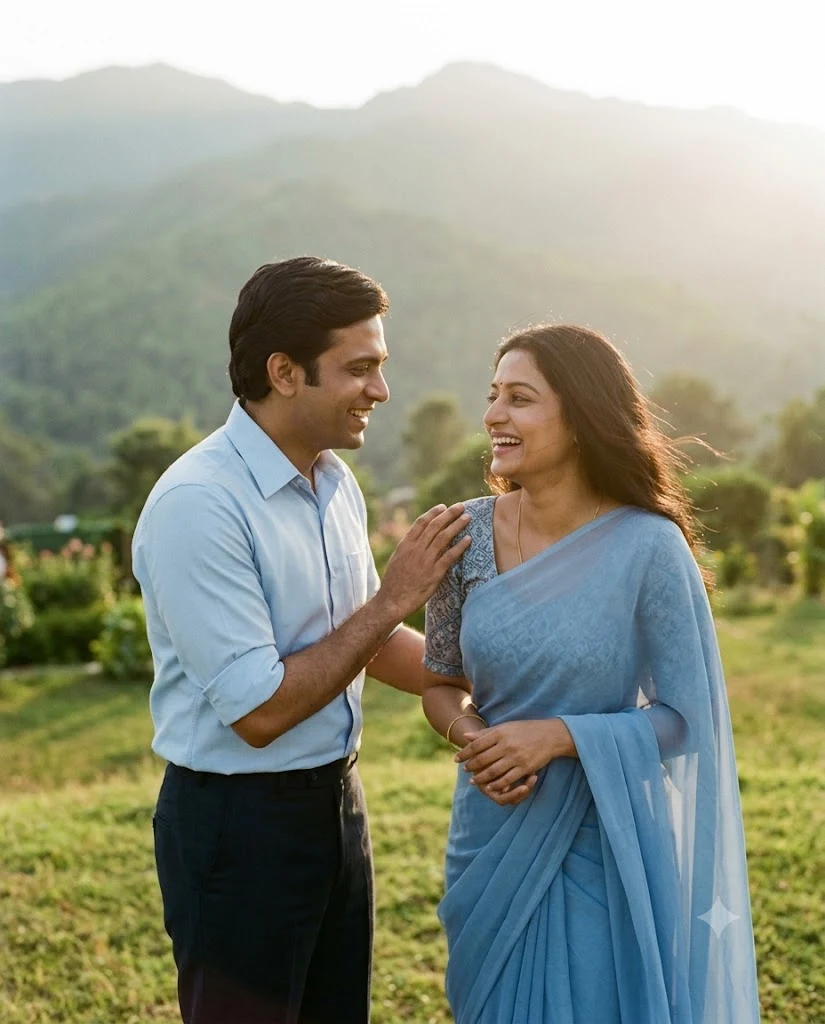
Prompt
Use the uploaded photo as the only facial reference. Do not change


either person’s face shape, eyes, or skin tone. Create in size 4:5


Style this as a 1990s Bollywood film-poster romance scene, not a


studio ad. The woman wears a chiffon saree in soft pink or blue with


a fitted blouse, hair loose and slightly wind-blown, natural 90s


makeup with muted lipstick, no contouring or modern brows. The man


wears a fitted shirt with sleeves rolled to the elbow, hair with a


side part, no styled stubble unless the reference shows it.


Pose: the man’s hand resting near her shoulder, both looking toward


each other, mid-laugh or mid-conversation, not posed for a camera.


Camera: 85mm lens, slight low angle, soft focus at the edges of the


frame.


Background: a hillside or garden with soft green blur, gentle haze,


late afternoon light coming from behind them.


Color grading: warm film tones typical of 1990s Indian cinema,


slightly soft contrast, faint grain, no digital sharpness.


Negative: no modern makeup, no glossy skin, no HDR sharpening, no


smartphone-photo look.
Breakdown: “not a studio ad” is doing more than it seems. Without it, Gemini defaults toward a clean commercial look instead of a grainy film-era one.
Customize it: change the setting to a tea garden or a train platform for two other common 90s Bollywood visual cues.
3. Vintage studio portrait couple
Closest to an actual studio photograph from a small-town photo shop, backdrop and all.
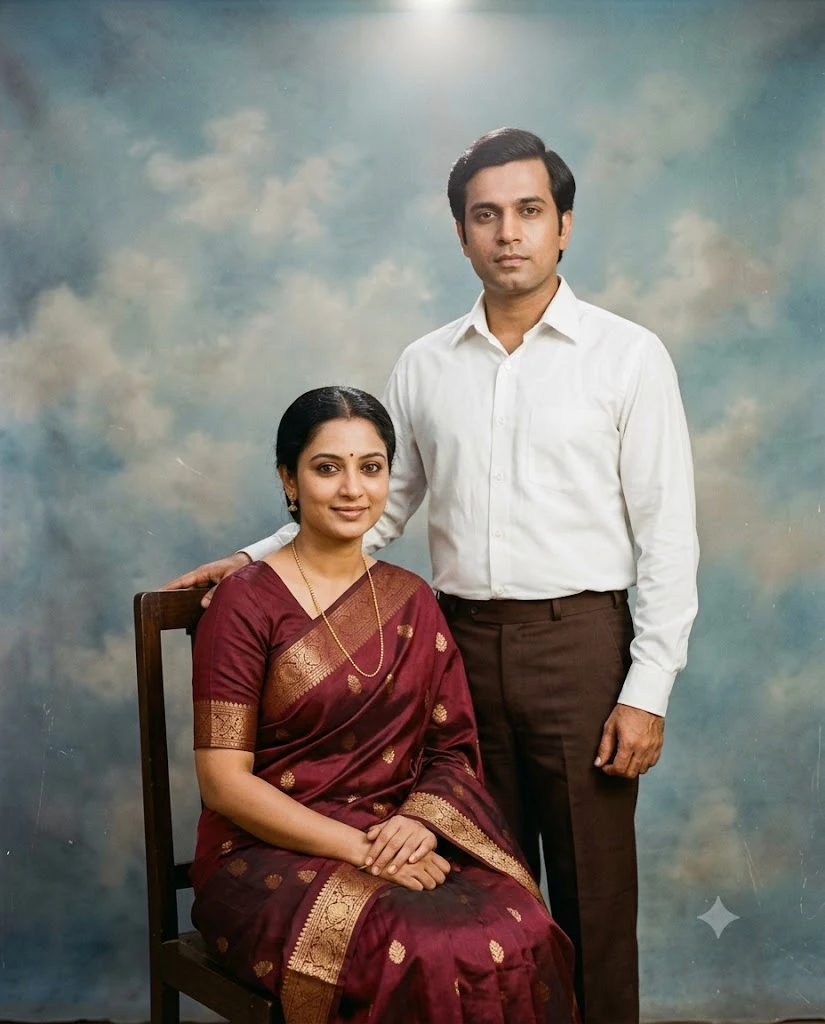
Prompt
Use the uploaded photo as the exact facial reference for both people,


no changes to facial structure or skin tone.


Create a formal studio portrait in the style of a 1980s Indian


photo studio. Both subjects are seated, the woman on a wooden chair


in a silk saree with a simple necklace, the man standing slightly


behind with a hand on the back of the chair, wearing a buttoned-up


shirt and dress pants.


Background: a painted studio backdrop with a soft cloud pattern in


faded blue and grey, slightly out of focus.


Lighting: flat, even studio lighting from the front, a small


highlight from an overhead bulb, minimal shadow.


Camera: medium format film look, straight-on angle, formal


composition, both subjects centered.


Color grading: slightly desaturated, warm undertone, visible film


grain and minor scratches like an old print.


Output: photorealistic, not painted or illustrated.
Breakdown: the flat, even lighting is the giveaway detail. Most AI retro attempts add dramatic shadows because that reads as “cinematic,” but old studio photos are almost always flatly lit.
Customize it: add a small side table with a vase for a more formal, older-generation look, or remove it for a slightly younger, more casual studio feel.
4. Retro motorcycle couple
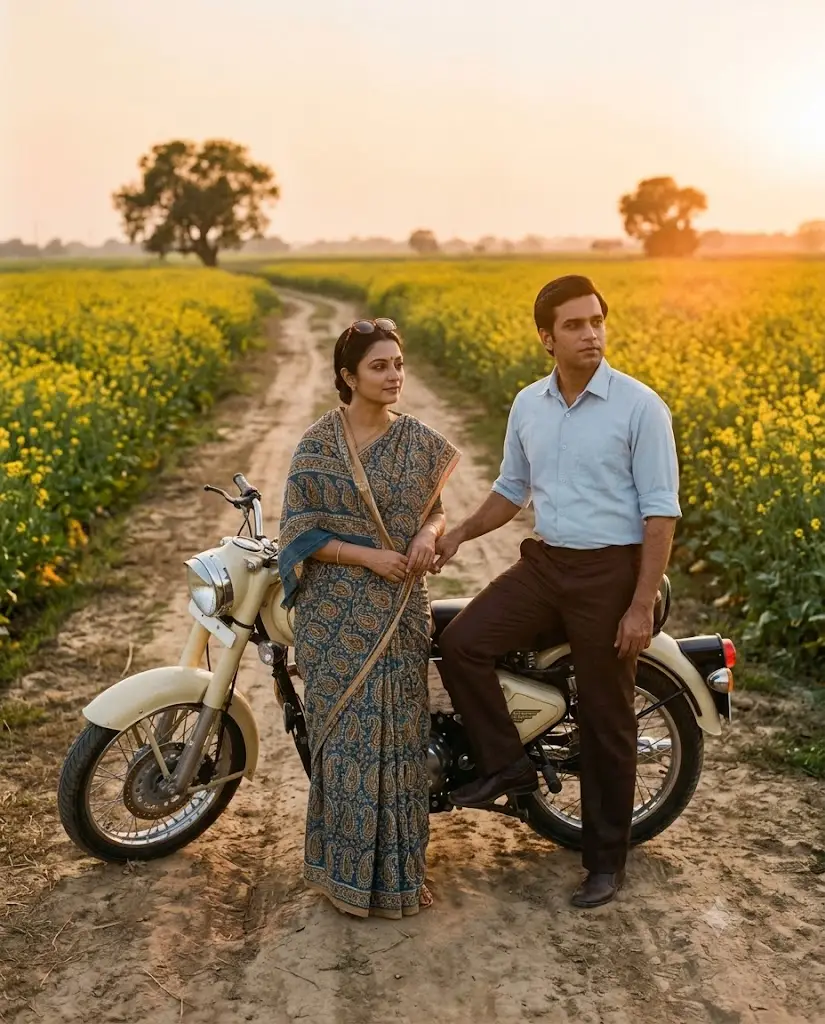
Prompt
Use the uploaded photo as the facial reference, preserve both faces


exactly.


The couple stands beside a vintage Royal Enfield Bullet, cream or


maroon paint, on a dirt road through mustard fields. The woman


wears a printed cotton saree with the pallu draped over one shoulder,


sunglasses pushed up or held in hand. The man wears a plain shirt


with rolled sleeves, standing with one foot on the bike’s footrest.


Pose: relaxed, the woman leaning slightly against the bike, both


looking off toward the horizon rather than at the camera.


Camera: wide shot, 35mm lens, warm sunset light from the side.


Background: mustard fields extending to the horizon, a dirt road,


one or two distant trees.


Color grading: warm golden hour tones, slight lens flare, visible


grain, faded shadows.


Negative: no modern motorcycle design, no digital clarity, no


oversharpened edges.
Breakdown: naming the specific bike model (Royal Enfield Bullet) instead of “vintage motorcycle” cut down on generic, wrong-looking bikes almost completely in my tests.
Customize it: switch the mustard field for a coastal road if the couple’s photo suggests a coastal or southern Indian background instead.
5. Retro rain romance couple
Prompt
Use the uploaded photo as the only facial reference, no changes to


either face.


The couple stands under one shared umbrella on a quiet street during


light rain, in the style of a 1980s Indian film scene. The woman


wears a simple cotton saree, slightly damp at the edges, hair


partially tied back. The man wears a plain shirt, sleeves rolled,


one hand holding the umbrella.


Pose: close together under the umbrella, the woman looking up at


the man, both smiling naturally, not posed.


Camera: medium shot, 50mm lens, slight motion blur on the rain


itself.


Background: a narrow street with old buildings, wet pavement


reflecting streetlight, a few parked bicycles.


Color grading: cool blue-grey tones with warm skin tones preserved,


visible grain, soft contrast.


Negative: no oversaturated colors, no digital rain effect that


looks like added VFX.
Breakdown: the instruction to keep warm skin tones while the rest of the scene goes cool blue is the detail that stops the whole image from looking flat or gray.
6. Indian village retro couple
Prompt
Use the uploaded photo as the exact facial reference for both


subjects.


Set the couple in a rural Indian village scene from the 1970s. The


woman wears a simple handloom saree in earthy red or ochre, minimal


jewelry, hair oiled and neatly braided. The man wears a plain


kurta and dhoti, standing barefoot or in simple sandals.


Pose: standing near a well or a mud-walled house, natural stance,


not posed for a formal photo.


Camera: eye level, 50mm lens, natural daylight, no artificial


lighting.


Background: mud houses, a well, a few hens or a cow in the distance,


dusty ground.


Color grading: earthy, warm, slightly faded tones like an old


Kodachrome print, visible grain.


Output: photorealistic, no illustration style, natural skin texture.
Breakdown: removing footwear or making it simple sandals, rather than default sneakers Gemini sometimes adds, keeps the whole scene from breaking character.
7. Black and white vintage couple
Prompt
Use the uploaded photo as the facial reference, keep both faces


exactly as shown, only remove color.


Create a black and white portrait in the style of 1960s Indian


studio photography. Both subjects dressed formally, the woman in a


plain silk saree, the man in a buttoned shirt and blazer.


Pose: seated together, formal, straight posture, slight smile,


looking at the camera.


Camera: medium format, straight-on, studio lighting with one key


light and soft fill.


Background: plain grey or white studio backdrop, no props except a


single side table if needed.


Grading: true black and white, film grain, slightly soft contrast


like an old silver print, minor scratches and dust for authenticity.


Negative: no colorized tint, no digital sharpening, no modern


studio lighting look.
Breakdown: “minor scratches and dust” sounds like a small detail, but it’s the single line that pushed the output from looking like a black-and-white filter on a modern photo to looking like an actual old print.
8. Retro wedding couple portrait
Prompt
Use the uploaded photo as the exact facial reference for both people.


Style this as a traditional Indian wedding portrait from the 1980s.


The woman wears a red silk saree with gold zari work, traditional


jewelry including a maang tikka and bangles, sindoor and bindi. The


man wears a cream or off-white sherwani with a simple turban or


just neatly combed hair.


Pose: standing side by side, formal, slight smile, hands not


touching, the way older wedding photos are usually composed.


Camera: eye level, medium shot, studio or mandap background.


Background: a simple mandap decorated with marigold flowers, or a


plain studio backdrop with floral garlands.


Color grading: warm film tones, slightly faded reds, visible grain.


Negative: no modern bridal makeup, no glossy digital finish.
Breakdown: older wedding photos rarely show the couple touching or laughing together, they’re formal. Matching that formality is what separates this from a modern wedding photo with a filter on it.
9. Golden hour retro couple
Prompt
Use the uploaded photo as the exact facial reference for both


subjects.


The couple stands together during golden hour, in casual retro


clothing from the late 1970s. Simple cotton clothes, nothing


formal, the kind worn for an evening walk rather than an occasion.


Pose: standing close, one person’s arm around the other, looking


off to the side rather than at the camera, natural and unposed.


Camera: 85mm lens, backlit by the setting sun, soft lens flare,


shallow depth of field.


Background: an open field or a quiet street, silhouetted trees in


the distance.


Color grading: warm gold and amber tones, visible grain, soft


highlights blooming slightly around the light source.


Negative: no oversharpened faces, no digital HDR look.
Breakdown: this is the easiest prompt on the list to get right on the first try, mostly because golden hour lighting is forgiving even when other details are slightly off.
10. Old cinema hall retro couple
Prompt
Use the uploaded photo as the exact facial reference, no changes to


either face.


Set the couple inside an old single-screen Indian cinema hall from


the 1980s, seated together in worn velvet seats. Casual retro


clothing, nothing formal.


Pose: seated side by side, looking toward each other rather than at


a screen, relaxed posture.


Camera: medium shot, low ambient light, 50mm lens, shallow depth


of field.


Background: rows of old cinema seats, a faint glow from the screen


off to one side, dust visible in the light beam.


Color grading: warm, dim, slightly grainy, deep shadows with warm


highlights.


Negative: no modern cinema seating, no LED lighting, no digital


clarity in the shadows.
Breakdown: dust in the light beam is a small detail that reads as “old projector” more than any color grading instruction does.
Why most retro AI prompts fail
A few patterns showed up across the failed attempts I ran before landing on the versions above:
- No named film style. “Vintage” alone gives Gemini too much room to guess, and it usually guesses wrong.
- Missing color grading instructions. Without them you get a modern photo with a light sepia tint, not an actual period look.
- Wrong clothing details. “Traditional clothes” produces something generic. Naming the fabric, era, and specific garment matters.
- Modern backgrounds slipping in. Power lines, parked cars, and phone-era street signs show up unless you say to avoid them.
- No camera details. Lens choice and angle change the whole feel of a shot more than people expect.
- Weak lighting instructions. “Nice lighting” is not a lighting instruction.
- No nostalgic mood cues. A technically retro-colored photo can still feel flat without a described mood or pose.
- Poor composition. Modern portrait poses (hands on hips, big smiles at the lens) don’t match how people posed decades ago.
Tips for better results
Upload a clear, front-facing reference photo. Side angles or group photos with other people confuse the face matching.
Name the decade, not just “retro” or “vintage.” The 1970s and the 1990s look nothing alike.
Mention a real film stock: Kodak Gold, Fujifilm Superia, Kodachrome. Each gives a distinct color cast.
Add lens details: 35mm for wider environmental shots, 50mm for standard portraits, 85mm for closer, softer-background shots.
Describe lighting direction and quality, not just brightness. “Soft light from the left” beats “good lighting.”
Name the actual location type: courtyard, cinema hall, mustard field, rather than a vague “outdoor” or “background.”
Keep facial identity instructions at the very start of the prompt, before anything else.
Add a short negative-prompt line if a specific detail keeps coming out wrong, rather than rewriting the whole prompt.
Common mistakes beginners make
Using modern clothing cuts or fabrics in a scene meant to be 40 or 50 years old.
Forgetting the color grading line entirely, which leaves the output looking like a normal photo with a name-only “retro” label.
Mixing decades in one prompt, like 70s clothing with 90s hairstyles.
Writing vague background descriptions that leave room for modern objects to appear.
Overusing grain or blur effects until the faces themselves get harder to see.
Skipping the facial identity instruction, which is the single most common reason a couple’s own faces don’t show up in the result.
Not naming a camera or lens, leaving Gemini to default to a flatter, more generic composition.
FAQ
What is the best prompt for Gemini AI retro style couple photos?
The saree-and-kurta courtyard prompt in this guide (#1) is the most reliable starting point. It gives consistent results because the clothing, lighting, and background are all specific rather than general.
Can Gemini AI create realistic vintage Indian couple portraits?
Yes, especially when you upload a reference photo and name the decade, clothing, and film style directly. Vague prompts give inconsistent results, but detailed ones like the examples above work well.
Which Gemini model gives the best retro images?
Gemini’s image generation model (used through the Gemini app or API) handles facial consistency and detailed clothing better than older AI image tools. Model availability changes, so check Gemini’s current app for which version is active before assuming a specific version number.
How do I keep the same faces in every AI photo?
Put the facial identity instruction first in your prompt, upload a clear reference photo before pasting the prompt, and repeat the instruction if faces drift across multiple regenerations.
Can I upload my own couple photo as a reference?
Yes, and it’s the main way to get your own faces in the output rather than generic AI-generated people.
Which camera style creates the best retro effect?
A named lens (50mm or 85mm) combined with a named film stock (Kodak Gold, Fujifilm) gives the most consistent retro look across different scenes.
How do I make AI photos look like old Bollywood movies?
Name the decade specifically (1970s, 1980s, or 1990s), describe soft lighting and warm color tones, and avoid modern makeup or hairstyle terms in the prompt.
Are Gemini AI retro prompts free to use?
Gemini’s free tier includes image generation with daily limits that change over time. Check Gemini’s current pricing page for the exact limit before assuming a specific number.
Wrapping up
Gemini can produce convincing retro couple portraits, but the difference between a flat, generic result and one that actually looks like it came from an old camera is in the details: the decade, the fabric, the lens, the light.
Start with prompt #1 If you want the safest first result, then adjust one detail at a time rather than rewriting the whole thing when something looks off.
Also Read: